Download DeskSoft FastFolders 2026 full latest version program free setup for Windows.
DeskSoft FastFolders 2026 for Windows Review
DeskSoft FastFolders is a Windows utility that makes it easier to browse folders and access files. Instead of opening several File Explorer windows to reach a deeply nested folder, you can use the program’s right-click menu to view folder contents and move through directory levels.
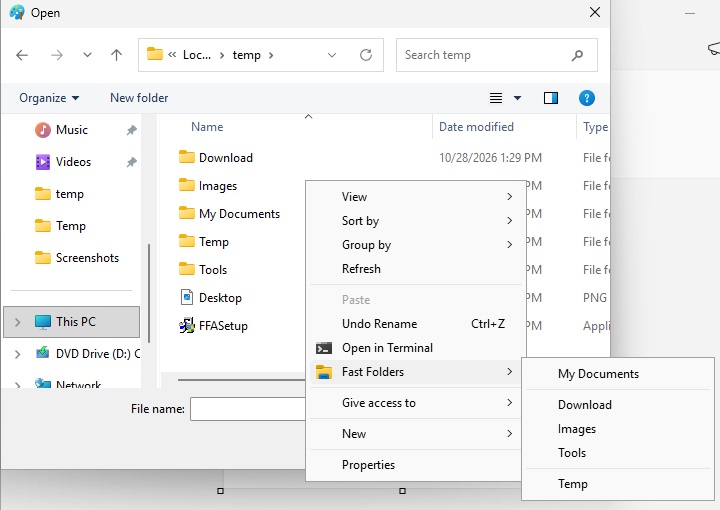
FastFolders works as an extension for Windows Explorer rather than a replacement for it. Once installed, it adds an option to the context menu of files, folders, and drives. You can browse available locations, open files, and reach subfolders through cascading menus.
The program is useful for people who regularly manage work documents, project folders, photos, downloads, and large collections of files. It also includes tools for checking folder sizes, copying directory listings, and moving or copying items through right-button drag and drop.
Quick Folder Navigation from the Right-Click Menu
FastFolders’ main feature is its context-menu integration. You can right-click a supported file, folder, or drive and browse its directory structure without opening each folder separately.
This approach is helpful when your files are stored several levels deep. For example, you might have separate folders for clients, projects, documents, and completed work. Instead of opening every folder in sequence, you can browse through the FastFolders menu and select the location you need.
The program can also browse other Windows shell locations, including items such as Control Panel and network locations. This makes it more than a shortcut for opening ordinary folders.
Copy and Move Files with Right-Button Drag and Drop
FastFolders also helps with moving and copying files. You can drag a file or folder with the right mouse button and use the FastFolders menu to select its destination.
This is useful when organizing documents or transferring files between different project folders. You do not have to open the source and destination folders in separate windows just to complete a simple transfer.
The right-button method also gives you control over the operation by letting you select the destination through the menu. It can make routine file organization more convenient, particularly when working with deeply nested folders.
Check Folder Sizes More Easily
Finding out which folders use the most storage can take time in Windows Explorer. FastFolders makes this easier by displaying folder sizes, including the contents of their subfolders.
This is useful when reviewing a drive, organizing old projects, or deciding which folders need attention during a cleanup. You can get a better idea of storage usage without opening the Properties window for every folder.
FastFolders also provides a folder-size column in the Details view of Explorer. The exact availability of this older Explorer integration can depend on the Windows version and program configuration.
Browse Large Directories in Multiple Columns
A folder containing hundreds of items can make a cascading menu difficult to navigate. FastFolders addresses this by allowing large directories to be split into multiple columns.
This gives you a more manageable view when browsing collections with many subfolders or files. It is particularly helpful for users who maintain large media libraries, software collections, or project archives.
You can also adjust menu speed and other settings to make the browsing experience better suited to your workflow.
Include Different File Types in the Menu
FastFolders is not limited to showing folders. It can also include file types in its directory structure, giving you quicker access to individual files.
This can save time when you frequently open files stored inside a particular directory. Rather than navigating through several folders and then searching for the file, you can use the menu to reach the item directly.
For people who work with documents, images, audio files, and other project assets, this feature can make everyday access more convenient.
Copy Directory Listings to the Clipboard
Another useful feature is the ability to copy a list of folder contents to the clipboard.
Pressing C on an item copies a directory listing. Using Shift + C includes additional file-size information in the listing.
This can help when preparing a list of stored files, documenting folder contents, or sharing information about a directory. It is a small feature, but it can save manual work when you need a quick record of what a folder contains.
Useful Keyboard and Mouse Shortcuts
FastFolders includes a few shortcuts that make its menus easier to use.
Pressing Ctrl while clicking an item keeps the FastFolders menu open. Pressing Shift while clicking an item opens it in an Explorer window instead of a normal window.
These options are useful when you want to continue browsing after selecting an item or prefer to open a location in the familiar Windows interface.
The available shortcuts make the utility more flexible, especially for people who use the right-click menu frequently.
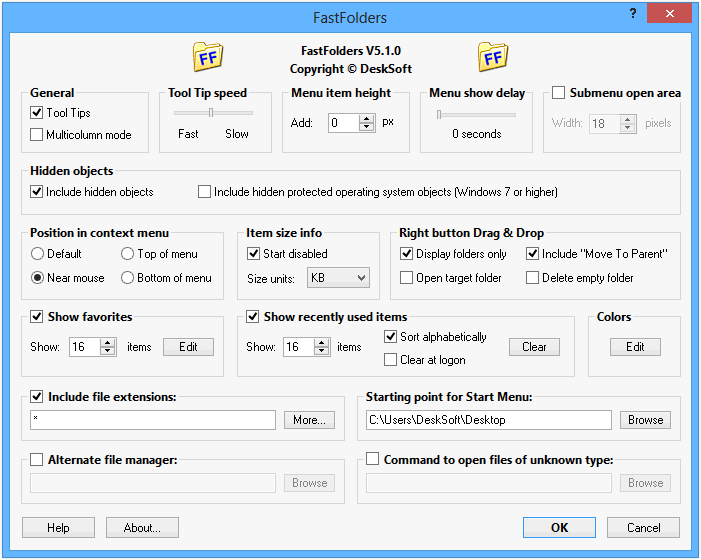
Key Features of DeskSoft FastFolders 2026
- Adds folder browsing to the Windows right-click context menu
- Browses folders, files, drives, and supported Windows shell locations
- Opens deeply nested folders through cascading menus
- Supports copying and moving files through right-button drag and drop
- Displays folder sizes, including subfolders and files
- Adds a folder-size column to Explorer’s Details view on supported systems
- Splits large directories into multiple columns
- Allows different file types to appear in the directory structure
- Provides adjustable menu speed and other settings
- Copies directory listings to the clipboard
- Supports additional keyboard and mouse shortcuts
- Offers 64-bit support
- Supports silent installation and uninstallation for larger deployments
Best Alternatives to DeskSoft FastFolders 2026
1. Directory Opus
Directory Opus is a full file manager for Windows with more advanced file-handling features. It offers dual-pane browsing, folder tabs, file filtering, customizable toolbars, and tools for managing large collections of files.
Unlike FastFolders, Directory Opus can replace much of the everyday File Explorer workflow. It is suitable for users who want more control over file organization and prefer a dedicated file-management application.
Choose Directory Opus if you need a complete file manager rather than a small context-menu extension.
2. Total Commander
Total Commander is another established Windows file manager. Its dual-pane interface makes it convenient to compare folders and transfer files between locations.
It also supports file searching, archive handling, synchronization, and additional functions through plugins. These features make it useful for people who regularly organize large numbers of files.
Total Commander is a stronger option when you need more detailed file operations. FastFolders is simpler if your main goal is reaching folders quickly from the Windows right-click menu.
3. Q-Dir
Q-Dir is a lightweight file manager that provides multiple folder views in one window. It allows users to work with two, three, or four panes, making it easier to move files between different locations.
Its layout can be useful when organizing documents, sorting downloads, or comparing folder contents. You can view several locations at the same time instead of repeatedly switching between Explorer windows.
Q-Dir is worth considering if you want a simple alternative file manager with a multi-pane layout. FastFolders remains more focused on quick access through the existing Windows interface.
Which Alternative Should You Choose?
The right choice depends on how you manage files.
- Choose FastFoldersif you want faster folder access through the Windows right-click menu without replacing File Explorer.
- Choose Directory Opusif you need advanced file management, customizable layouts, and more control over large collections.
- Choose Total Commanderif you prefer a dual-pane file manager with detailed file operations and plugin support.
- Choose Q-Dirif you want to view and manage several folders in one window.
FastFolders is the most focused option for quick navigation. The other tools provide broader file-management environments, so they are better suited to users who need more than context-menu shortcuts.System Requirements and Windows Compatibility
Conclusion
DeskSoft FastFolders 2026 is a practical utility for Windows users who spend a lot of time navigating folders. Its right-click browsing, folder-size display, and drag-and-drop support can reduce unnecessary steps when organizing files.
It does not try to replace File Explorer or provide the advanced tools found in a complete file manager. Instead, it improves a familiar part of Windows and makes folder access more convenient.
The program is most useful for people who work with deeply nested directories, large collections of files, or folders that they access regularly. If you want a lightweight way to browse and manage files without changing your usual Windows workflow, FastFolders is worth considering.
DeskSoft FastFolders 2026 Technical Setup Details
- Software Full Name: DeskSoft FastFolders 2026
- Setup File Name: FastFolders_5.14.3.rar
- Setup Size: 1.4 MB
- Setup Type: Offline Installer / Full Standalone Setup
- Compatibility Mechanical: 32 Bit (x86) / 64 Bit (x64)
- Latest Version Release Added On: 07th Nov 2026
- Developers: DeskSoft
System Requirements for DeskSoft FastFolders 2026
- Operating System: Windows 7/8/10
- RAM: 512 MB
- Hard Disk: 100 MB
- Processor: Intel Dual Core or higher processor
DeskSoft FastFolders 2026 Free Download
Download DeskSoft FastFolders 2026 free latest full version offline direct download link for full offline setup by clicking the button below.