Download KLS Backup Professional 2027 full latest version program free setup for Windows.
KLS Backup Professional 2027 for Windows Review
KLS Backup Professional 2027 is a Windows backup and file synchronization program developed by KirySoft. It helps users protect important files, folders, application data, email profiles, and databases by creating backup archives on local drives, network storage, FTP servers, and cloud platforms.
The software is designed for people who need more control over their backup routines than a basic file-copy tool can provide. You can create full, incremental, and differential backups, schedule jobs, protect archives with encryption, and restore individual files without recovering an entire backup.
KLS Backup Professional 2027 also includes tools for managing backup versions, synchronizing folders, checking archive authenticity, and monitoring scheduled tasks. Its latest release is version 15.0.0.3, released on October 29, 2026.

Backup Files, Folders, and Application Data
The main purpose of KLS Backup Professional 2027 is to keep important data safe in organized backup archives. You can select individual files and folders from local drives, network locations, and supported cloud services.
It also supports application-specific backup sources. These include Outlook and Thunderbird data, as well as web browser profiles from supported browsers such as Firefox, Chrome, and Edge. This is useful when you want to protect more than documents, pictures, and other ordinary files.
Database backup is another important part of the software. KLS Backup supports Microsoft SQL Server, MySQL, and MariaDB sources. This makes it useful for small businesses and technical users who need to protect application data alongside everyday files.
The available plugins extend the types of data you can include in backup jobs. However, you should check the plugin requirements before planning a backup around a particular application or data source.
Full, Incremental, and Differential Backups
KLS Backup Professional offers three main backup methods. Each one is useful for a different situation.
A full backup copies the selected data into a complete backup set. It is a good starting point because it gives you a complete copy of the selected files.
An incremental backup saves changes made since the previous backup. This can reduce the amount of data transferred and the time needed for routine backups.
A differential backup saves changes made since the last full backup. It can use more storage than incremental backups over time, but restoring a backup may require fewer backup sets.
The software also includes a copy backup option for creating a standalone full backup. This gives users another way to maintain separate copies of important files.
These options are useful when you have a large collection of data and do not want to create a complete backup every time a scheduled job runs.
Local, Network, FTP, and Cloud Storage
KLS Backup Professional 2027 supports several backup destinations. You can store archives on internal drives, removable storage, network folders, FTP and SFTP servers, and WebDAV locations.
Cloud support is another major part of the program. Supported services include Microsoft Azure, Amazon S3, Google Cloud Storage, OpenStack, OneDrive, Google Drive, Dropbox, and Backblaze B2, depending on the feature and connection configuration.
This flexibility helps users keep backup copies in different locations. For example, you can store one copy on an external drive and another on a cloud storage account.
Professional users can also work with secondary backup destinations and transfer-speed limits. These options are helpful when managing larger backup jobs or working with limited network bandwidth.
Remember that cloud backup depends on your storage provider, account permissions, internet connection, and available storage space. KLS Backup does not provide unlimited cloud storage as part of the software.
Backup Encryption and Archive Protection
Keeping backup files private is important, especially when they contain business documents, customer information, or personal records.
KLS Backup supports encrypted ZIP and 7z archives. Its feature list includes AES-256 encryption, while remote connections can use SSL/TLS protection. This helps protect stored archives and data transferred to supported remote destinations.
The program also supports password-protected archives and different backup formats. You can choose compressed archives to save storage space or use an uncompressed copy when that better suits your workflow.
Encryption is useful, but it also creates a responsibility. Keep your passwords in a secure location. If you lose the password required to open an encrypted archive, recovering the original files may become difficult or impossible.
Backup Scheduling and Automation
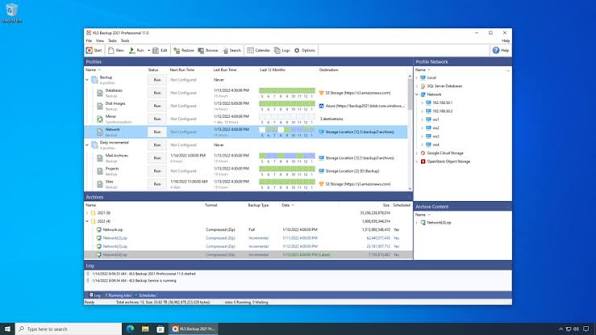
Manually creating backups is easy to forget. KLS Backup includes scheduling tools that let you automate recurring jobs.
You can configure backup profiles and run them at selected times. The software supports Windows Task Scheduler and its own Backup Service Scheduler. Profile groups also let you run or schedule multiple profiles together.
Additional scheduling controls include actions that run before or after a backup job. This can help users coordinate backup tasks with other maintenance activities.
The command-line interface provides another way to run backup jobs. It is useful for experienced users who want to include backup operations in scripts or existing workflows.
For everyday use, the scheduler can handle routine file protection without requiring you to start each backup manually.
Archive Management and File Restoration
Creating backups is only half of the job. You also need a practical way to find and recover files when something goes wrong.
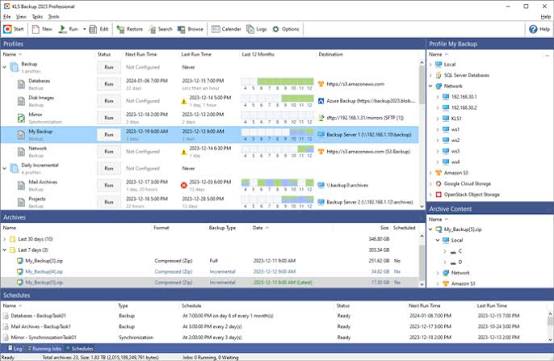
KLS Backup maintains archives containing previous backup versions. Its archive management tools let you search stored backups and select the files or folders you want to restore.
You can restore selected items to their original locations or choose a different destination. This is useful when you accidentally delete a document, replace a file with an older version, or need to recover data without changing the rest of your folders.
The software also includes archive testing and authenticity verification features. Archive testing can help identify problems with stored backup data, while authenticity verification helps check whether a remote backup archive is genuine.
These tools make backup management more practical, especially when you maintain several backup profiles over a long period.
Two-Way File Synchronization
KLS Backup Professional is not limited to creating backup archives. It also includes a file synchronization engine.
Synchronization helps keep the contents of two supported folders aligned. You can use it when working with files stored on different drives, network locations, or supported remote destinations.
The program supports synchronization with version management. This is important because simply copying files between locations does not always provide a way to recover earlier versions or deleted items.
Professional users also get additional synchronization options, including cloud-to-cloud synchronization and continuous synchronization where supported.
Keep in mind that synchronization and backup are not the same thing. If you delete or overwrite a file and the change is synchronized, the same change may affect the other location. A separate backup archive is still important when you need reliable recovery.
Web Monitor, Logs, and Notifications
KLS Backup Professional includes monitoring and reporting tools that help users check what is happening with their backup jobs.
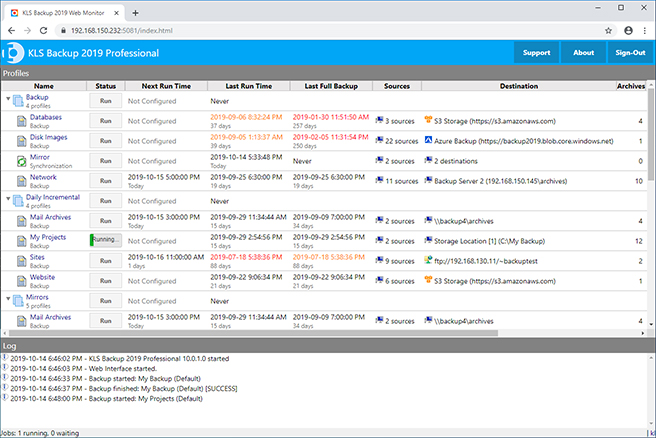
The Web Monitor provides a browser-based way to monitor backup activity. Detailed logs can also be saved as text or HTML files, and the program supports email notifications.
Windows Event Logs and notification plugins provide additional ways to track important events. These options are useful for users who manage multiple backup profiles or need to keep records of completed and failed jobs.
The command-line interface and Windows service support also make the software suitable for more structured backup environments.
What Is New in KLS Backup 2027?
KLS Backup 2027 introduced several improvements over the previous major release. According to the official version history, version 15.0.0.1 added security and performance improvements, interface updates, remote backup archive authenticity verification, and an option to run a backup job again.
Version 15.0.0.2 fixed an installer inconsistency and a potential ZIP archive creation problem.
The latest version, 15.0.0.3, was released on October 29, 2026. It includes further performance improvements, minor interface changes, and an improved Volume Shadow Copy engine. VSS helps backup software access files that may be in use by Windows or other applications.
These updates make the 2027 release more current, although they do not turn it into a completely different type of backup application.
Key Features of KLS Backup Professional 2027
- Backup files and folders from local and network locations.
- Support for Microsoft SQL Server, MySQL, and MariaDB databases.
- Backup application data, including Outlook and Thunderbird profiles.
- Support for FTP, SFTP, WebDAV, and multiple cloud storage services.
- Full, incremental, differential, and standalone copy backups.
- Compressed ZIP and 7z archives.
- AES-256 archive encryption and SSL/TLS remote connections.
- Selective file and folder restoration.
- Backup scheduling and profile groups.
- Two-way folder synchronization with version support.
- Archive search, testing, and authenticity verification.
- Web Monitor and command-line interface.
- Detailed logs and email notifications.
Best Alternatives to KLS Backup Professional 2027
1. AOMEI Backupper
AOMEI Backupper is a useful alternative for Windows users who want more emphasis on system, disk, partition, and file backups. It can create backup images and provides recovery options for situations such as system failure or drive replacement.
It supports full, incremental, and differential backup methods, along with bootable rescue media. These features make it a good choice for users who want to protect their Windows installation as well as personal files.
Compared with KLS Backup Professional, AOMEI Backupper is more focused on system and disk imaging. KLS Backup offers a broader collection of file archiving, database backup, remote storage, and synchronization features.
Choose AOMEI Backupper if your main goal is to create recoverable system and disk images.
2. EaseUS Todo Backup
EaseUS Todo Backup is another Windows backup application that supports files, folders, disks, partitions, and system backups. It can create backup images that users can restore after a system crash, disk problem, or unexpected data loss.
The software includes scheduled backups, incremental and differential backup methods, backup version management, and recovery tools. It also provides options for mounting supported backup images so users can browse their contents and retrieve individual files.
KLS Backup Professional is a stronger fit for users who need detailed archive management, database sources, remote backup destinations, and file synchronization. EaseUS Todo Backup is worth considering when system recovery and disk imaging are higher priorities.
3. Uranium Backup
Uranium Backup is a Windows backup solution aimed at both individual users and business environments. It supports scheduled backups and can work with local and network storage as well as several remote and cloud destinations.
Its available editions include database backup options for Microsoft SQL Server. This makes it relevant for businesses that need to protect database information and other important files.
KLS Backup Professional offers a broad combination of file archiving, application data backup, synchronization, and archive management. Uranium Backup is a reasonable alternative for users who want to explore another backup platform with business-focused options. Choose Uranium Backup if database protection and business backup workflows are important to your setup.
Which Alternative Should You Choose?
The best choice depends on what you need to protect.
- Choose KLS Backup Professional 2027if you need file and application backups, database support, cloud destinations, archive management, and synchronization in one Windows program.
- Choose AOMEI Backupperif you mainly want system, disk, and partition imaging with recovery media.
- Choose EaseUS Todo Backupif you need file and system backups with disk recovery and image browsing options.
- Choose Uranium Backupif you want to compare business-oriented backup tools with database protection features.
For users who mainly manage files, application data, and remote backup archives, KLS Backup Professional offers a useful combination of tools. Users who need a complete image of their Windows system should pay closer attention to disk-imaging features before choosing their backup software.
Final Words
KLS Backup Professional 2027 is a capable Windows backup and synchronization application for users who need more than basic file copying. Its support for local and remote storage, cloud services, databases, application profiles, encrypted archives, and scheduled jobs makes it useful for both personal and professional data protection. Its archive management and selective restoration tools are particularly helpful when you need to recover individual files or access older backup versions. The synchronization engine adds another useful option for managing files across supported locations.
However, users should understand the difference between file-based backup archives and full system imaging. KLS Backup offers disk-image support through plugins, but users who primarily need complete Windows system images may prefer a dedicated imaging application. Overall, KLS Backup Professional 2027 is worth considering if your priority is flexible file archiving, scheduled backups, cloud storage, and detailed control over backup jobs.
KLS Backup Professional 2027 Technical Setup Details
- Software Full Name: KLS Backup Professional 2027
- Setup File Name: KLS_Backup_Professional_2027_v15.0.0.3.rar
- Setup Size: 35 MB
- Setup Type: Offline Installer / Full Standalone Setup
- Compatibility Mechanical: 32 Bit (x86) / 64 Bit (x64)
- Developers: KLS Backup
System Requirements for KLS Backup Professional 2027
- Operating System: Windows 7/8/10
- RAM: 2 GB
- Hard Disk: 1 GB
- Processor: Intel Dual Core or higher processor
KLS Backup Professional 2027 Download
Download KLS Backup Professional 2027 free latest full version offline direct download link for full offline setup by clicking the button below.