Download AB Download Manager full version program free setup for Windows. It is a powerful and efficient tool that simplifies users’ downloading process.
Overview of the AB Download Manager
The goal of AB Download Manager is to optimize and simplify the process of downloading files from the internet. It is a flexible and easy-to-use download management tool. AB Download Manager is a useful tool for both casual users and professionals who regularly handle large volumes of files because of its extensive feature set, which improves the efficiency and control users have over their downloads.
The multi-threaded download capability of AB Download Manager is one of its primary features. This feature greatly expedites the download process by enabling the software to divide a file into several segments and download them all at once. AB Download Manager can reduce the time needed to obtain large files and achieve faster download speeds by using multiple connections to the server. This is especially helpful when downloading big files, like datasets, high-definition videos, or software updates.

AB Download Manager’s resume feature is another important feature. The program can pick up where it left off rather than restarting a download if it is interrupted by a lost internet connection, a system crash, or other problems. This saves time and bandwidth by preventing users from losing their progress and enabling them to finish their downloads without restarting the entire process.
Additionally, AB Download Manager has a scheduler feature that lets users specify when downloads will begin and end. Because users can plan downloads to take place overnight or during off-peak hours when internet traffic is less, this is especially helpful for controlling bandwidth usage. The scheduler offers more flexibility and control over download activities by being able to manage several downloads at various times.
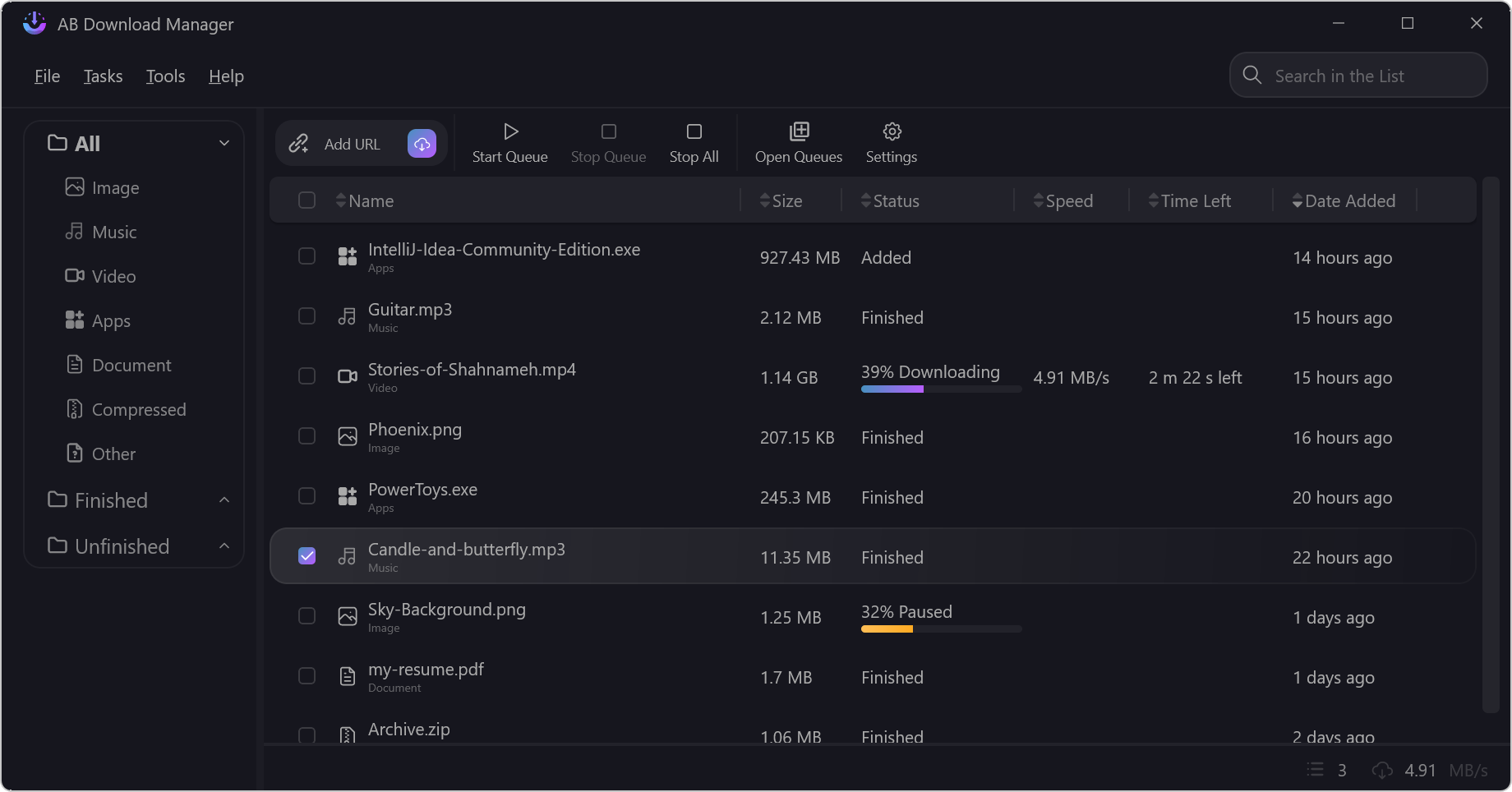
The program’s user-friendly interface makes it easier to manage and keep an eye on downloads. The status of ongoing downloads, including download speed, progress percentage, and estimated time left, is readily visible to users. Additionally, the interface gives users complete control over their download queue by offering options to pause, resume, and cancel downloads.
Numerous file formats and protocols are supported by AB Download Manager, including HTTP, HTTPS, FTP, and more. Users can handle downloads from a variety of sources and servers without running into compatibility problems thanks to this wide compatibility. The program is a flexible tool for a range of download requirements since it can easily handle both small and large files.
AB Download Manager has a batch download feature that lets users download several files at once for extra convenience. It eliminates the need for repetitive manual input by allowing users to add whole lists of files or URLs to the download queue and manage them collectively. For users who need to download numerous files at once, this batch processing feature is perfect.
In order to address any problems that might occur during the download process, the software also offers error recovery mechanisms. In the event of an error, AB Download Manager can automatically restart the download or notify the user, guaranteeing that disruptions are quickly fixed and downloads are finished successfully.
AB Download Manager’s security is another crucial feature. Integrity checks are built into the program to make sure downloaded files are accurate and complete. This gives users assurance that their downloads are dependable and undamaged by preventing corrupted or incomplete files.
Key Features
- Error Recovery: Automatically retries failed downloads and notifies users of errors to ensure successful completion.
- File Integrity Checks: Verifies the completeness and accuracy of downloaded files to prevent corruption.
- Protocol Support: Compatible with a wide range of protocols including HTTP, HTTPS, and FTP.
- Download Speed Limiting: Lets users set limits on download speeds to manage bandwidth usage and avoid network congestion.
- Automatic File Renaming: Automatically renames files to avoid conflicts and ensure proper organization.
- Notification System: Alerts users to the status of their downloads, including completion, errors, or interruptions.
- Drag-and-Drop Support: Facilitates easy addition of files and URLs to the download queue via drag-and-drop functionality.
- Integrated Browser Extension: Provides a browser extension for easy capture and download of content directly from web pages.
- Scheduled Pausing and Resuming: Allows users to pause and resume downloads at scheduled times.
- Download History: Maintains a history of completed and failed downloads for easy reference and management.
- Proxy Server Support: Supports proxy servers for users who need to manage downloads through secure or restricted networks.
- Customizable Download Folders: Allows users to specify different folders for different types of downloads.
- Parallel Downloads: Enables multiple simultaneous downloads to maximize bandwidth usage and efficiency.
- Advanced Search: Provides advanced search options to locate specific files or URLs within the download manager.
- File Size and Type Filtering: Filters downloads based on file size and type to manage download preferences.
- Secure Downloading: Ensures secure file transfers with built-in security features to protect against threats.
- Support for Large Files: Capable of handling and managing large file downloads without issues.
- Simple and Advanced Modes: Offers both basic and advanced modes for users with different levels of expertise.
- Automatic Updates: Keeps the software up-to-date with automatic updates for new features and security patches.
- Download Acceleration: Utilizes advanced algorithms to accelerate download speeds beyond typical limits.
- Real-Time Download Monitoring: Provides real-time monitoring of download progress, including speed and estimated time remaining.
- Customizable Interface: Allows users to customize the appearance and layout of the interface according to their preferences.
- Support for Encrypted Downloads: Manages and supports encrypted file downloads, ensuring data security.
- Multi-Language Support: Available in multiple languages to cater to a global user base.
- Multi-Threaded Downloading: Speeds up downloads by splitting files into multiple segments and downloading them simultaneously.
- Resume Capability: Allows downloads to resume from where they left off if interrupted, avoiding the need to restart from scratch.
- Download Scheduler: Enables users to set specific times for downloads to start and stop, optimizing bandwidth usage.
- User-Friendly Interface: Provides an intuitive interface for easy management and monitoring of downloads.
- Download Queue Management: Allows users to manage multiple downloads simultaneously, including options to pause, resume, or cancel.
- Batch Downloading: Supports downloading multiple files at once, reducing manual input and saving time.
Technical Details
- Software Name: AB Download Manager for Windows
- Software File Name: AB-Download-Manager-1.7.1.rar
- Software Version: 1.7.1
- File Size: 67 MB
- Developers: Amir Ab
- File Password: 123
- Language: Multilingual
- Working Mode: Offline (You donÆt need an internet connection to use it after installing)
System Requirements
- Operating System: Win 7, 8, 10, 11
- Free Hard Disk Space:
- Installed Memory: 1 GB
- Processor: Intel Dual Core processor or later
- Minimum Screen Resolution: 800 x 600
Download AB Download Manager Latest Version Free
Download AB Download Manager 1.7.1 free latest full version offline direct download link for full offline setup by clicking the button below.
Password: 123