Download Task Explorer full version program free setup for Windows. It is an advanced Task Manager tool with emphasis on, not just monitoring what applications are running, but on finding out what applications are doing.
Overview of Task Explorer
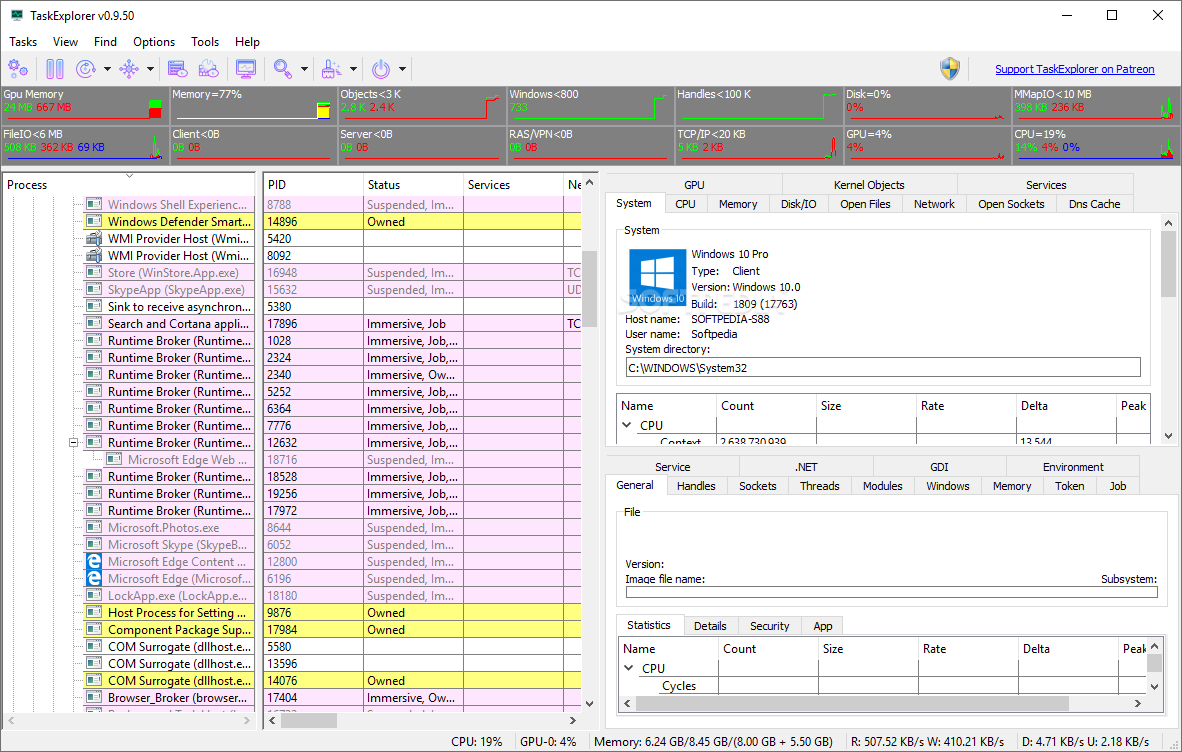
A stack trace for the chosen thread is included in the Thread Panel, providing additional information about what the chosen program is currently doing. Debugging deadlocks or performance problems is another great use for this. The Memory Panel, which offers a sophisticated memory editor and string search capabilities, can be used to view and modify the process memory. All open handles are displayed in the Handles Panel, along with helpful details like the file name, size, and current position. This makes it possible to see what a program is actually working on disk-wise at any given time.
One can enable the display of pseudo UDP connections made from ETW data in the settings. The Socket Panel displays all open connections/sockets per process and provides data rate information. In other words, each destination endpoint for UDP packets will appear as a separate entry in the sockets panel, making it possible to keep track of who a program is interacting with. All loaded DLLs and memory-mapped files are displayed in the Modules Panel, which also enables DLL injection and unloading. Numerous other panels, such as Token, Environment, Windows, GDI,.NET, etc. You can view the properties of multiple processes at once by double clicking on a process to open the Task Info panels in a different window.

The application’s system monitor feature is likewise well-developed. The toolbar offers reasonably sized graphs that show not only CPU usage but also handles, objects, network, and IO/disk access usage. The services panel enables viewing and controlling all system services, including drives, and the system info panels display all open files in the system and all open sockets by programs. The CPU, Memory, Disk I/O, Network, and GPU performance panels offer sizable graphs that provide a detailed view of how system resources are being used. The Task info panels can have more room when the System info panel is fully collapsed. Therefore, the system information panels can be opened in a separate window by using the relevant toolbar button, or they can be a panel of the main window.
Key Features
- Live graphs and statistics for CPU, memory, disk I/O, network, and GPU utilization are available for real-time system monitoring.
- Detailed per-process view: You can view detailed information (threads, handles, modules, sockets, memory, etc.) in specific panels for any active process.
- Thread Panel: useful for identifying deadlocks or performance problems, it displays the stack trace of a chosen thread.
- Memory Panel: includes string search in memory and allows you to examine and even modify process memory.
- The Handles Panel shows all open handles for a process, including file name, position, and size. It’s useful for understanding how a program uses disk or resources.
- Socket Panel: displays active network connections per process (with data rates), as well as network activity monitoring — useful for tracking which processes are using the network.
- Modules Panel: displays all loaded dynamic libraries (.DLLs / memory-mapped files) and allows you to unload or inject DLLs as needed.
- Flexible UI and multitasking: You can open details for multiple processes in separate windows (e.g., by double-clicking a process), collapse panels to maximize space, and navigate using the keyboard arrow keys.
- Powered by a stable library: the underlying ProcessHacker library (via PHlib) provides solid performance and dependability.
- Recent updates and enhancements: PHlib was updated to version 3.2.25324 in 1.6.6, process-map handling was enhanced, and problems with token-info listing and environment enumeration that were present in earlier versions were fixed.

Technical Details
- Software Name: Task Explorer for Windows
- Software File Name: Task-Explorer-1.6.6.rar
- Software Version: 1.6.6
- File Size:
- Developers: github
- File Password: 123
- Language: Multilingual
- Working Mode: Offline (You donÆt need an internet connection to use it after installing)
System Requirements
- Operating System: Win 7, 8, 10, 11
- Free Hard Disk Space:
- Installed Memory: 1 GB
- Processor: Intel Dual Core processor or later
- Minimum Screen Resolution: 800 x 600
Download Task Explorer Latest Version Free
Download Task Explorer free latest full version offline direct download link for full offline setup by clicking the button below.
Password: 123