Download JP Software CMDebug 36.50.68 full latest version program free setup for Windows. JP Software CMDebug is a standalone Windows batch file editor and debugger IDE that lets developers create, edit, and debug CMD-compatible batch files and TCC-RT scripts using a powerful graphical interface.
JP Software CMDebug 2026 Review
JP Software CMDebug 2026 is a professional batch file editor and debugger developed by JP Software. It is the standalone version of the batch debugging component extracted from JP Software’s flagship Take Command product. The software is designed for Windows developers, system administrators, IT professionals, and technical power users who write and maintain CMD batch scripts and TCC-RT automation scripts.
Writing batch scripts in Windows CMD has always been a painful process. The default CMD environment has no built-in debugger. Developers rely on echo statements and manual testing to find errors in their code. Complex or large batch files become extremely difficult to maintain without proper tooling. This is the exact problem JP Software CMDebug 2026 was built to solve. It provides a complete graphical IDE with a sophisticated debugger built entirely around the Windows batch scripting workflow. Developers stop guessing and start seeing exactly what their code does at every step.
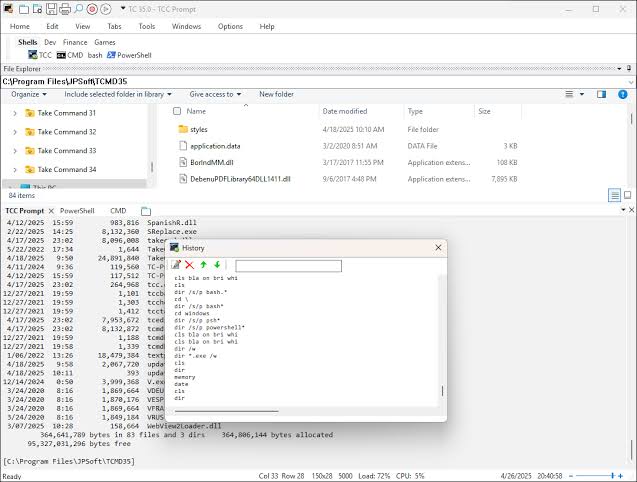
The interface is split into two clear sections. The upper half is the code editor. The lower half displays variables, parameters, breakpoints, call stacks, aliases, and watch windows. The editor supports syntax highlighting for both CMD and TCC scripting languages, line numbering, and tabbed file navigation so multiple batch files can stay open at the same time. The IDE automatically detects ANSI, UTF-8, UTF-8 with BOM, and UTF-16 encoded batch files. Code editing tools let users toggle comments on selected sections, remove blank lines, compress spaces, tabify selections, and change text case with just a few clicks.
The debugger is the most valuable part of the application. It supports single stepping, conditional breakpoints, expression evaluation, and error lookup. The Command Expansion window is a standout feature. It shows three states for every command: the original command line, the line after alias expansion, and the line after variable expansion. This three-layer view makes it possible to trace exactly how a command is being interpreted at runtime. Tabbed panels for breakpoints, call stacks, variables, aliases, and watch expressions give developers complete visibility into every aspect of a running script.
CMDebug supports two syntax modes. CMD Syntax mode maximizes compatibility with the default Windows CMD command processor. In this mode, TCC-only commands, variables, and functions are disabled so scripts behave exactly as they would in CMD.EXE. TCC Syntax mode provides the full TCC-RT command set. TCC-RT is a massive superset of Windows CMD with 220 or more internal commands, 367 or more internal functions, and 289 or more system variables. Developers using TCC Syntax mode can also encrypt their finished scripts and distribute them freely using the free TCC-RT runtime on any number of target machines. Supported file types are .BAT, .CMD, and. BTM.
The software is well suited for IT teams managing large collections of legacy batch files, developers writing deployment automation scripts, and administrators building system maintenance workflows. Organizations that need to distribute scripts securely benefit from the TCC-RT encryption feature, which protects source code while allowing free distribution. The JP Software Support Forums give users access to an active community of batch scripting professionals for help, tips, and ongoing learning.
Key Features
- Standalone batch file IDE and debugger extracted from the Take Command product
- Tabbed edit windows for working with multiple batch files simultaneously
- Sophisticated debugger with single stepping, conditional breakpoints, and expression evaluation
- Syntax highlighting for both CMD and TCC scripting languages
- Tooltips, bookmarks, and tabbed windows for breakpoints, call stack, variables, aliases, and watch expressions
- Command Expansion window showing original command, post-alias expansion, and post-variable expansion
- Automatic detection of ANSI, UTF-8, UTF-8 with BOM, and UTF-16 batch file encodings
- CMD Syntax mode for maximum CMD.EXE compatibility
- TCC Syntax mode providing the full TCC-RT command set with 220 or more internal commands
- Script encryption support for secure distribution via the free TCC-RT runtime
- Support for .BAT, .CMD, and .BTM file types
- Error lookup tool for tracing bugs to their source
- Code editing tools including toggle comments, remove blank lines, compress spaces, and change text case
- JP Software Support Forums and active community for ongoing help and tips
- Compatible with Windows 7 through Windows 11 and Windows Server 2016 through 2025
JP Software CMDebug 2026 Technical Setup Details
- Software Full Name: JP Software CMDebug 2026
- Setup File Name: JP_Software_CMDebug_36.50.68.rar
- Setup Size: 68 MB
- Setup Type: Offline Installer / Full Standalone Setup
- Compatibility: 32 Bit (x86) / 64 Bit (x64)
- Developers: JP Software
System Requirements for JP Software CMDebug 2026
- Operating System: Windows 7/8/10
- RAM: 512 MB
- Hard Disk: 100 MB
- Processor: Intel Dual Core or higher processor
JP Software CMDebug 2026 Free Download
Download JP Software CMDebug 2026 free latest full version offline direct download link for full offline setup by clicking the button below.