Download Comfy Photo Recovery 7.2 full latest version program free setup for Windows. Comfy Photo Recovery is a tool built to recover deleted or lost digital photos. It works after accidental deletion, quick formatting, or full formatting of a drive, memory card, or USB stick. It also recovers RAW photo files from most camera brands.
Comfy Photo Recovery 2026 Review
Losing photos feels different from losing any other file. A deleted document can often be rewritten. A deleted photo cannot be retaken. Comfy Photo Recovery 2026 is built around this exact problem. It scans drives, memory cards, and cameras to find photos that seem gone for good, then lets you get them back. The software supports a long list of image formats. This includes everyday formats like JPG, PNG, BMP, GIF, and TIFF. It also reads RAW files from professional cameras, including CR2 from Canon, NEF from Nikon, ARW from Sony, and ORF from Olympus. This matters for photographers who lose a shoot to a corrupted card and cannot afford to lose the original RAW quality. One of the strongest features is the “Search for Partitions” tool.
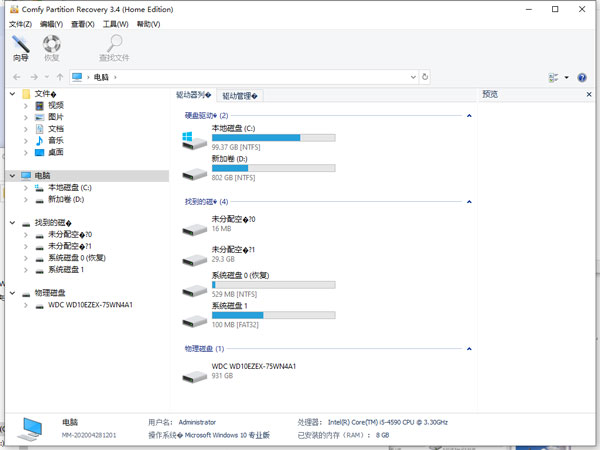
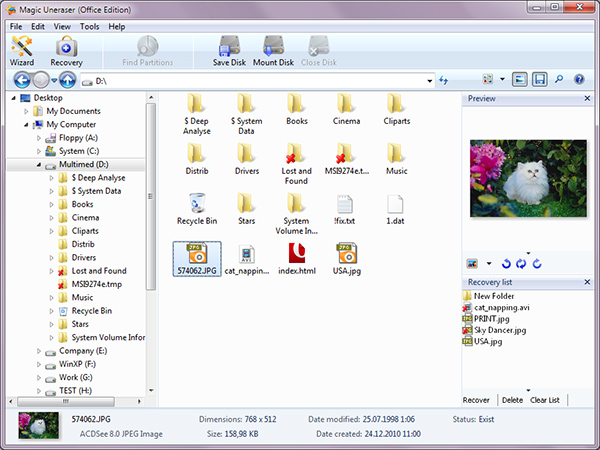
Sometimes a whole partition disappears after a formatting mistake or a drive error, not just a few files. This feature scans for that missing partition and lets you continue recovery from it, which basic recovery tools often cannot do.Safety is built into how the program works. Comfy Photo Recovery only reads data from the drive during a scan. It does not write anything back, so there is no risk of overwriting the very files you are trying to recover. Users can also create a virtual copy of a damaged drive first, then run recovery attempts on that copy instead of the original. This protects fragile or failing drives from further damage. Before recovering anything, users can preview each photo as a small thumbnail.
Found images can be filtered by date, size, or resolution, which helps when a scan turns up thousands of files. This step confirms you are recovering the right photos before saving them anywhere. Recovered files are not limited to one save option. Users can save them to another drive, burn them to a CD or DVD, create an ISO image, or upload them to a remote server through FTP. This gives some flexibility depending on how the recovered photos will be stored or shared. The interface follows a step-by-step wizard. This keeps the process simple for anyone who has never used recovery software before. A few older reviews note the program cannot pause a scan partway through, so once a long scan starts, it should be allowed to finish.
Key Features
- Recovers photos after accidental deletion or formatting
- “Search for Partitions” tool for a deleted or corrupted partition
- Supports JPG, PNG, BMP, GIF, TIFF, PSD, ICO, and more
- Recovers RAW files from Canon, Nikon, Sony, Olympus, and other brands
- Read-only scanning, so original data is never overwritten
- Virtual copy creation for safe recovery on damaged drives
- Thumbnail preview before recovery
- Filter results by date, size, and resolution
- Save recovered photos to a drive, disc, ISO file, or FTP server
- Step-by-step wizard interface for beginners
- Supports NTFS, FAT12, FAT16, FAT32, and exFAT
- Multiple editions to match personal or business use
Comfy Photo Recovery 2026 Technical Setup Details
- Software Full Name: Comfy Photo Recovery 2026
- Setup File Name: Comfy_Photo_Recovery_7.2.rar
- Setup Size: 67 MB
- Setup Type: Offline Installer / Full Standalone Setup
- Compatibility Mechanical: 32 Bit (x86) / 64 Bit (x64)
- Developers: Comfy Photo Recovery
System Requirements for Comfy Photo Recovery 2026
- Operating System: Windows 7/8/10
- RAM: 512 MB
- Hard Disk: 100 MB
- Processor: Intel Dual Core or higher processor
Comfy Photo Recovery 2026 Free Download
Download Comfy Photo Recovery 2026 free latest full version offline direct download link for full offline setup by clicking the button below.