Download SSD Booster .NET 2026 full latest version program free setup for Windows.
SSD Booster .NET 2026 for Windows Review
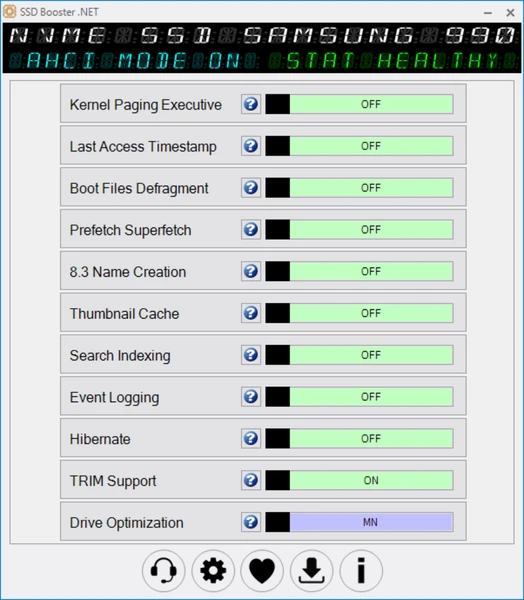
SSD Booster .NET 2026 is a Windows utility designed to help users manage settings related to solid-state drives. It brings several storage and system options into one place, making it easier to review SSD-related settings without opening multiple Windows menus. The software is suitable for users who want more control over how Windows handles storage, background tasks, and selected system features. One of the main reasons to consider SSD Booster .NET is its focus on practical system settings. It provides access to options related to TRIM, drive optimization, search indexing, hibernation, and other Windows features. TRIM helps a compatible SSD manage space released when files are deleted. Windows also has built-in tools that handle SSD maintenance, so users should understand what this utility changes before adjusting any option.

Simply switching off Windows features does not guarantee better performance. The software uses a compact interface with straightforward controls. This can be helpful for experienced users who want to review several settings without navigating through different parts of Windows. Its portable design also means it can run without a traditional installation, which may suit technicians and users who prefer keeping their system tools in one folder. However, users should check the downloaded file and its compatibility before running it, especially on newer Windows versions. SSD Booster .NET may be useful when troubleshooting a storage setup or reviewing system settings on a computer that uses an SSD.
However, it should not be viewed as a tool that can automatically fix every slow computer. Slow performance can also result from limited memory, background applications, low free storage, outdated drivers, or an aging drive. Changing SSD settings will not resolve every one of these problems. For most users, the safest approach is to let Windows manage routine drive maintenance and use SSD Booster .NET only when there is a clear reason to change a particular setting. Before making advanced changes, create a backup of important files and note the original settings so they can be restored if needed. Overall, SSD Booster .NET 2026 is best suited to users who understand basic Windows settings and want a lightweight way to review SSD-related options.
Key Features of SSD Booster .NET 2026
- SSD settings management: Access several Windows settings related to SSD use from one interface.
- TRIM support: Check and manage the setting that helps compatible SSDs handle deleted data efficiently.
- Drive optimization: Review settings related to Windows drive maintenance.
- Search indexing control: Adjust how Windows indexes files for faster searches.
- Event logging options: Manage settings connected with Windows event records.
- Hibernation control: Access the Windows feature that saves your current session for later.
- Prefetch and Superfetch settings: Review Windows features that help applications load efficiently.
- System information: View useful details about your computer and operating system.
- Portable design: Run the utility without a traditional installation.
- Lightweight application: Use a small utility focused on SSD configuration.
- Windows compatibility: The developer lists Windows 7 and later among its supported systems.
- Freeware and updates: The developer describes SSD Booster as donationware and advertises lifetime free updates
Alternatives to SSD Booster .NET 2026
If SSD Booster .NET does not offer all the tools you need, several Windows alternatives can help you manage storage, check drive health, and understand performance issues. The best choice depends on whether you want to adjust Windows settings, monitor your SSD, or maintain a drive from its manufacturer.
- Windows Optimize Drives
Windows Optimize Drives is a built-in utility for maintaining HDDs and SSDs. It automatically manages drive optimization on a schedule and lets you check the status of connected drives. For SSDs, Windows performs TRIM operations instead of treating them like traditional hard drives. This makes it a practical alternative for users who want basic drive maintenance without installing additional software. It is particularly suitable for beginners because it works directly with Windows.
- CrystalDiskInfo
CrystalDiskInfo is designed to monitor the condition of storage drives. It displays drive health information, temperature, firmware details, and available health readings. This can help you notice warning signs before a drive develops a serious problem. Unlike SSD Booster .NET, its main purpose is monitoring rather than changing multiple Windows settings. It is a useful choice for users who want to check whether their SSD is operating normally and identify when a backup or drive replacement may be necessary.
- Samsung Magician
Samsung Magician is a drive management utility for supported Samsung storage products. Depending on the model, it can provide drive information, performance testing, firmware updates, performance optimization, and additional maintenance options. It is a stronger choice for users who own a compatible Samsung SSD and want tools designed for their particular drive. However, supported features vary by model, and it is not the best option for managing every SSD brand.
- CrystalDiskMark
CrystalDiskMark is useful when you want to measure SSD read and write speeds. It runs storage performance tests and displays results that help you compare a drive’s speed under different test conditions. For example, you can use it to check whether a new SSD performs close to its expected speed or compare results before and after troubleshooting. It does not replace a drive health monitor or a Windows settings manager, but it helps you measure performance rather than relying on assumptions about speed improvements.
- SSD Manufacturer Utilities
Many SSD manufacturers provide their own maintenance tools for supported drives. These applications may offer firmware updates, drive health information, performance tests, and other model-specific features. They can be especially useful when diagnosing problems or checking whether your SSD needs a firmware update. Before using one, confirm that it supports your exact drive model. For routine maintenance, Windows’ built-in optimization tools may already provide everything you need.
Conclusion
SSD Booster .NET 2026 is worth considering if you want a compact Windows utility that brings several SSD-related settings together. Its portable design, lightweight size, and simple controls make it useful for experienced users who prefer adjusting settings themselves. However, it is not essential for every Windows computer, and changing more settings does not automatically make an SSD faster. Beginners may be better off using Windows’ built-in storage tools and their SSD manufacturer’s software. If you choose SSD Booster .NET, review each option carefully, avoid disabling features you rely on, and keep a backup of important files before making significant system changes.
SSD Booster .NET 2026 Technical Setup Details
- Software Full Name: SSD Booster .NET 2026
- Setup File Name: SSD_Booster-15-10-2026.rar
- Setup Size: 3 MB
- Setup Type: Offline Installer / Full Standalone Setup
- Compatibility Mechanical: 32 Bit (x86) / 64 Bit (x64)
- Latest Version Release Added On: 15th Oct 2026
- Developers: SSD Booster
System Requirements for SSD Booster .NET 2026
- Operating System: Windows 7/8/10
- RAM: 1 GB
- Hard Disk: 100 MB
- Processor: Intel Dual Core or higher processor
- Microsoft .NET Framework 4.5
SSD Booster .NET 2026 Download
Download SSD Booster .NET 2026 free latest full version offline direct download link for full offline setup by clicking the button below.