Download PaintFE 2026 full latest version program free setup for Windows.
PaintFE 2026 for Windows Review
PaintFE 2026 is a free, open-source image editor for Windows designed for users who want more control over drawing, photo editing, image retouching, and creative design. It combines familiar painting tools with layers, color adjustments, filters, selection tools, and advanced editing features in one application. Whether you are creating digital artwork, preparing images for a website, editing screenshots, or designing simple graphics, PaintFE offers a range of tools without requiring a paid subscription or user account. The project is available for Windows, Linux, and macOS, making it a useful option for people who work across different desktop platforms.
One of PaintFE’s main strengths is its range of drawing and painting tools. You can use brushes, pencils, erasers, lines, fill tools, and gradients to create or refine images. Brush settings let you adjust size, hardness, spacing, and opacity to suit different types of artwork. The software also supports custom brush tips and shapes, which can help when creating textures, icons, illustrations, and other graphics. Users who work on pixel art can benefit from its hard-edged pencil, adjustable pixel grid, and stepped zoom controls, which make it easier to work with individual pixels.
PaintFE also provides layer-based editing, allowing you to separate parts of an image and make changes without rebuilding the entire design. Layers support different blend modes and opacity levels, giving you more control over how images and effects appear together. Selection tools include rectangular and elliptical selections, a lasso, and a magic wand. These are useful for isolating specific areas before moving, recoloring, or editing them. For photo cleanup, tools such as Clone Stamp, Content-Aware Fill, Smudge, and Liquify can help remove unwanted details or reshape parts of an image.
For users who need more than basic drawing, PaintFE includes a useful collection of image adjustments and creative effects. You can change brightness, contrast, exposure, color balance, temperature, and saturation to improve an image’s appearance. Filters support tasks such as sharpening, blurring, reducing noise, and creating stylized effects. Live previews make it easier to judge many adjustments before applying them. The application also supports gradients, text, shadows, outlines, and other effects that can help with thumbnails, social media graphics, posters, and digital artwork.
Performance is another important part of PaintFE’s design. The desktop application uses GPU acceleration for supported editing operations, with CPU processing available for other tasks. This can help when applying supported effects or working with larger images, although actual performance depends on your graphics hardware, drivers, memory, canvas size, and number of layers. Large projects may still require a capable computer, so a lightweight application should not automatically be considered suitable for every older PC.
PaintFE also includes a scripting system for users who want to automate repeated editing tasks. Scripts can perform supported image operations, making the software useful for people who regularly apply similar changes to multiple graphics. It supports common image formats, including PNG, JPEG, WebP, BMP, and TIFF, along with animated formats such as GIF and APNG. It can also import supported layered Paint.NET project files, which
Privacy and cost are additional advantages. PaintFE is open-source software released under the MIT license, and its native editing runs locally on your computer. It does not require an account or subscription, and the project states that the desktop application does not include telemetry or built-in license checks. An optional local AI background-removal feature is also available, but it requires additional setup and suitable system resources. These features make PaintFE worth exploring if you want a capable editor without relying on cloud-based image processing.
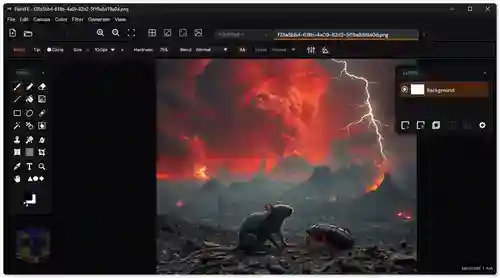
There are a few things to consider before choosing it. PaintFE has a broad toolset, so beginners may need time to learn where particular features are located. Some advanced functions may feel less familiar than those in established image editors, and its portable Windows download is currently unsigned, which can trigger a Windows SmartScreen warning. Users who prefer a more straightforward installation can check whether the Microsoft Store version is available. For Windows, the listed requirements include Windows 10 version 1903 or later, or Windows 11, on a 64-bit system. Keeping graphics drivers up to date is also recommended.
Overall, PaintFE 2026 is a strong option for users who want drawing tools, layers, photo adjustments, retouching features, and automation in one free Windows application. It is especially appealing to hobby artists, students, content creators, and users who want an alternative to subscription-based editing software. However, professionals who depend on a specific established workflow should test their file formats and required features before making it their main editor.
Key Features of PaintFE 2026
- Drawing and painting tools: Create artwork with brushes, pencils, erasers, lines, fill tools, and gradients.
- Custom brush tips: Adjust brush size, hardness, spacing, and opacity, and use additional brush tips.
- Layer-based editing: Organize image elements on separate layers and adjust opacity and blend modes.
- Selection tools: Select image areas with rectangular, elliptical, lasso, and magic wand tools.
- Photo retouching: Use Clone Stamp, Content-Aware Fill, Smudge, and Liquify for supported editing tasks.
- Color adjustments: Change brightness, contrast, exposure, saturation, temperature, and other image settings.
- Creative filters: Apply blur, sharpening, noise reduction, and artistic effects.
- Text and shapes: Add text and create graphics using built-in shapes.
- Pixel art support: Work with precise pencil drawing, stepped zoom, and a configurable pixel grid.
- GPU acceleration: Use supported graphics processing features to improve performance on compatible hardware.
- Scripting support: Automate repeatable image-editing tasks through its built-in scripting system.
- Image format support: Open and export common formats, including PNG, JPEG, WebP, BMP, and TIFF.
- Animation support: Work with supported animated GIF and APNG files.
- Local editing: Process images on your computer without requiring a cloud account.
Alternatives to PaintFE 2026
PaintFE offers a wide range of editing features, but another image editor may be a better fit depending on your experience, preferred workflow, and the type of images you create. These alternatives are worth comparing before choosing your main Windows graphics application.
- Paint.NET
Paint.NET is a practical alternative for Windows users who want an approachable image editor for everyday work. It supports layers, selections, drawing tools, color adjustments, and effects, making it suitable for editing photos, creating thumbnails, and preparing simple graphics. Its interface is relatively easy to learn, so beginners may find it more comfortable than a tool with a wider range of advanced features. PaintFE is worth comparing if you need additional retouching tools, scripting, or its particular set of creative effects.
- GIMP
GIMP is a free, open-source image editor designed for photo manipulation, graphic design, and detailed image editing. It provides layers, masks, selections, filters, color adjustments, and customizable tools. It is a suitable choice for users who need extensive control over images without paying for a subscription. However, its interface and workflow can take time to learn. PaintFE may appeal to users who prefer a different desktop experience and want its built-in scripting and drawing features.
- Krita
Krita is particularly suitable for digital artists, illustrators, and users who spend much of their time drawing or painting. It offers customizable brushes, layers, stabilizers, and tools designed for creating detailed artwork. Its animation features may also be useful for artists exploring frame-based projects. If your main goal is digital illustration, Krita is worth considering alongside PaintFE. PaintFE may be more appealing if you want to combine painting with general image adjustments, retouching, and scripted editing tasks.
- Adobe Photoshop
Adobe Photoshop is a professional image-editing application used for photo manipulation, graphic design, compositing, and detailed retouching. It offers a mature workflow and extensive tools for users who need advanced editing capabilities. It can be a strong choice for professional designers and photographers, especially when their work depends on established industry workflows. However, its paid subscription model may not suit everyone. PaintFE is an alternative for users who prefer free, locally processed image editing without a subscription.
- Microsoft Paint
Microsoft Paint is a simple option for basic drawing, cropping, resizing, annotations, and quick image changes. It is suitable for everyday tasks where you do not need advanced layers, complex retouching, or extensive color adjustments. Its familiar interface makes it easy for beginners to use. PaintFE is a better candidate when your projects require more detailed editing tools, custom brushes, layers, filters, and advanced image effects.
Which alternative should you choose?
- Choose Paint.NET for straightforward Windows image editing.
- Choose GIMP for extensive free image manipulation and graphic design tools.
- Choose Krita for digital painting and illustration.
- Choose Adobe Photoshop for professional workflows and advanced photo editing.
- Choose Microsoft Paint for quick, basic image tasks.
- Choose PaintFE if you want a free editor that combines painting, layers, retouching, filters, and scripting.
Conclusion
PaintFE 2026 is a capable option for Windows users looking for a free image editor with more features than a basic drawing application. Its combination of painting tools, layers, selection options, photo adjustments, creative effects, and scripting makes it suitable for a variety of personal and creative projects.
Its biggest advantages are its open-source license, local editing, portable desktop version, and broad toolset without a subscription. The main drawbacks are the learning curve for some advanced features and the need to check compatibility with your existing projects and preferred workflow.
If you create digital artwork, edit photos, prepare website images, or design social media graphics, PaintFE is worth trying. Users who need a highly specialized professional workflow may prefer an established alternative, but for everyday image editing with room to explore more advanced tools, PaintFE 2026 is a promising choice.
PaintFE 2026 Technical Setup Details
- Software Full Name: PaintFE 2026
- Setup File Name: PaintFE-19-10-2026.rar
- Setup Size: 24 MB
- Setup Type: Offline Installer / Full Standalone Setup
- Compatibility Mechanical: 32 Bit (x86) / 64 Bit (x64)
- Latest Version Release Added On: 19th Oct 2026
- Developers: PaintFE
System Requirements for PaintFE 2026
- Operating System: Windows 7/8/10
- RAM: 1 GB
- Hard Disk: 1 GB
- Processor: Intel Dual Core or higher processor
PaintFE 2026 Download
Download PaintFE 2026 free latest full version offline direct download link for full offline setup by clicking the button below.