Download RTM Audio Peak for Mac Free. It is full Latest Version setup of RTM Audio Peak DMG for Mac OS X. Peak is a true-peak brickwall mastering limiter that finishes a master at the chosen ceiling, keeps transients breathing at high gain, and proves the peaks survive every major codec before shipping.
Review of RTM Audio Peak
RTM Audio Peak is a mastering limiter plugin for Mac made by RTM Audio. Most limiters guard only the sample peak. The assumption is that if the bounced file never goes above the ceiling, the job is done. The problem is that a DAC, and every lossy codec, reconstruct a signal that rides higher between the samples. A bounce that looked safe clips on Spotify, clips through earbuds, and clips in the car because the codec pushed the inter-sample levels past the ceiling the limiter thought it was holding. The master sounded right in the DAW and falls apart in the real world. PEAK solves this directly. It finishes the master at the ceiling, keeps the transients breathing, and proves the peaks survive the codec before shipping. RTM Audio describes PEAK as loud where it counts and transparent everywhere else. A ceiling nothing gets past. Not even the codec.
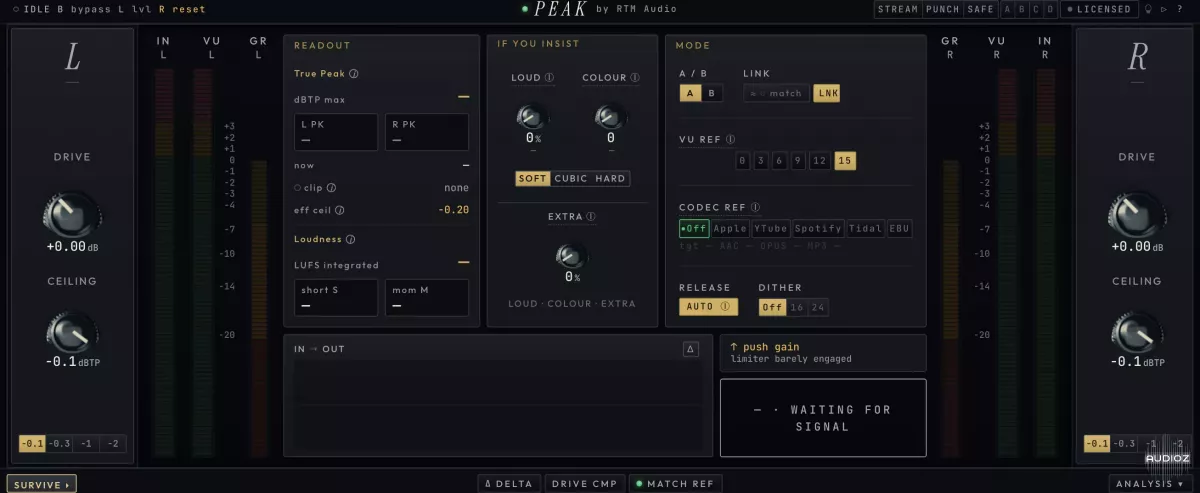
What separates PEAK from a basic true-peak limiter is the analysis panel. Most limiters claim transparency. PEAK proves it. The analysis panel scores what the limiter actually did to the master, band by band, then names the exact move that gets the headroom back. This is post-limiter forensics rather than a promise. The engineer sees exactly what PEAK changed, where it changed it, and what to do if the headroom is not quite right. The live codec simulation is the most practically useful feature in the plugin. Drag the ceiling, switch a codec on, and watch the difference live inside the plugin. The codec simulation runs in real time, showing exactly how the current master behaves through lossy compression before any export. This removes the bounce, encode, and check loop that engineers repeat every time they adjust the ceiling or the limiting character.
True-Peak Brickwall Limiting
PEAK is a true-peak brickwall limiter built for the mix bus and master chain. It enforces the chosen ceiling across the output, catching both sample peaks and inter-sample peaks that standard peak meters miss. The brickwall design means nothing gets past the ceiling, including the reconstruction artifacts that codecs and DACs introduce when they interpolate between sample points.
The Codec Problem: Why Sample Peaks Are Not Enough
Most limiters guard only the sample peak. A DAC and every lossy codec reconstruct a signal that rides higher between the samples, so a bounce that looked safe clips on Spotify. PEAK is designed to guard against this specifically, making its true-peak enforcement relevant not just for the raw audio file but for how the file actually behaves after encoding and playback on any system.
Live Codec Simulation
Drag the ceiling, switch a codec on, and watch the difference live inside the plugin. The codec simulation runs in real time, showing exactly how the current master behaves through lossy compression before any export. This eliminates the bounce, encode, and check workflow loop that engineers otherwise repeat every time they adjust the ceiling or the limiting character.
Transients Breathing at High Gain
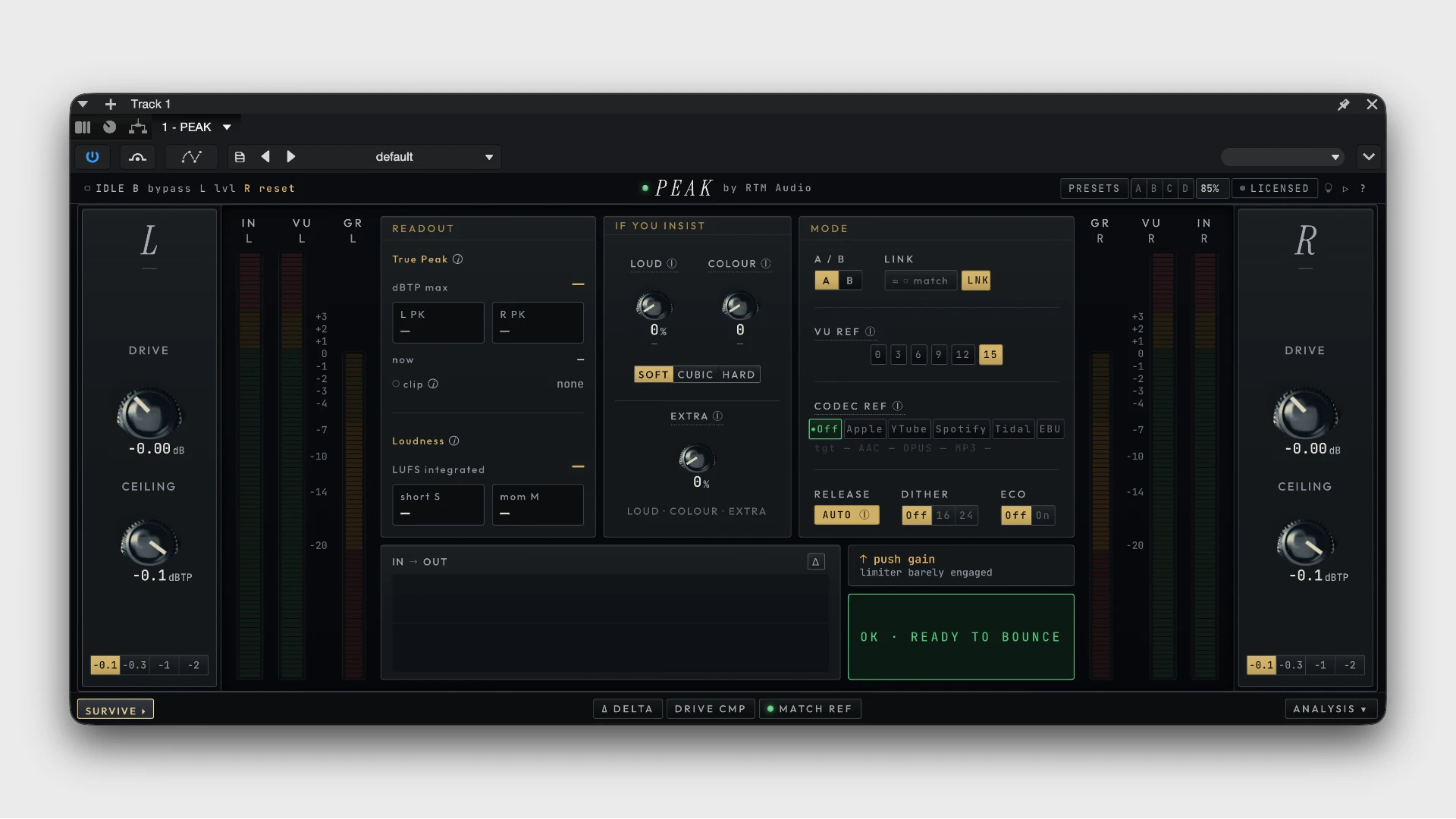
PEAK keeps the transients breathing even at high gain reduction. This is the core sonic claim: that loudness does not have to mean flattened transients. Where most brickwall limiters compress the dynamic feel of a master when pushed hard, PEAK maintains the sense of movement and life in the transients through the ceiling it enforces.
Post-Limiter Analysis Panel
Every limiter claims transparency. PEAK proves it. The analysis panel scores what the limiter actually did to the master, band by band, then names the exact move that gets the headroom back. This gives the engineer specific, actionable feedback rather than a visual that simply confirms limiting happened. The analysis panel is what makes PEAK a diagnostic tool as well as a processing tool.
Band-by-Band Headroom Reporting
The analysis panel works band by band. If the low end is causing the majority of limiting events, the panel identifies that specifically and points toward the adjustment that recovers headroom without affecting the whole master. This replaces the guesswork of pushing the ceiling and listening to hear where the damage is.
Plugin Formats and Mac Compatibility
PEAK is available in AU, VST3, and AAX formats for macOS and Windows. The installer is notarized and runs natively as a Universal 2 Binary on both Apple Silicon and Intel Macs. This means the plugin drops directly into Logic Pro, Pro Tools, Cubase, Studio One, Reaper, and Ableton Live on Mac without compatibility issues.
Key Features of RTM Audio Peak for Mac
- True-peak brickwall mastering limiter for the mix bus and master chain
- Enforces the chosen ceiling against both sample peaks and inter-sample peaks
- Live codec simulation shows how the master behaves through lossy codecs before export
- Keeps transients breathing at high gain without flattening the dynamic feel
- Post-limiter analysis panel scores what the limiter did band by band
- Names the exact move that recovers headroom after limiting
- Band-by-band headroom reporting identifies which frequency range is causing the most limiting
- Loud where it counts and transparent everywhere else
Technical Details
- Full Name: RTM Audio Peak
- Setup App File Name: RTM Audio Peak
- Full Application Size: 15 MB
- Latest Version: 3.0.17
- Setup Type: AU, VST3
- Developers: RTM Audio
System Requirements
- Operating System: macOS 11 (Big Sur) or later
- Memory (RAM): 4/8 GB
- Hard Disk Space: 14.1 MB
- Processor: Apple Silicon (M1-M5) and newer or Intel Core (64-bit)
Frequently Asked Questions
What is RTM Audio Peak?
PEAK is a true-peak brickwall mastering limiter that finishes a master at the chosen ceiling, keeps transients breathing at high gain, and proves the peaks survive every major codec before shipping.
Does Peak work on Mac?
Yes. It is available in AU, VST3, and AAX formats, running natively on both Apple Silicon and Intel Macs through a notarized Universal 2 Binary installer.
Why does Peak include a codec simulation?
Most limiters guard only the sample peak. A DAC and every lossy codec reconstruct a signal that rides higher between the samples, so a bounce that looks safe can clip on Spotify. The live codec simulation shows how the master behaves through lossy compression before any export.
What does the analysis panel do?
The analysis panel scores what the limiter actually did to the master band by band, then names the exact move that recovers headroom. It gives specific, actionable feedback rather than just confirming that limiting happened.
Does Peak keep transients alive at high gain?
Yes. PEAK is designed to keep transients breathing even at high gain reduction, maintaining the dynamic feel of the master through the ceiling it enforces.
Download RTM Audio Peak for Mac
Click on the button below to start RTM Audio Peak Download for Mac OS X. This is completely Tested and Working Latest Version Mac OS App of RTM Audio Peak. It is offline installer and standalone setup for RTM Audio Peak for Apple Macintosh. We provide Resumeable single direct link RTM Audio Peak Download for Mac.