Download HDT4ALL full latest version program free setup for Windows. HDT4ALL is a bootable hardware detection tool. It runs directly at startup and shows detailed information about the CPU, RAM, GPU, disks, USB devices, and network adapters, even on a PC with no operating system installed.
HDT4ALL Review
Checking a computer’s hardware is usually easy when Windows is running. The problem starts when Windows will not boot, or when there is no operating system on the machine at all. This is common for technicians repairing PCs, builders testing new systems, and anyone buying a used computer and wanting to confirm what is actually inside it. HDT4ALL was made to solve exactly this problem. HDT stands for Hardware Detection Tool. It runs from a bootable USB drive or CD/DVD, straight at system startup, before any operating system loads. This means a technician can plug in the drive, boot from it, and see full hardware details on a machine that is otherwise unbootable or completely blank.
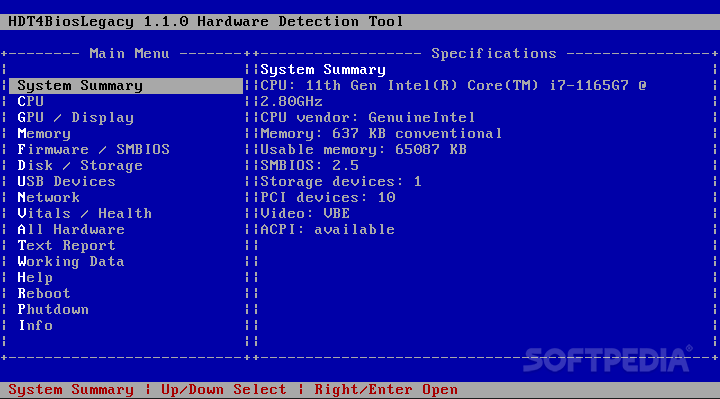
The information it shows is detailed. It covers CPU specifications, GPU and display details, RAM modules, firmware and SMBIOS data, and disk or storage information. It also detects connected USB devices and network adapters, and includes basic system health readings. All of this is organized into a simple menu, with each section split out so users can find what they need without digging through clutter. HDT4ALL supports both UEFI and Legacy BIOS firmware, which covers almost every PC in use today, from very old machines to current systems. This is useful because many diagnostic tools only work on one type of firmware, forcing users to carry two different tools. HDT4ALL avoids that by handling both from the same bootable ISO.
Trust matters for a tool that runs before any operating system does. HDT4ALL is free and open-source, released under the MPL-2.0 license, so its code is open for anyone to review. It also does not connect to the internet while running. All device information comes from local hardware ID files, not from an online lookup, so nothing is sent out during a scan. Using it is simple. The ISO file is downloaded and written to a USB drive, or burned to a CD or DVD. The PC is then booted from that drive, and HDT4ALL loads its main menu automatically. Navigation uses the arrow keys, with Enter to open a section and Esc to go back. Once a scan is reviewed, users can generate a text report, which is useful for documenting a computer’s hardware before a repair, upgrade, or resale.
Key Features
- Runs at boot, with no operating system needed
- Supports both UEFI and Legacy BIOS firmware
- Detailed CPU, GPU, and RAM information
- Firmware and SMBIOS data
- Disk and storage details
- USB device detection
- Network adapter information
- Basic system health readings
- Text report generation for documentation
- Works fully offline during scans
HDT4ALL Technical Setup Details
- Software Full Name: HDT4ALL
- Setup File Name: HDT4ALL.iso
- Setup Size: 27 MB
- Setup Type: Offline Installer / Full Standalone Setup
- Compatibility Mechanical: 32 Bit (x86) / 64 Bit (x64)
- Developers: HDT4ALL
System Requirements for HDT4ALL
- Operating System: Windows 7/8/10
- RAM: 1 GB
- Hard Disk: 200 MB
- Processor: Intel Dual Core or higher processor
HDT4ALL Free Download
Download HDT4ALL free latest full version offline direct download link for full offline setup by clicking the button below.