Download Synopsys PrimeTime vP-2019.03 full latest version program free setup for Windows.
Synopsys PrimeTime vP-2019.03 for Windows Review
Synopsys PrimeTime P-2019.03 is a professional static timing analysis tool used in ASIC and integrated-circuit design flows. It checks whether a digital design can meet its required timing constraints before fabrication. PrimeTime works with gate-level designs, timing libraries, clocks, delays, and design constraints to identify timing problems that can affect the final chip. Synopsys describes PrimeTime as a signoff solution for timing analysis, while the 2019 documentation specifically explains its role in verifying that a completed design can operate at the intended clock speed. The P-2019.03 release belongs to Synopsys’ 2019 P-Foundation generation. Synopsys’ archived documentation shows the original P-2019.03 installation guide was released in March 2019, followed by P-2019.03-SP1 in April. The PrimeTime user documentation also has later service-pack versions from the same release family.
PrimeTime is designed for engineers who need detailed timing verification after synthesis and during physical implementation. It analyzes paths through a digital design and checks conditions such as setup and hold timing, clock relationships, and design-rule limits. The 2019 Synopsys timing documentation identifies PrimeTime as the signoff timing analysis tool used to verify the completed design. A major part of the workflow is Static Timing Analysis (STA). Unlike simulation, STA evaluates timing paths without requiring test vectors for every possible operating condition. PrimeTime can use timing information from Liberty libraries and Synopsys database files, then apply timing constraints to analyze how signals move through the design. The software works with SDC timing constraints, which define important information such as clock periods, waveforms, input and output delays, clock groups, and clock-gating checks. These constraints allow the timing engine to determine when data is expected to arrive and when it needs to be available.
PrimeTime also supports advanced variation analysis. The P-2019.03 documentation covers Advanced On-Chip Variation (AOCV) analysis, including depth-based derating for clock and data paths. This is useful when engineers need to account for timing changes caused by manufacturing and operating variations rather than analyzing the design under only one ideal condition. Another important area is signal integrity. PrimeTime has been developed as part of Synopsys’ timing and signoff ecosystem, where timing analysis can be combined with signal-integrity considerations. Current PrimeTime documentation also describes timing, signal integrity, power, variation-aware analysis, and scalable multi-scenario analysis as parts of the broader PrimeTime suite. The P-2019.03 generation also introduced or expanded capabilities used in more complex timing flows. For example, Synopsys documentation from 2019 describes cell alternative library mapping introduced in P-2019.03-SP1, allowing specific cells to be mapped to alternative libraries for timing analysis without relinking the complete design.
For Windows users, there is an important compatibility detail. Synopsys’ P-Foundation platform guide lists 64-bit Microsoft Windows with Windows 7, Windows 10, Windows Server 2008 R2, and Windows Server 2016 as tested configurations for the foundation release. It also lists Microsoft Visual Studio 2017 v15.7 as the compiler environment. However, Synopsys notes that not every product is available on every listed platform, so users should verify the exact PrimeTime build through Synopsys SolvNet before planning a Windows installation. PrimeTime is not typical desktop software. It is intended for semiconductor design environments and is commonly operated through command-line and Tcl-based flows. Engineers generally work with scripts, libraries, design databases, constraints, and reports rather than using it like a conventional Windows productivity application. The 2019 Synopsys documentation also assumes familiarity with UNIX/Linux and basic IC design principles.
Key Features
- Static Timing Analysis for digital IC designs
- Gate-level timing verification
- Setup and hold timing analysis
- Clock and data path analysis
- SDC timing constraint support
- Clock creation and clock-group definitions
- Clock-gating checks
- Timing path grouping
- Liberty .lib timing library support
- Synopsys database .db support
- Advanced On-Chip Variation analysis
- Timing derating and variation analysis
- Signal-integrity analysis capabilities
- Multi-scenario timing workflows
- Tcl-based scripting and automation
- Integration with Synopsys synthesis and physical-design flows
- Support for large chip designs
- 64-bit Windows platform support within the P-Foundation release family

Alternatives
Cadence Tempus is one of the closest alternatives for professional static timing analysis. It is designed for timing signoff and fits into Cadence’s digital implementation ecosystem. It is particularly relevant for teams already using Cadence tools for synthesis, place-and-route, and signoff.
Siemens EDA Questa One provides a broader verification environment rather than being a direct one-to-one replacement for PrimeTime. It can be relevant when timing verification is part of a larger digital verification workflow.
OpenSTA is an open-source static timing analysis project. It is much more lightweight than commercial PrimeTime and can be useful for learning STA concepts, experimenting with timing flows, and working with open-source digital design projects.
OpenROAD is another open-source option for digital chip design. Its flow includes timing analysis as part of a larger automated RTL-to-GDSII workflow. It is useful for users who want an open-source environment covering more than timing analysis alone.
Cadence Innovus with Tempus can be considered when timing analysis needs to stay closely connected to physical implementation. This type of integrated commercial flow is more suitable for professional chip-development environments than standalone open-source STA tools.
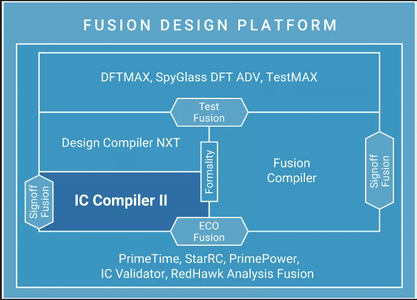
For engineers working with an existing Synopsys-based flow, PrimeTime has an important advantage: it fits directly into the Synopsys ecosystem alongside tools such as Design Compiler and IC Compiler. The 2019 documentation shows how timing analysis connects with synthesis and physical implementation workflows.
Conclusion
Synopsys PrimeTime P-2019.03 is a specialized EDA tool for engineers who need detailed static timing analysis and signoff verification of digital IC designs. Its workflow is built around timing libraries, gate-level designs, SDC constraints, timing paths, variation analysis, and automated reporting rather than general-purpose Windows computing. For users specifically looking for the Windows version of PrimeTime P-2019.03, platform verification is important because Synopsys’ P-Foundation documentation lists supported Windows configurations but also states that individual products may not be available on every platform. The exact PrimeTime build and licensed platform should therefore be checked through Synopsys SolvNet before installation. As an older 2019 release, P-2019.03 is mainly relevant to legacy design flows, academic environments, existing project compatibility, or teams that need to reproduce results from an older Synopsys toolchain. Users starting a new professional flow should also examine the current PrimeTime release rather than assuming that a 2019 build provides the capabilities and platform support of today’s software.

Synopsys PrimeTime vP-2019.03 Technical Setup Details
- Software Full Name: Synopsys PrimeTime vP-2019.03
- Setup File Name: Synopsys_PrimeTime_vP-2019.03.rar
- Setup Size: 1.2 GB
- Setup Type: Offline Installer / Full Standalone Setup
- Compatibility Mechanical: 32 Bit (x86) / 64 Bit (x64)
- Latest Version Release Added On: 20th Sep 2026
- Developers: Synopsys
System Requirements for Synopsys PrimeTime vP-2019.03
- Operating System: Windows 7/8/10
- RAM: 32 GB
- Hard Disk: 4 GB
- Processor: Intel Dual-Core or higher processor
Synopsys PrimeTime vP-2019.03 Download
Download Synopsys PrimeTime vP-2019.03 free latest full version offline direct download link for full offline setup by clicking the button below.