Download IDrive 2026 full latest version program free setup for Windows. It is a powerful cloud-based data backup, storage, synchronization, and recovery program.
IDrive 2026 for Windows Review
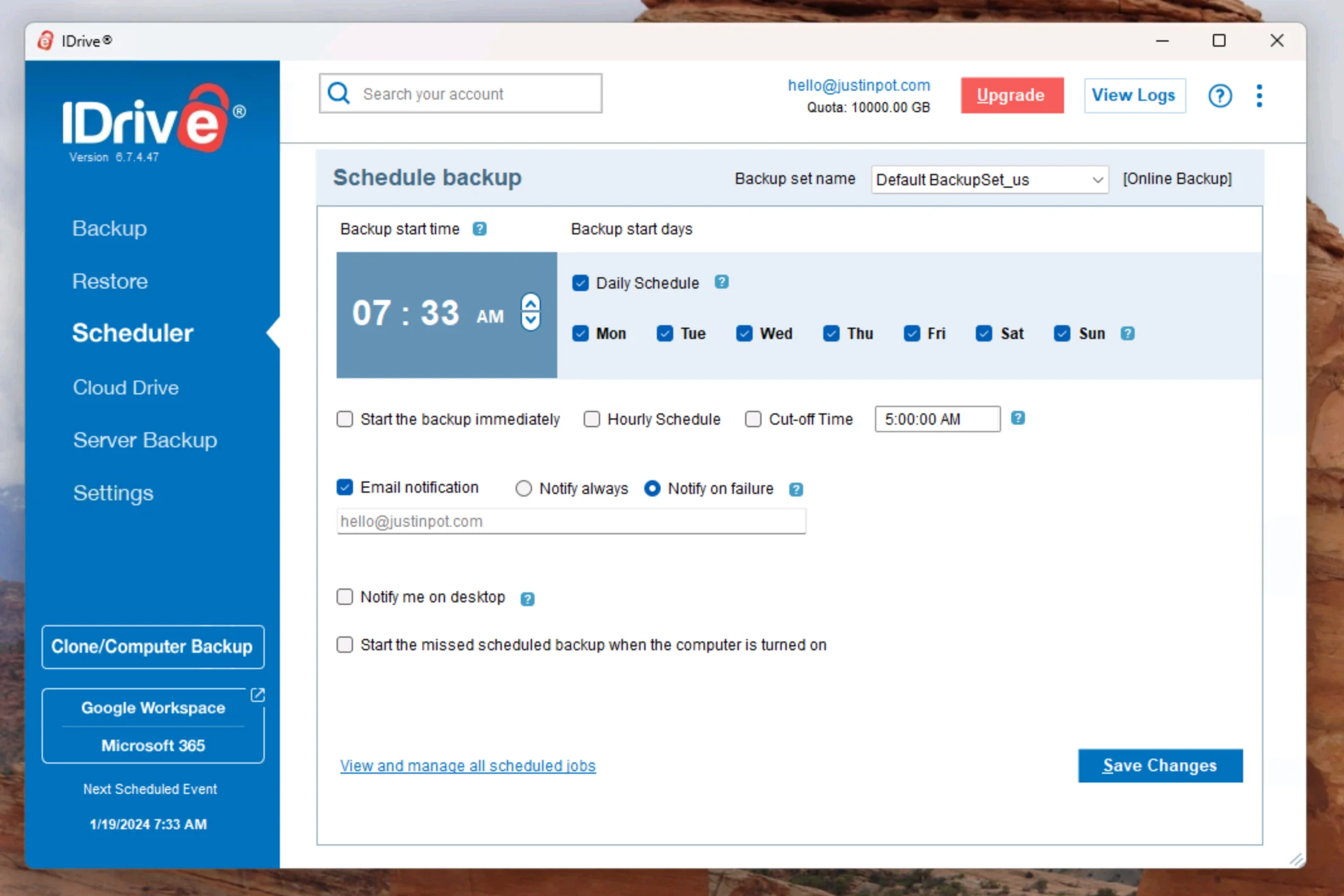
IDrive 2026 is a cloud backup and storage solution for Windows users who want to protect personal files, folders, external drives, and even an entire computer. It combines online backup, file synchronization, disk-image backup, versioning, and recovery tools in one service. The Windows application can also schedule backups and manage restore settings from the desktop. IDrive supports Windows 11 and Windows 10 along with several older Windows versions and Windows Server editions. It also supports multiple devices under one account, including PCs, Macs, Linux systems, phones, tablets, and external drives, depending on the plan. The main purpose of IDrive is automatic cloud backup. You select the files and folders you want to protect, and IDrive uploads them to its cloud storage.
It supports continuous data backup, so the service can detect changes to files and back up modified data rather than repeatedly transferring the complete file. One useful feature is multiple-device backup. Instead of maintaining separate cloud backup accounts for every computer, IDrive allows supported PCs, Macs, Linux computers, mobile devices, and external hard drives to be managed through one account. This can be useful for users who have a desktop PC, laptop, and other devices to protect.
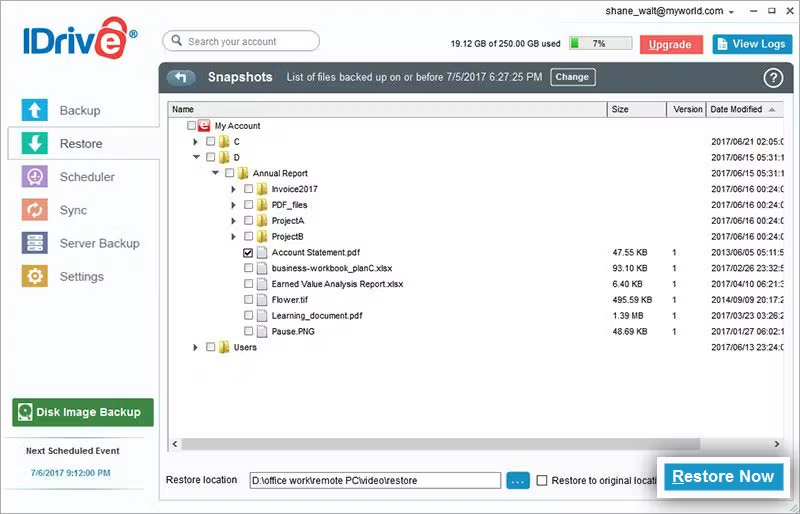
IDrive also includes Snapshots and Versioning. The service can retain up to 30 previous versions of backed-up files. This is useful when a file is accidentally changed, deleted, corrupted, or affected by ransomware because you can go back to an earlier version rather than relying only on the newest copy. Another important feature for Windows users is entire-machine backup. IDrive can back up the operating system, programs, system settings, and personal data. After the initial backup, incremental processing can transfer only changed blocks. IDrive also supports restoring an entire machine, including the operating system, through its recovery tools.
The service also provides disk-image backup. This creates an image of a Windows drive that can later be restored to a local computer or external drive. IDrive notes that full image restoration is not guaranteed in every situation because factors such as different hardware, boot-file problems, and RAID configurations can affect recovery. For this reason, important backups should be tested rather than simply assumed to be recoverable. For users who need both cloud storage and synchronization, Cloud Drive provides real-time syncing between linked devices. Files stored in Cloud Drive can be accessed from connected devices, and IDrive keeps sync storage separate from the backup storage allocation within the supported plans. Security is another part of the service. IDrive states that files are transferred and stored using 256-bit AES encryption. It also offers a user-defined private encryption key that is not stored on its servers.
Users choosing a private key should keep it safe because losing access to the key can affect their ability to decrypt backed-up data. IDrive also offers IDrive Express, which can be useful when a large amount of data would take too long to transfer over the internet. The service can use physical storage shipment for backup or retrieval, reducing the need to upload or download the entire dataset through an internet connection. The Windows application is fairly flexible, but IDrive has a broader feature set than a simple file-sync tool. Users have to understand the difference between cloud backup, Cloud Drive synchronization, disk images, and entire-machine recovery. That extra flexibility is useful, but it can make the service feel more complicated than basic automatic backup software.
Key Features
- Cloud backup for Windows PCs
- Continuous data backup
- Backup for multiple computers and devices
- External hard-drive backup
- Cloud Drive file synchronization
- File and folder backup
- Entire-machine backup
- Operating-system and system-data recovery
- Disk-image backup and restore
- Incremental backup of changed data
- Snapshots and file versioning
- Up to 30 previous file versions
- Ransomware recovery support through historical versions
- 256-bit AES encryption
- User-defined private encryption key
- Scheduled backups
- Local backup options
- Web-based file access
- IDrive Express physical data transfer
- NAS backup support on supported plans
- Windows Server support
- Active Directory Group Policy deployment for supported environments
Alternatives
Backblaze is a simpler cloud-backup option for users who mainly want automatic protection of a Windows computer. It is more focused on straightforward computer backup than combining backup, synchronization, disk imaging, and multiple device types in one service.
Acronis Cyber Protect Home Office is worth considering when system imaging and full PC recovery are important. It can back up an entire PC, individual disks and partitions, or selected files and folders. Its disk-based approach is useful when you want to restore Windows, applications, settings, and personal data together.
Carbonite focuses heavily on automatic cloud file backup. On Windows, it can automatically select common user folders and allows users to manually add files or folders. It also keeps multiple file versions on Windows, which can help when recovering an earlier version of a document.
IDrive 360 is another option from IDrive for users who need more endpoint-management features. It supports Windows file backup, entire-machine backup, centralized management, and recovery capabilities. It is more relevant to business and managed-device environments than the standard personal IDrive application.
Windows Backup is the built-in Microsoft option and can be sufficient for users who only need basic Windows backup and account-based file protection. It does not provide the same combination of cloud storage, long-term file versioning, disk imaging, and multi-device management offered by IDrive.
Conclusion
IDrive 2026 is a feature-rich backup solution for Windows users who want more than simple cloud file storage. It combines scheduled and continuous backup, file versioning, external-drive protection, Cloud Drive synchronization, disk images, and entire-machine recovery in one service. Its strongest use case is protecting several types of data from one Windows-based workflow. The ability to keep previous file versions and create full-machine backups also gives users additional recovery options when files are accidentally deleted, corrupted, or affected by unwanted changes. The main thing to consider is complexity. Users who only need automatic backup of documents and photos may find simpler services easier to manage. But for Windows users who want cloud backup plus broader recovery and synchronization features, IDrive 2026 provides a much wider set of tools.
IDrive 2026 Technical Setup Details
- Software Full Name: IDrive 2026
- Setup File Name: IDrive_2026-18-09.rar
- Setup Size: 44 MB
- Setup Type: Offline Installer / Full Standalone Setup
- Compatibility: 32 Bit (x86) / 64 Bit (x64)
- Developers: IDrive
System Requirements for IDrive 2026
- Operating System: Windows 7/8/10
- RAM: 512 MB
- Hard Disk: 200 MB
- Processor: Intel Dual-Core or higher processor
- Microsoft .NET Framework 4.5 or higher
IDrive 2026 Download
Download IDrive 2026 free latest full version offline direct download link for full offline setup by clicking the button below.