Download Hitek AutoKrypt 2026 full latest version program free setup for Windows. Hitek AutoKrypt 2026 is an intelligent file encryption and decryption software.
Hitek AutoKrypt 2026 for Windows Review
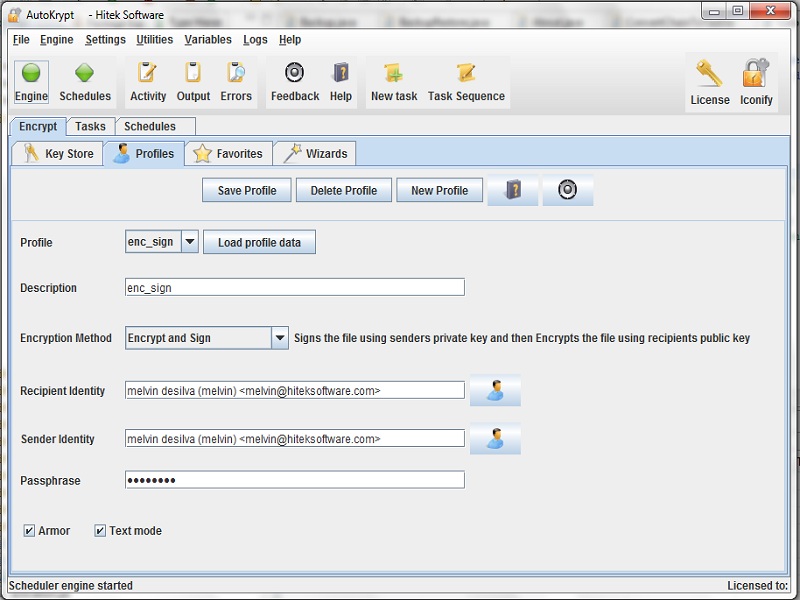
Hitek AutoKrypt is a Windows encryption utility built for users who need to encrypt and decrypt files automatically. Instead of manually processing files one by one, AutoKrypt lets you create encryption profiles, schedule tasks, monitor folders, and run complete encryption workflows automatically. It supports password-based and OpenPGP encryption, public and private keys, signing, verification, and combined encryption and signing operations. The software is aimed more at businesses, administrators, and users with repeatable file-security workflows than people who only need to encrypt an occasional document. Its automation tools can process entire folder trees, rename files using regular expressions, create backups, send task notifications, and run jobs from the command line. AutoKrypt’s main advantage is the combination of encryption and automation. You can create separate profiles for different encryption methods and reuse them in scheduled tasks. This is useful when the same type of files needs to be protected every day, every hour, or whenever they appear in a monitored folder.
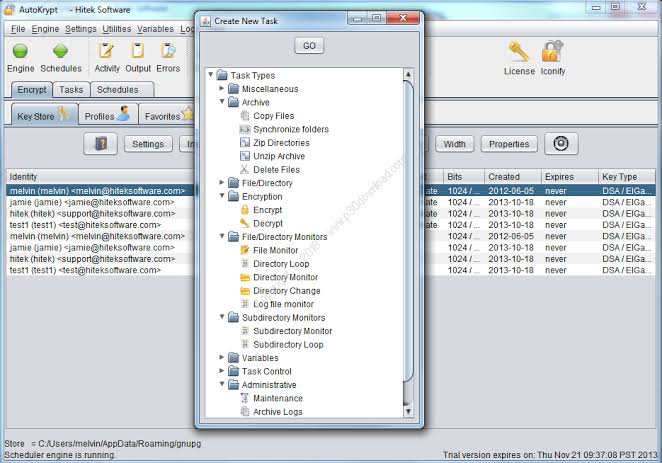
The encryption module is built around GnuPG and supports OpenPGP password encryption as well as public/private key encryption. Users can also sign and verify files, or combine encryption with signing. This makes AutoKrypt useful for workflows where both confidentiality and file verification are important. AutoKrypt can work with complete directory structures rather than individual files. You can configure it to process files throughout a folder tree and automatically create backups of the original, encrypted, or decrypted files. This is helpful for regular backup and document-processing workflows where manual encryption would take too much time. The scheduling system gives the software another practical advantage. Encryption, decryption, copying, compression, and other supported tasks can be scheduled, while dynamic variables can be used to build more flexible workflows. Tasks can also be combined into chains so that several operations run in sequence. File monitoring can make these workflows more automatic. AutoKrypt can work with directory and file monitors, allowing tasks to respond to files as they are added or changed.
This can be useful for organizations that receive sensitive documents into a specific folder and need them encrypted without manual intervention. The Task Runner provides command-line control, so AutoKrypt can also be integrated with other programs and scripts. Its command-line module supports remote control through SSH, while the background task engine can run as a service on supported operating systems. Another useful feature is automated file renaming. Regular expressions can be used to rename encrypted or decrypted files, while date and time information can be added to filenames for archiving. This makes the software more suitable for structured business workflows than basic file-encryption utilities. The main drawback is complexity. AutoKrypt offers many automation options, but users who only want to encrypt a few files may find a simpler encryption application easier to understand. It is also important to keep backups and test automated workflows before applying them to important data.
Key Features
- File and folder encryption
- Automatic encryption and decryption
- OpenPGP password-based encryption
- Public and private key encryption
- File signing and verification
- Combined encryption and signing workflows
- Encryption profiles
- Key generation and key management
- Complete folder-tree processing
- Scheduled encryption and decryption
- Directory and file monitoring
- Task chains
- Dynamic variables
- Automated file renaming with REGEX
- Backup of original and processed files
- Email notifications based on task results
- Command-line Task Runner
- Remote control through SSH
- Windows Service support
- Compression and copy tasks
- Suitable for batch processing and recurring workflows
Hitek AutoKrypt Alternatives
GnuPG is the most direct alternative for users who want OpenPGP encryption without AutoKrypt’s graphical automation layer. It provides the underlying encryption technology used by AutoKrypt but requires more command-line knowledge.
Cryptomator is better suited to users who want to protect files stored in folders or cloud-synchronized locations through an easier desktop workflow. It focuses on encrypted storage rather than complex scheduled task automation.
7-Zip can create encrypted archives using AES-256 and is useful when the goal is simply to package and password-protect files. It does not provide AutoKrypt’s scheduling and monitoring system.
VeraCrypt is a stronger choice when you need encrypted containers or full-volume encryption rather than individual automated file-processing tasks.
AxCrypt focuses on straightforward file encryption and sharing, making it more approachable for users who do not need AutoKrypt’s extensive automation features.
Crypt4All is another option for users who need OpenPGP-based file encryption with a more direct desktop workflow. It can be considered when the encryption requirement is more important than task automation.
Conclusion
Hitek AutoKrypt 2026 is best understood as an automated encryption workflow tool, not simply another file-encryption utility. Its combination of OpenPGP support, encryption profiles, scheduled tasks, folder monitoring, task chains, command-line control, and backups makes it particularly useful for recurring business and administrative workflows. Its biggest strength is automation. Once a workflow is configured, AutoKrypt can repeatedly encrypt, decrypt, rename, back up, and process files without requiring the same manual steps each time. The tradeoff is a steeper learning curve than simpler encryption tools. For Windows users who regularly handle sensitive files and need repeatable encryption jobs, AutoKrypt is a practical choice. For occasional file encryption, a simpler OpenPGP or encrypted-archive tool may be easier to manage.
Hitek AutoKrypt 2026 Technical Setup Details
- Software Full Name: Hitek AutoKrypt 2026
- Setup File Name: Hitek_Software_AutoKrypt_14.06.rar
- Setup Size: 67 MB
- Setup Type: Offline Installer / Full Standalone Setup
- Compatibility Mechanical: 32 Bit (x86) / 64 Bit (x64)
- Developers: Hitek
System Requirements for Hitek AutoKrypt 2026
- Operating System: Windows 7/8/10
- RAM: 2 GB
- Hard Disk: 200 MB
- Processor: Intel Dual Core or higher processor
Hitek AutoKrypt 2026 Download
Download Hitek AutoKrypt 2026 free latest full version offline direct download link for full offline setup by clicking the button below.