Download HomeBank 2026 full latest version program free setup for Windows.
HomeBank 2026 for Windows Review
HomeBank 2026 is a free personal finance management program for Windows users who want to keep track of their income, expenses, savings, and bank accounts. Instead of maintaining separate spreadsheets for every expense, users can record their financial activity in one place and review where their money goes. It is suitable for individuals, families, and anyone who wants a clearer picture of their monthly spending.
The latest official release is HomeBank 5.10.4, released on November 12, 2026. The program supports Windows 10 and Windows 11, and its installer includes an option to install a portable edition. HomeBank is open-source software, so users can manage their finances without paying for a subscription or purchasing a premium license.
Account and Transaction Management
HomeBank allows users to create different account types, including bank, cash, credit card, asset, and liability accounts. Each account can have its own opening balance and minimum balance. This makes it easier to keep track of money across several accounts rather than combining everything into one total.
Adding transactions is straightforward. Users can record income, purchases, bills, transfers, and other payments, then assign categories and payees to each entry. Transactions can also be split between multiple categories when a single payment covers different types of expenses. The software includes templates and duplicate detection to reduce repetitive entry and help keep financial records accurate.
Budgeting and Expense Tracking
The budgeting tools help users set monthly or annual spending limits for different categories. For example, you can create separate budgets for groceries, transport, utilities, entertainment, and household expenses. HomeBank then compares recorded spending with the planned amounts, making it easier to identify categories where expenses are increasing.
Users can also create rules that automatically assign categories and payees to matching transactions. This is particularly helpful when the same merchants appear regularly in bank statements. Tags provide another way to organize expenses, such as separating work purchases, holidays, or household projects without changing the main category structure.
Reports and Cash Flow Forecasts
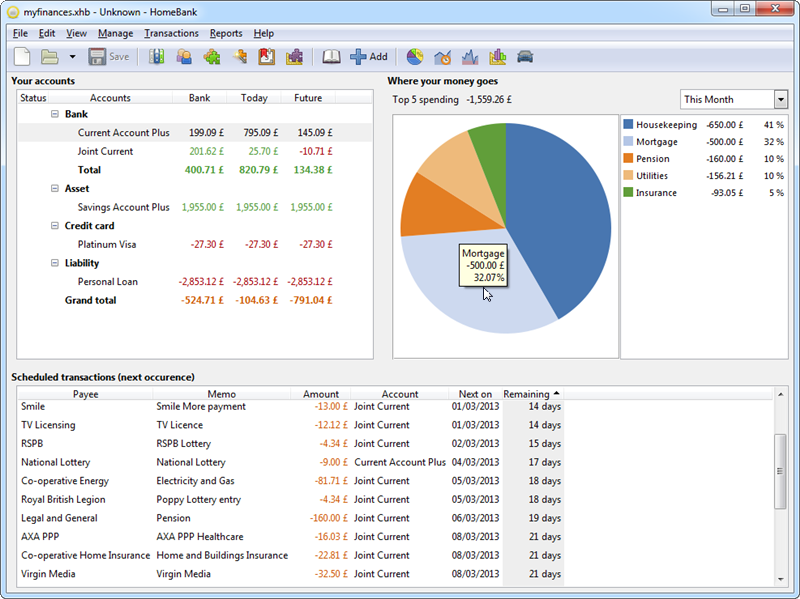
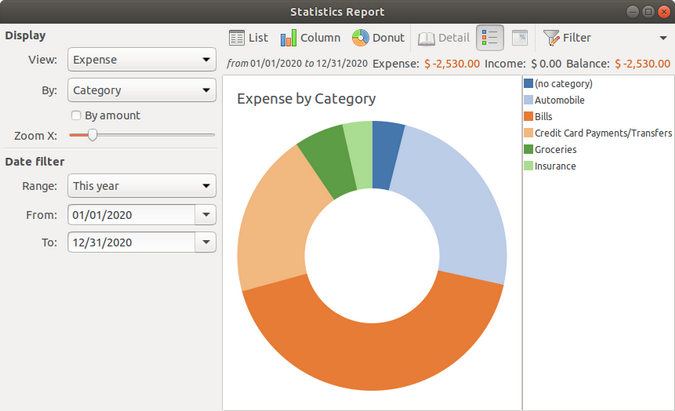
HomeBank includes reports that help users understand their financial activity over different periods. Its charts display spending patterns, account balances, category totals, and budget performance. Users can filter reports by transaction details and save frequently used filters for later.
The cash flow forecast uses scheduled transactions to estimate future account balances. This can help users prepare for regular bills, upcoming payments, and expected income. HomeBank also includes vehicle cost tracking, which can be useful for recording fuel expenses and monitoring the cost of running a car.
Import, Export, and Daily Use
HomeBank supports importing financial records from CSV, QIF, OFX, and QFX files. This makes it easier to move information from supported banking services or other personal finance programs. It can detect duplicate transactions during imports, reducing the chance of recording the same payment twice. Users can export account information to QIF and selected data to CSV for use in spreadsheets.
The interface is practical, although new users may need some time to understand categories, filters, account settings, and report options. It is designed mainly for manually managed financial records and imported bank statements rather than being a full online banking service. Users who prefer automatic bank synchronization should check whether their financial institution and preferred service support their workflow before choosing HomeBank.
Key Features of HomeBank 2026
- Multiple account types:Manage bank, cash, credit card, asset, and liability accounts.
- Transaction tracking:Record income, expenses, transfers, and other financial activity.
- Category management:Organize transactions using custom categories and payees.
- Split transactions:Divide one payment across multiple expense categories.
- Monthly and annual budgets:Set spending limits and monitor expenses.
- Automatic assignment:Create rules to assign categories and payees to matching transactions.
- Scheduled transactions:Record recurring payments such as rent, subscriptions, and utility bills.
- Transaction templates:Save common entries to make regular recordkeeping faster.
- Duplicate detection:Identify repeated transactions during data imports.
- Financial reports:Review spending, account balances, budgets, and other financial information through charts.
- Cash flow forecasting:Estimate future balances using scheduled transactions.
- Multiple currencies:Manage accounts that use different currencies.
- CSV and QIF export:Move financial information into other supported applications.
- Portable edition:Choose a portable installation option from the Windows installer.
- Open-source software:Use the program without a paid subscription.
Best Alternatives to HomeBank 2026
GnuCash
GnuCash is a strong alternative for users who need more detailed personal accounting. It supports double-entry bookkeeping, multiple accounts, scheduled transactions, reports, and financial statements. It is more suitable for users who want accounting-focused tools, although its interface and setup can take more time to learn.
Money Manager Ex
Money Manager Ex is another free, open-source personal finance application. It provides account management, expense tracking, budgeting, recurring transactions, and financial reports. Its straightforward approach makes it a good option for users who want to organize everyday spending without working through a more advanced accounting system.
Quicken
Quicken is worth considering for users who want a broader personal finance management service. Depending on the edition, it offers account tracking, budgeting, bill management, investment tools, and financial reports. Unlike HomeBank, Quicken is a commercial product with paid plans, so it is better suited to users who need its additional services and are comfortable with subscription costs.
Conclusion
HomeBank 2026 is a practical choice for Windows users who want free software to manage personal finances, track expenses, and plan monthly budgets. Its account management, transaction categories, scheduled payments, reports, and cash flow forecasts cover the main needs of everyday money management. The latest 5.10.4 release also keeps the Windows version current. Although its interface requires some learning and it does not replace a full online banking service, HomeBank offers a useful set of financial tools without a subscription. It is particularly suitable for users who prefer to manage their records locally and maintain control over their financial data.
HomeBank 2026 Technical Setup Details
- Software Full Name: HomeBank 2026
- Setup File Name: HomeBank-v5.10.4.rar
- Setup Size: 21 MB
- Setup Type: Offline Installer / Full Standalone Setup
- Compatibility Mechanical: 32 Bit (x86) / 64 Bit (x64)
- Latest Version Release Added On: 15th Nov 2026
- Developers: HomeBank
System Requirements for HomeBank 2026
- Operating System: Windows 7/8/10
- RAM: 1 GB
- Hard Disk: 500 MB
- Processor: Intel Dual Core or higher processor
HomeBank 2026 Free Download
Download HomeBank 2026 free latest full version offline direct download link for full offline setup by clicking the button below.