Download IObit Smart Defrag Pro 2026 full latest version program with free setup for Windows.
IObit Smart Defrag Pro 2026 for Windows Review
IObit Smart Defrag Pro 2026 is a Windows disk optimization utility designed to organize files on hard drives and maintain storage performance. It offers several defragmentation methods, automatic maintenance, boot-time optimization, and tools for handling large files and games. The main purpose is to make file access more efficient, particularly on traditional mechanical hard drives (HDDs).
The current official release listed by IObit is Smart Defrag 12.0.0. The software is available in Free and Pro editions, with Pro unlocking additional automation and advanced optimization options. It supports Windows 11, Windows 10, and several older Windows versions. Its interface brings different disk maintenance tasks together, making it easier to analyze drives and choose an appropriate optimization method.
HDD and SSD Optimization
Smart Defrag handles HDDs and SSDs differently. On a traditional hard drive, files can become fragmented when their data is stored in separate locations. The software reorganizes fragmented files to help the drive access them more efficiently. Users can select options such as Fast Defrag, Defrag & Optimize, Large Files Defrag, and Free Space Defrag.
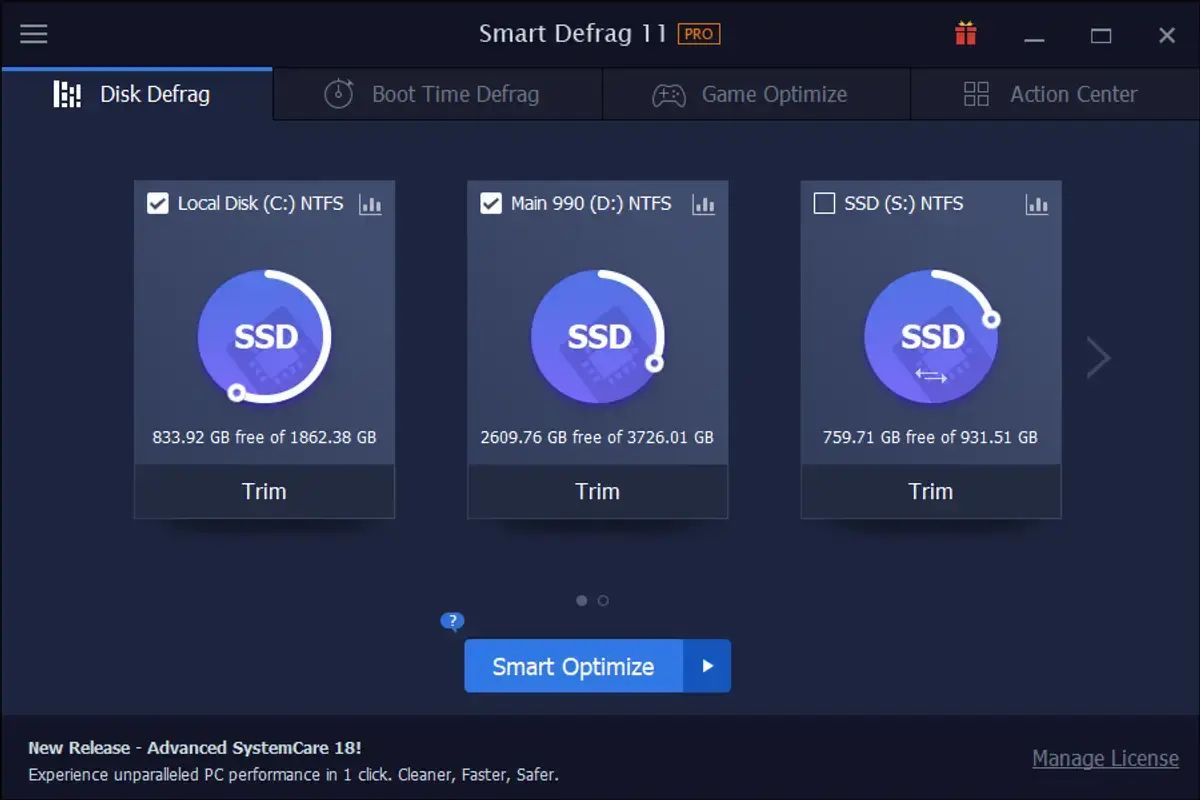
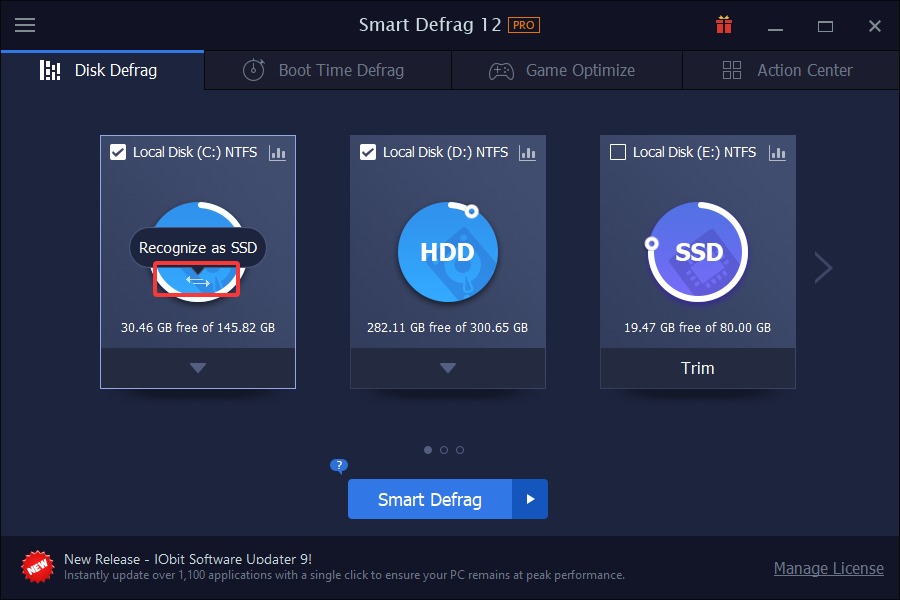
For SSDs, the software provides TRIM and intelligent optimization instead of regular HDD-style defragmentation. This distinction is important because SSDs use different storage technology and do not benefit from conventional defragmentation in the same way. Smart Defrag can also analyze a drive before performing an operation, helping users choose the appropriate maintenance method.
Automatic and Boot-Time Defragmentation
One of the main reasons to consider the Pro edition is its automatic maintenance feature. It can defragment selected drives when the computer is idle, reducing the need to run every task manually. Users can also schedule maintenance according to their preferred routine.
Boot-time defragmentation is another useful option. Some Windows system files cannot be moved while the operating system is running. Smart Defrag can handle supported files before Windows fully starts, including page files, hibernation files, and the Master File Table (MFT). This can be helpful on systems where those files contribute to disk fragmentation.
Game and Large File Optimization
Smart Defrag includes options for optimizing game files and large files stored on a hard drive. Its Game Optimize section can detect supported games and lets users add titles manually. The idea is to organize game data so the HDD can access it more efficiently.
Large File Defrag is useful for users who regularly work with large media files, archives, and other data stored on mechanical drives. Free Space Defrag also consolidates scattered empty areas on a drive. These features provide more control than a simple one-click defragmentation tool, although actual performance improvements depend on the drive, its condition, and the type of files being accessed.
Disk Health and User Interface
Smart Defrag includes a Disk Health section that displays information such as drive temperature, usage, and available self-monitoring reports. This gives users a convenient way to check basic drive information without opening several Windows tools.
The interface organizes its main functions into Disk Defrag, Boot Time Defrag, Game Optimize, and Action Center. Users can analyze a drive, select an optimization method, and review the results after a task finishes. The manual also documents controls for pausing, stopping, and scheduling operations. Some additional recommendations may appear in the Action Center, so users should review optional offers carefully during installation and regular use.
One limitation is that Smart Defrag cannot solve every cause of a slow computer. A full SSD-based Windows system may gain little from installing another disk optimizer because Windows already performs scheduled drive optimization. Pro is more relevant to users who need its additional HDD maintenance controls, automatic tasks, or boot-time features.
Key Features of IObit Smart Defrag Pro 2026
- Smart Defrag:Analyzes a drive and selects a suitable defragmentation method.
- Fast Defrag:Quickly defragments fragmented files on HDDs.
- Defrag & Optimize:Reorganizes fragmented files and storage data.
- Large Files Defrag:Targets large files for more focused maintenance.
- Free Space Defrag:Consolidates scattered free space on mechanical drives.
- Automatic Defrag:Runs supported maintenance tasks automatically when the PC is idle.
- Scheduled Optimization:Lets users arrange disk maintenance at convenient times.
- Boot-Time Defrag:Optimizes supported system files that cannot be moved while Windows is running.
- Game Optimize:Detects supported games and provides options for organizing their files.
- SSD TRIM:Provides SSD-specific optimization rather than conventional HDD defragmentation.
- Disk Health:Displays drive temperature, usage, and self-monitoring information.
- Windows App Defrag:Offers optimization for supported Windows applications.
- Detailed Reports:Shows fragmentation information and completed optimization results.
- Automatic Updates:Pro users can enable automatic program updates.
Best Alternatives to IObit Smart Defrag Pro 2026
O&O Defrag 32
O&O Defrag 32 is a strong alternative for users who want more control over HDD, SSD, and NVMe optimization. It offers automatic maintenance, different optimization methods, boot-time operations, and drive health information. Its detailed controls make it suitable for advanced users and people managing several storage drives.
Auslogics Disk Defrag 12
Auslogics Disk Defrag is a useful option for users who mainly work with traditional hard drives. It provides file and folder defragmentation, scheduled maintenance, free-space consolidation, and portable operation. Its free edition makes it worth considering if you need basic HDD maintenance without paying for a subscription.
Windows Optimize Drives
Windows Optimize Drives is the built-in option for users who prefer not to install additional software. It automatically optimizes supported drives on a schedule, defragmenting HDDs and performing TRIM operations on SSDs. It does not offer all the targeted file and game options found in Smart Defrag Pro, but it is sufficient for routine maintenance on many Windows computers.
Conclusion
IObit Smart Defrag Pro 2026 is a useful disk maintenance tool for Windows users who want more control over hard drive optimization. Its automatic defragmentation, boot-time operations, game optimization, and large-file tools make it particularly relevant for computers that still use mechanical HDDs. It also includes separate TRIM support for SSDs, along with basic drive health information. However, users with SSD-only systems may find Windows’ built-in Optimize Drives feature sufficient. Smart Defrag Pro is worth considering when its additional maintenance controls match your needs, rather than simply expecting a dramatic speed increase from installing another optimizer.
IObit Smart Defrag Pro 2026 Technical Setup Details
- Software Full Name: IObit Smart Defrag Pro 2026
- Setup File Name: IObit_Smart_Defrag_Pro_12.1.0.619.rar
- Setup Size: 21 MB
- Setup Type: Offline Installer / Full Standalone Setup
- Compatibility Mechanical: 32 Bit (x86) / 64 Bit (x64)
- Developers: IObit
System Requirements for IObit Smart Defrag Pro 2026
- Operating System: Windows 7/8/10
- RAM: 1 GB
- Hard Disk: 200 MB
- Processor: Intel Dual Core or higher processor
IObit Smart Defrag Pro 2026 Free Download
Download IObit Smart Defrag Pro 2026 free latest full version offline direct download link for full offline setup by clicking the button below.