Download Burp Suite Professional 2026 full latest version program free setup for Windows.
Burp Suite Professional 2026 for Windows Review
Burp Suite Professional 2026 is a web application security testing tool developed by PortSwigger. It is designed for penetration testers, cybersecurity professionals, and developers who need to find security weaknesses in websites and web applications. The software provides a collection of tools for examining HTTP and HTTPS traffic, testing application behavior, scanning for vulnerabilities, and investigating suspicious requests. It allows users to intercept communication between a browser and a web server, modify requests, and observe how an application responds.
Burp Suite Professional is particularly useful for identifying problems such as SQL injection, cross-site scripting, authentication weaknesses, and other web security issues. It combines automated scanning with manual testing tools, giving security professionals more control over their testing process. The 2026 release is available for Windows, including x64 and ARM-based systems. It is suitable for authorized security assessments, application testing, and professional penetration testing workflows.

Proxy for Intercepting Web Traffic
Burp Proxy is one of the main tools included in Burp Suite Professional. It allows users to examine communication between a web browser and a web application. When a browser sends a request to a website, Burp Proxy can intercept that request before it reaches the server. Users can inspect its headers, parameters, cookies, and other information. They can also modify the request and forward it to observe how the application responds.
For example, a security tester can examine how a login form handles submitted information or check whether an application properly validates user input. Burp also provides an HTTP history view, allowing users to review requests and responses from previous browsing activity. This makes it easier to investigate application behavior without repeating every action. The Proxy tool is useful during both manual testing and larger security assessments because it provides a clear view of the communication taking place between the browser and the target application.
Burp Scanner for Automated Vulnerability Detection
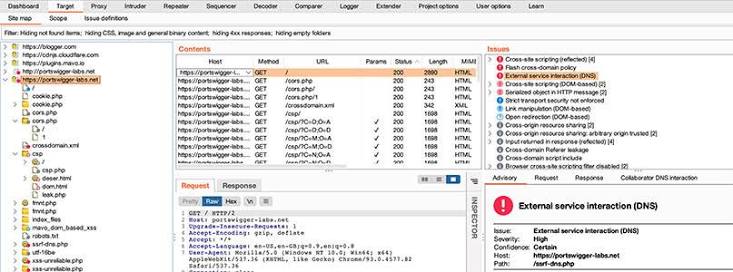
Burp Scanner is one of the most important features of the Professional edition. It automatically examines web applications for potential security weaknesses.
Instead of checking every part of an application manually, users can configure a scan and allow Burp to investigate selected areas. The scanner analyzes application responses and identifies potential vulnerabilities that require further attention.
It can help detect issues such as cross-site scripting, SQL injection, server-side request forgery, and other common web security problems.
The scan results are organized into findings that users can review and investigate. Each issue provides information that helps testers understand the possible weakness and decide whether additional manual verification is needed.
Automated scanning can save time during large assessments, but it does not replace manual testing. Some vulnerabilities depend on application logic or specific user interactions that require additional investigation.
Repeater for Manual Request Testing
Burp Repeater is designed for manually modifying and resending HTTP requests. It is particularly useful when a tester wants to understand how an application handles different inputs. You can send a request to Repeater, change its parameters, headers, cookies, or request body, and send it again. The response appears alongside the request, making it easier to compare results.
For example, a tester can change a parameter in an authorized test application to check whether the server validates the submitted value correctly. Repeater is also useful for investigating authentication behavior, access controls, and input validation. Rather than running a complete scan every time, you can make small changes and observe the results. The tool provides a practical workflow for understanding application responses and confirming potential security issues.
Intruder for Customized Testing
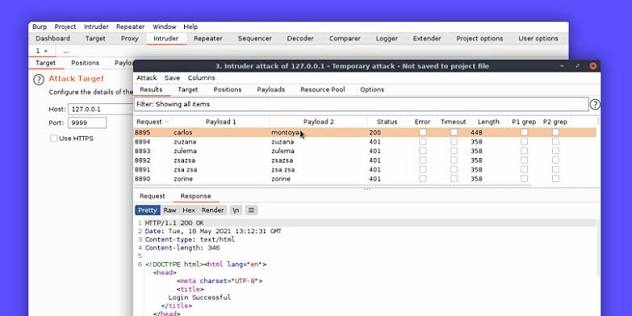
Burp Intruder helps automate repeated HTTP requests using different input values. It is useful when testers need to examine how an application responds to a range of test inputs. Users can select positions within a request and provide payload lists for testing. Intruder then sends the configured requests and displays the responses for comparison. This can help investigate input validation, parameter handling, and other application behaviors during an authorized assessment.
The Professional edition provides the full Intruder functionality, while the Community Edition has a limited version. This difference is important for users who need more flexible testing workflows. Intruder can generate a large number of requests, so testers should configure it carefully and use it only within an approved testing scope.
Scanner and Manual Testing Together
One of Burp Suite Professional’s main advantages is the combination of automated and manual testing. A tester can begin with an automated scan to identify possible weaknesses, then use Proxy and Repeater to investigate specific findings. Intruder can help test additional input variations when needed.
This approach is useful because automated tools may identify suspicious behavior without fully explaining its impact. Manual testing allows professionals to verify whether a reported issue is genuine and understand how it affects the application.
The combination also helps reduce unnecessary work. Instead of manually checking every request, testers can use automation for initial discovery and focus their attention on important findings.
Collaborator for Out-of-Band Testing
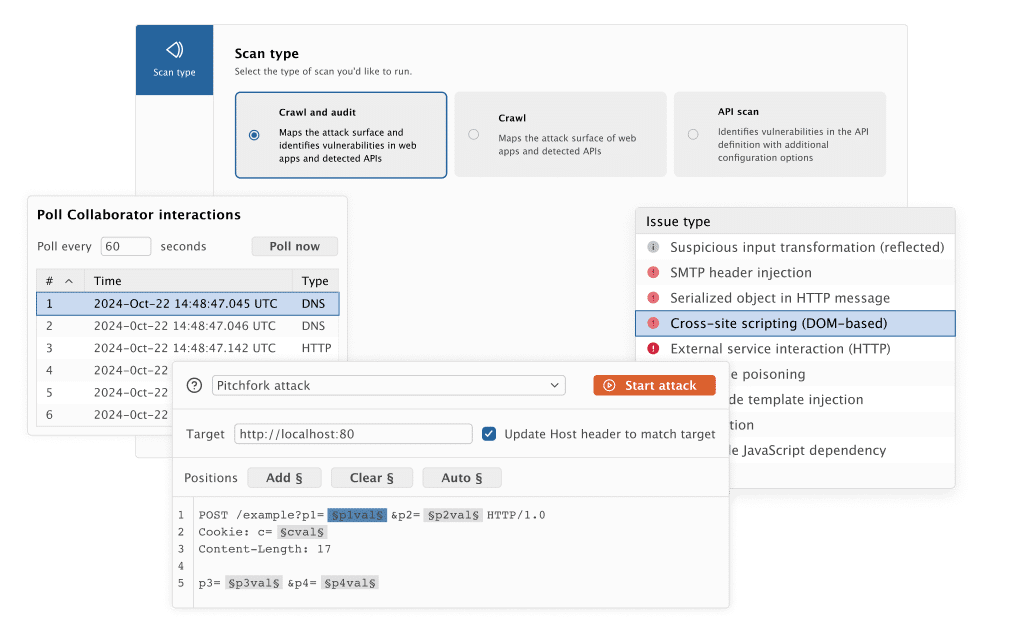
Burp Collaborator is designed to help identify vulnerabilities that do not produce an obvious response in the browser. Some security weaknesses cause a target application to make an external network request. This behavior may not be visible in the normal HTTP response. Collaborator provides a controlled external service that can receive and record certain interactions generated during testing.
These interactions can help confirm issues such as blind server-side request forgery or other out-of-band vulnerabilities. Professional users can use automated and manual out-of-band application security testing features to investigate these situations. This is particularly useful when a vulnerability cannot be confirmed through a standard request-and-response comparison.
HTTP Digest Authentication Support
Burp Suite Professional 2026.10 introduces support for HTTP Digest authentication. This makes it easier to test applications that use this authentication method without depending on older software versions or alternative workarounds. Authentication testing is an important part of web security because applications must correctly verify user identities before providing access to protected resources.
The update also improves notifications and fixes several issues related to request handling, project configuration, extensions, and WebSocket Repeater tabs. These changes help improve the everyday testing experience, particularly for users working with complex applications and long testing sessions.
BApp Store and Extension Support
Burp Suite supports extensions through its BApp Store. These extensions allow users to add functionality and customize the software according to their testing requirements. Some extensions provide additional scanning checks, request analysis tools, reporting features, and workflow improvements.
Professional users can access Pro-exclusive BApps and use Burp’s API to build custom extensions or connect the software with other tools. This flexibility is useful for security teams that follow specific testing procedures or work with different application technologies. However, extensions should be selected carefully. Installing unnecessary or unreliable extensions can affect the testing environment and create additional maintenance work.
Project Files and Reporting
Burp Suite Professional allows users to save their testing work in project files. This is useful when an assessment takes several sessions or involves multiple application areas. Saved projects can preserve relevant testing data and configurations, allowing users to continue their work later.
The software also provides reporting options for documenting identified security issues. Reports can help developers and security teams understand what was discovered and decide which problems need attention. This is especially valuable for professional penetration testers who need to communicate findings to clients or development teams.
Installation and Everyday Workflow
Burp Suite Professional uses an installer that supports both Professional and Community editions. During installation, users select the edition they want to use. After installation, the software provides a dashboard and access to its main testing tools. New users can begin with Proxy to understand HTTP traffic before moving on to Repeater, Intruder, and automated scanning.
Burp also includes a built-in browser, which helps users test web applications without configuring a separate browser manually. The interface contains many tools and settings, so beginners may need time to understand the different workflows. However, PortSwigger provides documentation and practical learning resources to help users become familiar with the software.
Key Features of Burp Suite Professional 2026
- Intercept and inspect HTTP and HTTPS traffic through Burp Proxy.
- Automated vulnerability scanning with Burp Scanner.
- Manual request testing with Repeater.
- Full Intruder functionality for customized request testing.
- Burp Collaborator for out-of-band vulnerability detection.
- HTTP Digest authentication support in version 2026.10.
- WebSocket traffic inspection and testing.
- BApp Store extensions and API customization.
- Project files for saving testing sessions.
- Reporting tools for documenting security findings.
- Built-in browser for web application testing.
- Support for Windows x64 and ARM systems.
Best Alternatives to Burp Suite Professional 2026
- OWASP ZAP
OWASP ZAP is an open-source web application security testing tool. It provides automated scanning, request interception, and manual testing features for examining web applications.
It is a good option for developers, students, and security professionals who want a free tool for learning and authorized security testing.
Compared with Burp Suite Professional, ZAP offers a different interface and workflow. Burp Professional provides a more advanced commercial toolkit, including its professional scanner and full Intruder functionality.
- Acunetix
Acunetix is a web application security scanner designed to identify vulnerabilities in websites and web applications. It focuses on automated testing and helps security teams discover common application weaknesses.
It is useful for organizations that need regular scanning across multiple websites and applications.
Compared with Burp Suite Professional, Acunetix places more emphasis on automated vulnerability discovery and centralized security workflows. Burp is particularly suitable for hands-on penetration testers who need detailed manual testing controls.
- Invicti
Invicti is a web application security testing platform designed for automated vulnerability scanning and security assessment.
It helps organizations discover vulnerabilities across web applications and APIs. Its scanning approach is useful for teams that want to include security testing in their development and application management processes.
Unlike Burp Suite Professional, which focuses heavily on hands-on testing, Invicti is more suited to organizations looking for automated application security scanning at a larger scale.
Which Alternative Should You Choose?
Choose Burp Suite Professional 2026 if you need a combination of automated scanning and detailed manual web application testing. Choose OWASP ZAP for a free open-source option, Acunetix for automated website vulnerability scanning, or Invicti for application security testing across larger environments.
Conclusion
Burp Suite Professional 2026 is a comprehensive web application security testing toolkit for Windows users. Its combination of Proxy, Scanner, Repeater, Intruder, Collaborator, and extension support makes it useful for professional penetration testing and application security assessments. Its biggest advantage is the balance between automated vulnerability discovery and manual testing. Users can scan applications, inspect requests, verify potential issues, and document findings within one environment.
The main limitation is its learning curve and commercial licensing. Beginners may need time to understand its tools, while users who only need basic manual testing may find the free Community Edition sufficient. If you work in cybersecurity, penetration testing, or web application development and need advanced testing capabilities, Burp Suite Professional 2026 is worth considering. Always use it only on applications and systems you own or have explicit permission to test.
Burp Suite Professional 2026 Technical Setup Details
- Software Full Name: Burp Suite Professional 2026
- Setup File Name: Burp_Suite_Professional_2026.10.1.rar
- Setup Size: 701 MB
- Setup Type: Offline Installer / Full Standalone Setup
- Compatibility Mechanical: 32 Bit (x86) / 64 Bit (x64)
- Developers: Burp Suite
System Requirements for Burp Suite Professional 2026
- Operating System: Windows 7/8/10
- RAM: 4 GB
- Hard Disk: 2 GB
- Processor: Intel Dual Core or higher processor
Burp Suite Professional 2026 Download
Download Burp Suite Professional 2026 free latest full version offline direct download link for full offline setup by clicking the button below.