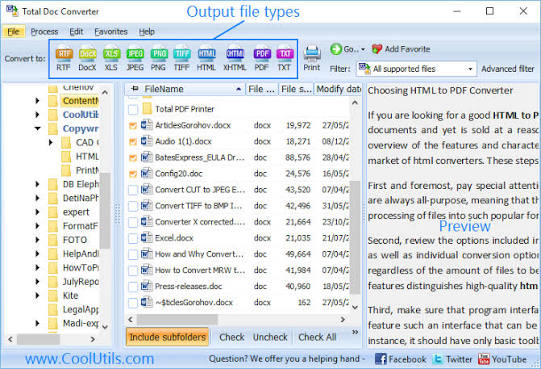
Download Coolutils Total Doc Converter 2026 full latest version program free setup for Windows.
CoolUtils Total Movie Converter 2026 Review
CoolUtils Total Movie Converter 2026 is a Windows video conversion program designed to help users change video formats, prepare clips for different devices, and manage multiple files in one process. It supports popular video formats such as AVI, MKV, MOV, MP4, WMV, MPEG, FLV, VOB, and 3GP. The software is useful for people who have older video files that do not play on their current devices or need to convert large collections of clips into a more suitable format.
The program is developed by CoolUtils and is available as a paid desktop application with a 30-day free trial. It is not a separate product edition numbered 2026; the keyword refers to the software’s current use in 2026. Its main appeal is a simple conversion process combined with batch processing, device presets, and command-line support.
Video Format Conversion
Total Movie Converter supports a range of input formats, including AVI, FLV, MKV, M2TS, MOV, VOB, MPEG, MPEG4, ASF, WMV, 3GP, MOD, and DivX. Users can select an output format such as AVI, MPEG, MPG, WMV, or FLV, depending on the conversion they need. Device presets are also available for products such as iPhone, iPad, Apple TV, Archos, and Xbox.
The software is particularly useful when dealing with older video formats or files that need to be prepared for specific playback devices. It also provides codec options, allowing users to change video encoding settings instead of simply changing the file extension. Before starting a conversion, it is worth checking the available output settings to make sure the resulting file is compatible with the intended player.
Batch Conversion and File Editing
Batch conversion is one of the program’s most practical features. Users can add several videos or select a folder and process multiple files using the same output settings. This saves time when converting camera recordings, downloaded videos, or archived media collections.
Total Movie Converter also includes basic editing options. Users can rotate videos, resize their dimensions, cut unwanted sections, and combine multiple clips into one file. Audio and video bitrate, frame rate, and volume can also be adjusted. These tools are useful for basic preparation, although the program is not designed to replace a full video editor with a timeline and advanced editing features.
Device Presets and Audio Extraction
The Video To Device feature helps users prepare videos for selected portable devices and media players. Instead of adjusting every encoding setting manually, users can choose a suitable preset and let the program apply the corresponding settings. This is helpful when converting videos for older devices with specific format and resolution requirements.
The software can also extract audio from supported video files and save it as an MP3 file. This can be useful when users want to keep a soundtrack, speech recording, or other audio content without retaining the video. The available audio codec, bitrate, and channel settings provide additional control over the output.
Command-Line Support and Windows Compatibility
Total Movie Converter includes command-line support, making it useful for users who want to automate repetitive conversion tasks. It can process file lists, include subfolders, and write error information to a log file. Users can also set output formats, video codecs, frame rates, bitrates, and resizing options through command-line parameters.
The official product page lists support for Windows 7, 8, 10, and 11, including 32-bit and 64-bit systems. The developer also lists Windows 2000 and older versions for legacy users. Its desktop interface is designed for straightforward file selection and conversion, so beginners can use the main functions without learning command-line instructions.
One limitation is that Total Movie Converter focuses on conversion and basic adjustments rather than advanced video production. Users who need detailed color correction, modern editing timelines, or extensive encoding controls may prefer another application. Its output format choices should also be checked carefully if a project requires a specific modern codec or container.
Key Features of CoolUtils Total Movie Converter 2026
- Multiple video formats:Supports AVI, MKV, MOV, M2TS, VOB, WMV, MPEG, FLV, 3GP, DivX, and other formats.
- Video conversion:Converts supported videos into formats such as AVI, MPEG, MPG, WMV, and FLV.
- Batch processing:Converts multiple videos or entire folders in one operation.
- Device presets:Prepares videos for selected iPhone, iPad, Apple TV, Archos, and Xbox devices.
- Codec selection:Provides options for changing supported video codecs.
- Bitrate adjustment:Lets users change audio and video bitrate settings.
- Frame rate control:Adjusts the frame rate during conversion.
- Video resizing:Changes video dimensions to suit different playback requirements.
- Video rotation:Rotates supported videos when recordings have the wrong orientation.
- Video cutting:Removes unwanted sections from a clip.
- Video merging:Combines multiple video files into one output file.
- Audio extraction:Saves audio from supported video files as MP3.
- Volume adjustment:Increases the audio volume of video files.
- Deinterlacing:Helps process interlaced video footage.
- Command-line support:Automates conversion tasks through scripts and file lists.
- Offline conversion:Processes files locally without requiring an online conversion service.
Best Alternatives to CoolUtils Total Movie Converter 2026
HandBrake
HandBrake is a free, open-source video transcoder for Windows users who want more control over video encoding. It supports presets, video compression, subtitle handling, and queued conversion jobs. It is a better option for users who mainly need to convert videos into modern formats and do not mind spending more time adjusting encoding settings.
VLC Media Player
VLC Media Player is best known as a free multimedia player, but it also includes conversion and streaming features. It supports many video and audio formats and can handle basic media conversion without requiring a separate paid application. It is a suitable choice for occasional conversions, although its workflow is less focused on batch file management than Total Movie Converter.
Any Video Converter
Any Video Converter is another option for users who want video conversion alongside basic editing and device-related output options. It is worth considering when you need a more general media conversion tool with a beginner-friendly interface. Check the features and limitations of its selected edition before choosing it for regular batch work.
Conclusion
CoolUtils Total Movie Converter 2026 is a practical Windows utility for converting videos, processing multiple files, and preparing media for different playback devices. Its batch conversion, device presets, audio extraction, resizing, cutting, merging, and command-line support make it useful for everyday media management. It is not a replacement for advanced video editing software, but it covers common conversion tasks without an overly complicated workflow. Users who regularly work with older video formats or large collections of clips may find it useful, while those looking for a free modern video encoder should also consider HandBrake.
Coolutils Total Doc Converter 2026 Technical Setup Details
- Software Full Name: Coolutils Total Doc Converter 2026
- Setup File Name: Coolutils_Total_Doc_Converter_5.1.0.445-222.rar
- Setup Size: 168 MB
- Setup Type: Offline Installer / Full Standalone Setup
- Compatibility Mechanical: 32 Bit (x86) / 64 Bit (x64)
- Developers: Coolutils
System Requirements for Coolutils Total Doc Converter 2026
- Operating System: Windows 7/8/10
- RAM: 2 GB
- Hard Disk: 200 MB
- Processor: Intel Dual Core or higher processor
Coolutils Total Doc Converter 2026 Free Download
Download Coolutils Total Doc Converter 2026 free latest full version offline direct download link for full offline setup by clicking the button below.