Download IObit Driver Booster Pro v13.4.0.234 free. It is the full offline installer standalone setup of IObit Driver Booster Pro for Windows. IObit Driver Booster Pro 2026 is a system optimization utility that automatically scans for outdated, missing, or faulty device drivers and updates them to improve hardware compatibility, stability, and performance.
Review of IObit Driver Booster Pro 2026
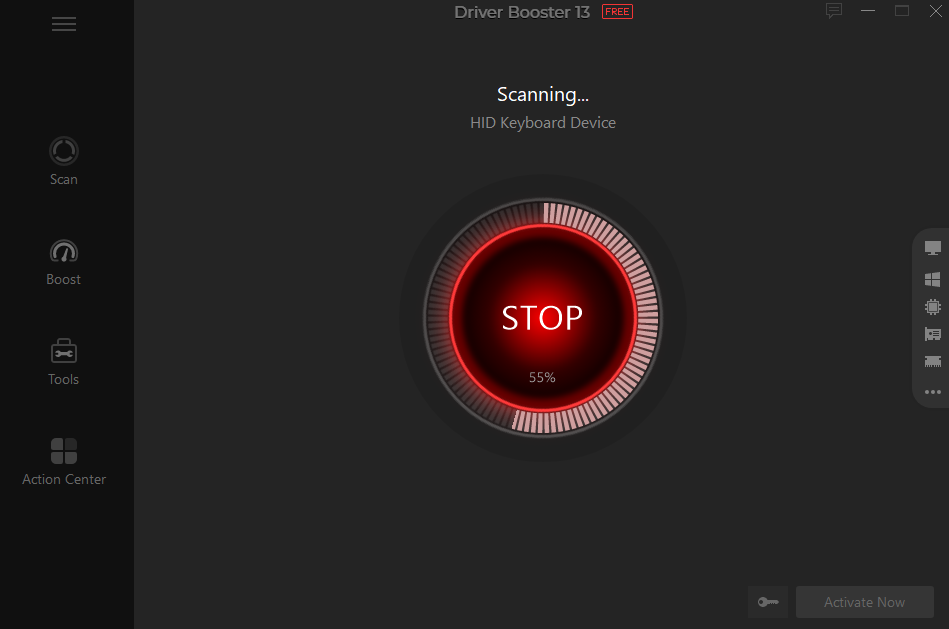
IObit Driver Booster Pro 2026 is a driver update tool for Windows. It scans your PC, finds outdated or broken drivers, and updates them with one click. It covers graphics cards, audio devices, network adapters, and almost every other hardware component on your system. Sudden crashes, lagging games, or random device errors are common on Windows PCs. Most of the time, an outdated or corrupted driver is the real cause. Windows has its own Device Manager, but checking and updating every driver manually takes a lot of time and effort. Most users do not even know where to find the correct driver version for their exact hardware. Driver Booster Pro removes that manual work. It scans your entire system and matches every device against its own driver database. Then it downloads and installs the correct version automatically.
Massive Verified Driver Database
The software checks your hardware against a database of over 18 million verified drivers. It pulls certified drivers from more than 1,200 major brands, including Intel, AMD, and NVIDIA. This covers everything from your graphics card to your printer, audio device, and network adapter, including support for Windows ARM64 devices.
Two-Step Safety Verification
Driver safety matters as much as driver accuracy. Each driver in the database is verified in two steps. First, it passes Microsoft WHQL certification. Then it goes through an additional IObit security scan. This two-layer check ensures that every driver you install is safe and reliable.
Automatic Backup and Restore Points
Driver updates can sometimes cause new problems instead of fixing old ones. Driver Booster Pro protects against this. Before applying any update, it automatically creates a system restore point and backs up your existing drivers. If an update causes an issue, you can revert to the previous version in a few clicks.
Built for Gaming Performance
Gamers benefit directly from this software. It optimizes your PC for gaming by updating key components like DirectX, PhysX, and OpenAL. This results in smoother gameplay, faster loading times, and fewer crashes during play. The database is also regularly updated with new Game Ready drivers to support the latest game releases as soon as they launch.
Fixes Common System Issues
Beyond driver updates, the software includes tools for common Windows problems. If your audio suddenly stops working, it scans and resets corrupt or outdated audio drivers. If your Wi-Fi keeps dropping, it can update your network drivers in a single click to restore a stable connection.
Offline Driver Installation
Driver Booster Pro also supports offline driver installation. You can download drivers in advance and install them later without an internet connection. This is especially useful after a fresh Windows install or system upgrade, when your network driver itself might be missing.
Cleans Old Driver Footprints
Old USB devices often leave behind driver files even after you stop using them. Over time, this clutters your system registry. Driver Booster Pro can permanently clean these stale driver footprints, keeping your system tidy and reducing unnecessary clutter.
Simple, Color-Coded Interface
The interface uses color-coded status indicators to show driver issues at a glance. This makes it easy to spot problem drivers, even in a large hardware list. The layout stays simple and clear, so users with little technical background can use the tool just as easily as IT professionals.
Key Features of IObit Driver Booster Pro 2026
- Automatically scans for outdated, missing, or faulty device drivers and updates them with one click
- Matches your hardware against a database of over 18 million verified drivers
- Two-step driver verification with Microsoft WHQL certification and an IObit security scan
- Automatically creates a system restore point and backs up existing drivers before updates
- Optimizes your PC for gaming by updating DirectX, PhysX, and OpenAL components
- Regularly adds support for new Game Ready drivers for the latest game releases
- Fixes common issues including network connectivity problems, device errors, and audio glitches
- Supports offline driver installation and downloading drivers in advance
- Cleans stale driver footprints left behind by old, disconnected USB devices
- Color-coded interface that clearly shows driver issues and status
IObit Driver Booster Pro 2026 Technical Setup Details
- Software Full Name: IObit Driver Booster Pro 2026
- Setup File Name: IObit_Driver_Booster_Pro_v13.4.0.234.rar
- Setup Size: 29 MB
- Setup Type: Offline Installer / Full Standalone Setup
- Compatibility Mechanical: 32 Bit (x86) / 64 Bit (x64)
- Developers: IObit
System Requirements for IObit Driver Booster Pro 2026
- Operating System: Windows 7/8/10
- RAM: 1 GB
- Hard Disk: 1 GB
- Processor: Intel Dual Core or higher processor
Frequently Asked Questions
What is IObit Driver Booster Pro 2026?
IObit Driver Booster Pro 2026 is a system optimization utility for Windows. It automatically scans for outdated, missing, or faulty device drivers and updates them to improve hardware compatibility, stability, and performance.
How many drivers does Driver Booster Pro support?
It scans and matches your hardware against a database of over 18 million verified drivers from more than 1,200 major brands, including Intel, AMD, and NVIDIA.
Is Driver Booster Pro safe to use?
Yes. Each driver is verified in two steps, first through Microsoft WHQL certification and then through an additional IObit security scan, ensuring every update is safe and reliable.
Can Driver Booster Pro improve gaming performance?
Yes. It optimizes your PC for gaming by updating key components such as DirectX, PhysX, and OpenAL, resulting in smoother gameplay, faster loading times, and fewer crashes.
Does Driver Booster Pro back up drivers before updating?
Yes. It automatically creates a system restore point and backs up your existing drivers before applying any update, so you can revert if needed.
Does it work without an internet connection?
Yes. It supports offline driver installation. Drivers can be downloaded in advance and installed later, which is useful for reinstalled or upgraded systems without an active network driver.
Does Driver Booster Pro support the latest Windows versions?
Yes. It supports Windows 7, 8, 10, and 11 in both 32-bit and 64-bit versions, and it also supports Windows 10/11 ARM64 devices.
Download IObit Driver Booster Pro 2026 Free
Click the button below to start the IObit Driver Booster Pro 2026 download. This is the full latest version offline installer for 32-bit and 64-bit Windows.