Download HEAR360 Ecoplate for Mac free. It is the full latest version setup of Ecoplate for macOS. Ecoplate is a plate reverb plugin that recreates the legendary Ecoplate I hardware unit. It gives mixing engineers that sweet high end and wide stereo image without needing to own or maintain the original bulky analog plate.
Review of HEAR360 Ecoplate
HEAR360 Ecoplate is a plate reverb plugin for Mac made by HEAR360. The Ecoplate I, designed by Jim Cunningham in the ’80s, was preferred by many producers and engineers over the older EMT 140 plate reverb for its sweet high end and wide stereo image. The catch is that real plate reverb hardware is large, expensive, hard to find, and not practical for most home or project studios. Engineers who wanted that specific sound used to need access to a studio that already owned one. That is not realistic for most people working independently today.
Ecoplate solves this problem directly. HEAR360 modeled the original Ecoplate I plate reverb with precision and care to deliver authentic, true-to-life sound. They then took the original interface and made it better, adding modern functionality through a simple, clean design. This gives engineers and producers access to the original Ecoplate I sound from their own studio, without having to track down a rare and bulky analog unit.
A hands-on review from Tape Op Magazine found that Ecoplate is sonically very tidy. It does not create the kind of artifacts in the mids and low mids that build up in a mix as more sources are added. It has a wide-open, sparkling ’80s sound that sits naturally in the back of a mix rather than requiring fussing to make it feel like it belongs. On a snare it provided incredible space without needing much EQ. On guitars it gave a classic sense of air and length without overly reacting to the low end. On vocals it was flexible and huge, with the ability to spread the image ultra-wide to help separate the vocal reverb from the rest of the mix.
The plugin also adds several software-only features that go beyond the original hardware. These include pre-delay with tempo sync, low-pass and high-pass filters, and an analog model profile that reproduces Ecoplate’s original noise floor along with an added saturation control. Ecoplate is modeled for high-resolution content and runs natively at sample rates up to 192k, so it holds up well in modern, demanding sessions.
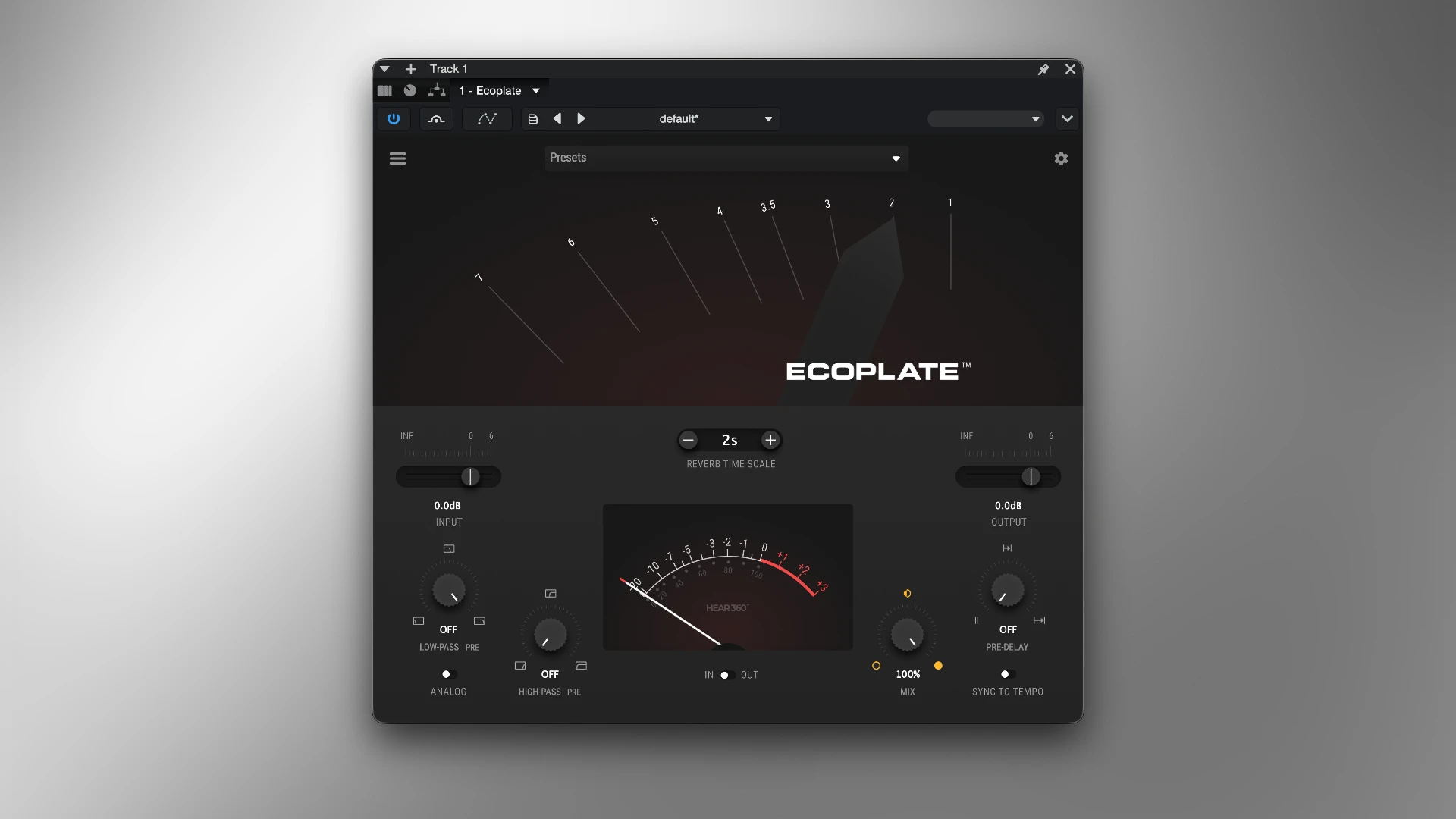
Decay and Reverb Time Scale
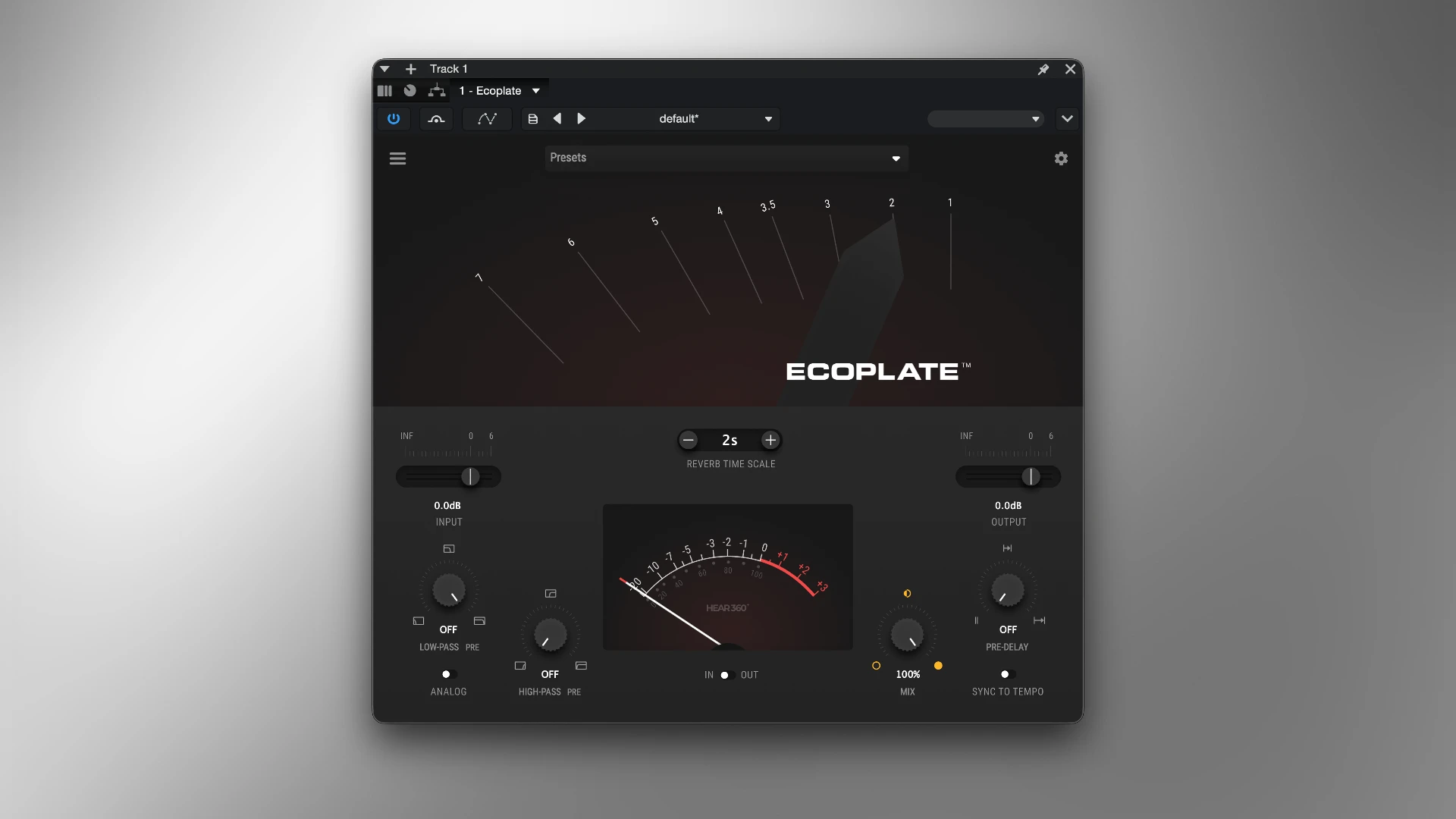
Reverb tail lengths run from 1 to 12 seconds, though the unit actually produces over 12 seconds of decay at its maximum setting. Just like the original hardware, decay time is adjusted by moving a lever left or right, with the numbers corresponding to seconds in time. A value can also be typed directly into the Reverb Time Scale box, or adjusted using plus and minus buttons for quick changes.
Pre-Delay with Tempo Sync
The Pre-Delay knob adjusts delay time in milliseconds. Manipulating this before the reverb hits can open up space and add clarity to a mix, with later settings pushing the reverb to start further back in time. Sync To Tempo allows the pre-delay to be set using musical note values, synchronized directly with the DAW session’s BPM and tempo settings.
Input and Output Gain Control
Sliding the input and output levers boosts or attenuates the gain of the input and output signals. The input gain shapes the audio before it reaches the reverb engine, while the output control adjusts the full signal including the reverberation. Input level can be pushed well past zero for more saturation and intensity when a heavier vibe is wanted.
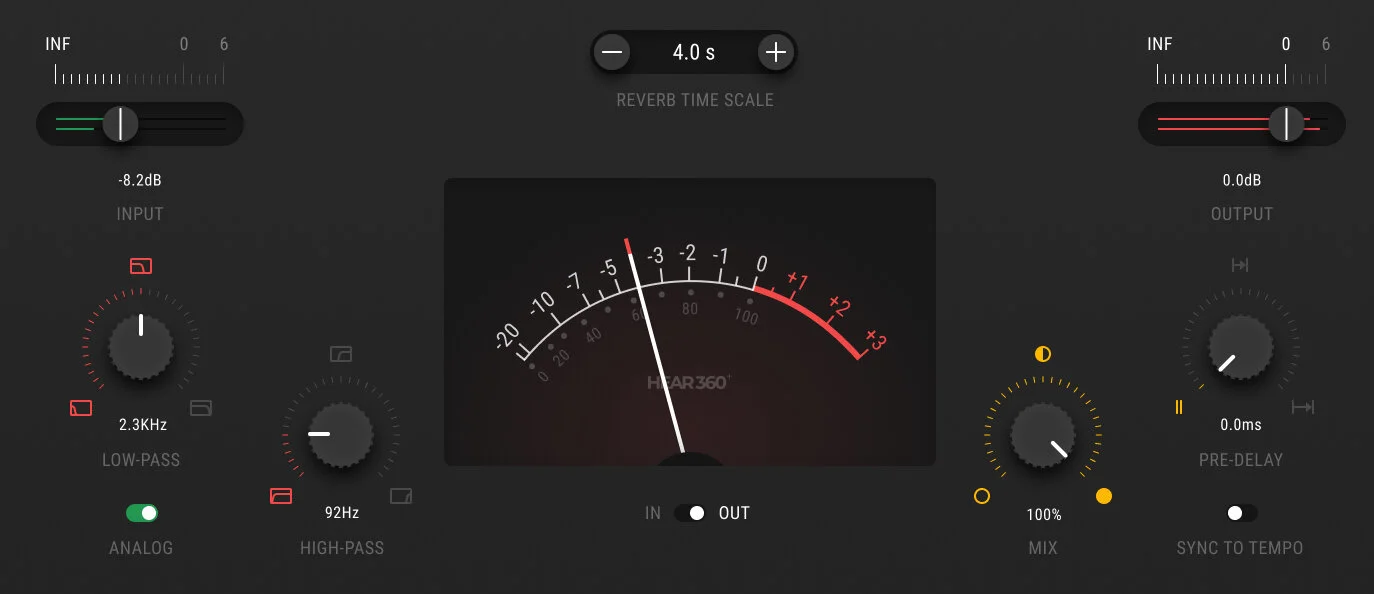
Mix and LVL Mode for Precise Reverb Levels
A standard wet mix percentage is available as the default option. When the goal is to keep a carefully balanced instrument volume unchanged while adjusting reverb ratios, LVL mode can be switched on instead. In LVL mode, the track’s input volume never changes, and the LVL knob works purely as a reverb level control. Clicking the MIX knob toggles into LVL mode, which is ideal when inserting Ecoplate directly on a single track rather than as an aux send.
Analog Mode: Noise and Saturation
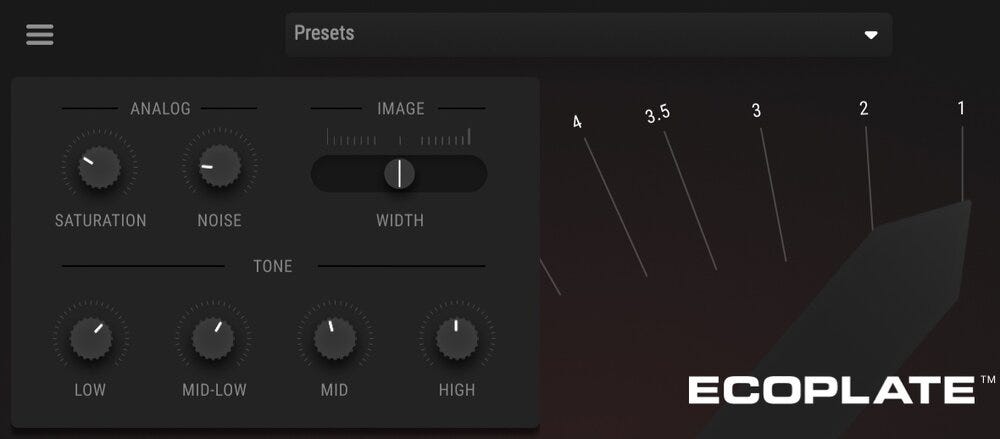
The Analog switch turns on Ecoplate’s noise profile, which reproduces the sound of the actual hardware unit’s noise floor. As a custom addition not found on the original hardware, an input tube saturation stage was also added to the plugin. A dropdown menu gives independent control over the amount of saturation and noise, each adjustable from 0 to 100 percent, and both can be toggled on and off through the Analog switch. Turning Analog on adds a vintage vibe and extra color. Turning it off keeps an ultra-clean signal path.
Filters and Stereo Width
Inside the additional settings menu, tone, analog noise level, analog saturation, and stereo width can all be adjusted. This makes it possible to fatten the bottom end or fine-tune the stereo image to match the personality of a session. Variable low-pass and high-pass filters can be engaged either before or after the effect. There is even a slider for the stereo image that can be pushed to be quite broad for extra depth.
Plugin Formats and Mac Compatibility
Ecoplate is available in AAX, VST3, and AU plugin formats for Mac, with 64-bit and native M1+ ARM support. The Mac installer contains three copies covering AAX, AU, and VST3. Reason does not support VST3, and Steinberg has officially removed the VST SDK from circulation, so newer plugins like Ecoplate cannot ship in the older VST2 format. This format coverage still means Ecoplate drops directly into Logic Pro, Pro Tools, Cubase, Studio One, and Ableton Live on Mac.
EcoSlap: The Free Companion Plugin
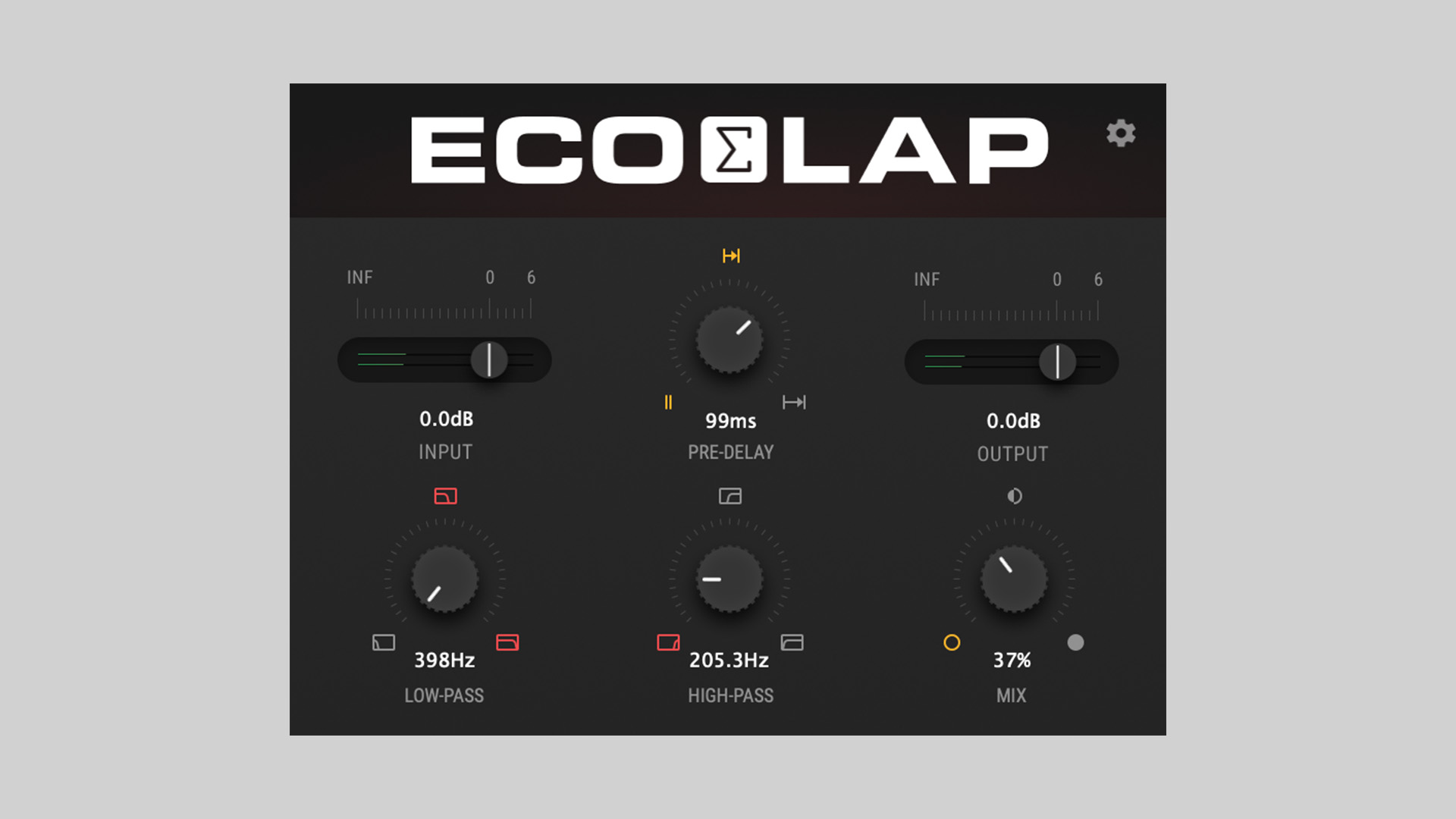
HEAR360 also released EcoSlap, a free slap-delay plugin based on the shortest decay setting of the Ecoplate I reverb model. Instead of simply copying old gear, EcoSlap blends slap-back delay with a reverb-like tone, adding controls such as high- and low-pass filters, pre-delay, and a creative mix section. EcoSlap is available as a free download in VST3 and AU formats for macOS and Windows, making it a useful companion to try before deciding on the full Ecoplate plugin.
Key Features of HEAR360 Ecoplate for Mac
- Models the original Ecoplate I hardware unit with authentic, true-to-life sound
- Reverb decay from 1 to 12+ seconds, adjustable by lever or typed value
- Pre-delay control with tempo sync to the DAW session’s BPM
- Input and output gain control with input saturation when pushed past zero
- LVL mode keeps track volume unchanged while controlling reverb level separately
- Analog switch reproduces the original hardware noise floor and adds tube saturation
- Independent control over saturation and noise amount, each from 0 to 100 percent
- Low-pass and high-pass filters that can run pre- or post-effect
- Stereo image slider for broad, wide reverb width
- Native support for high-resolution audio up to 192 kHz
- Available as AAX, VST3, and AU plugin formats for Mac
- Native AU and VST3 support for Apple Silicon M1 and newer
Technical Details
- Full Name: Ecoplate by HEAR360
- Developer: HEAR360 (The Department of Sound)
- Setup App File Name: HEAR360 Ecoplate
- Full Application Size: 1.4 GB
- Latest Version: 1.0.2
System Requirements
- Operating System: macOS (Intel and Apple Silicon supported)
- Memory (RAM): 8/4 GB
- Hard Disk Space: 193.7 MB
- Processor: Apple Silicon (M1-M5) and newer or Intel Core (64-bit)
Frequently Asked Questions
What is HEAR360 Ecoplate?
Ecoplate is a plate reverb plugin that models the original Ecoplate I hardware unit with precision and care to deliver authentic, true-to-life sound.
Does Ecoplate work on Mac?
Yes. It is available in AAX, VST3, and AU plugin formats for Mac with 64-bit and native M1+ ARM support.
What is the difference between MIX mode and LVL mode?
MIX mode uses a standard wet percentage. LVL mode keeps the track’s input volume unchanged and uses the LVL knob purely as a reverb level control, which is useful when inserting Ecoplate directly on a single track.
What does the Analog switch do?
The Analog switch turns on Ecoplate’s original hardware noise profile and adds an input tube saturation stage that was not present on the original hardware unit.
Does Ecoplate support tempo-synced pre-delay?
Yes. Sync To Tempo allows the pre-delay to be set using musical note values, synchronized with the DAW session’s BPM and tempo settings.
Is there a free plugin related to Ecoplate?
Yes. EcoSlap is a free slap-delay plugin based on the shortest decay setting of the Ecoplate I reverb model, available in VST3 and AU formats for macOS and Windows.
What sample rates does Ecoplate support?
Ecoplate is modeled for high-resolution content and runs natively at sample rates up to 192 kHz.
Download HEAR360 Ecoplate for Mac
Click the button below to start the HEAR360 Ecoplate download for Mac. This is the full latest version of Ecoplate for macOS.