Download Allavsoft Video Downloader Converter 2026 free. It is the full offline installer standalone setup of Allavsoft Video Downloader Converter for Windows. Allavsoft Video Downloader Converter 2026 is a powerful desktop tool that downloads videos and audio from more than 1,000 websites and converts them to any format you need, all from one clean interface.
Review of Allavsoft Video Downloader Converter 2026
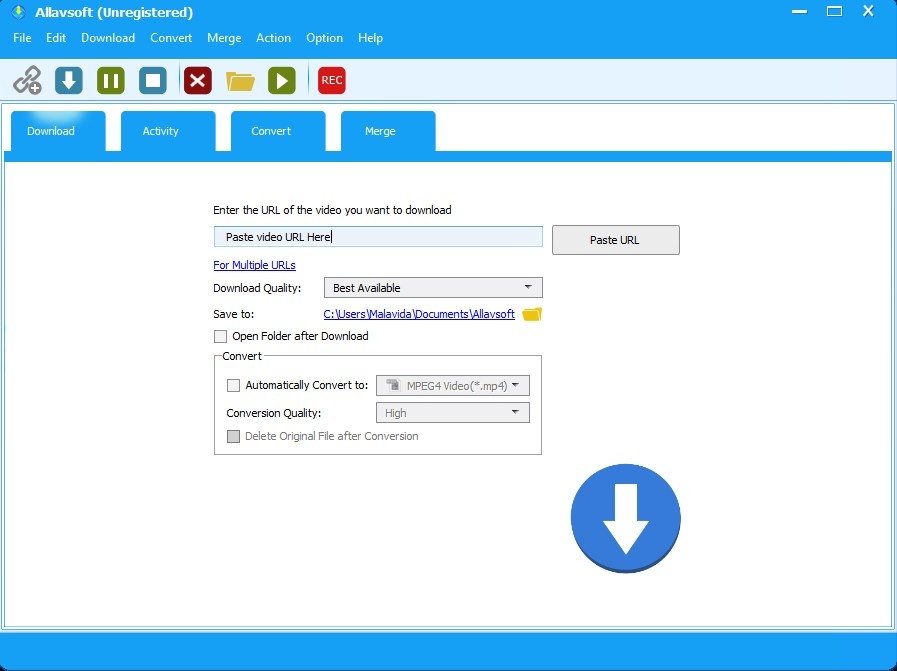
Allavsoft Video Downloader Converter 2026 is an all-in-one media download and conversion tool for Windows and Mac. It lets you save videos, music, playlists, and subtitles from online platforms and convert them to any format directly after downloading. Watching videos online is convenient, but it comes with real problems. Internet connections drop during travel. Streaming platforms remove content without warning. You find a tutorial or lecture you want to study offline, but the platform has no download option. You need a clip in MP4 for a project, but the site only streams it. These situations happen daily, and switching between a downloader, a converter, and a screen recorder to handle them wastes time. Allavsoft Video Downloader Converter 2026 handles all of this in one place. You paste a URL, choose your format and quality, and click download. The software does the rest. The installer is clean with no bundled software, and the interface is ready to use within 90 seconds of setup.
Downloads From 1,000+ Websites
Allavsoft downloads movies, video, music, and subtitles from more than 1,000 media sharing sites. This includes YouTube, Facebook, Vimeo, TikTok, Instagram, Dailymotion, Twitch, Crunchyroll, Deezer, SoundCloud, BBC, Udemy, PBS, and many more. You copy the video URL, open Allavsoft, and it detects the link automatically from your clipboard. No manual pasting needed in most cases.
8K and 4K Quality Downloads
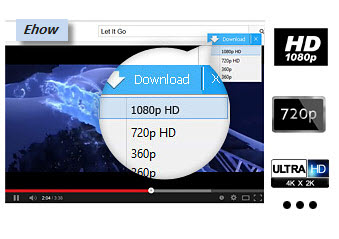
The software supports downloading in 8K ultra high definition, 4K, 3D video, HD 2K, 1080p, 720p, and standard definition down to 240p. You choose the quality level before downloading, so you can balance file size and resolution depending on your storage and playback needs.
One-Click Video Format Conversion
Allavsoft converts downloaded videos to popular formats in a single click. Supported output formats include MP4, AVI, WMV, MOV, MPEG-1, MPEG-2, VOB, ASF, RMVB, DV, TS, Apple ProRes, WebM, FLV, and OGV. The built-in converter also works on video files already stored on your PC, so you do not need a separate conversion tool. Output formats are also arranged by device type, making it easy to pick the right format for your phone, tablet, iPhone, iPad, Android device, or Apple TV.
Audio Extraction and Conversion
The software extracts audio from online music videos, movies, and other video content and saves it in your chosen audio format. Supported formats include MP3, WMA, WAV, AAC, Apple Lossless M4A, AIFF, FLAC, OGG, and AU. This is useful for saving podcast episodes, music tracks, or lecture audio without keeping the full video file.
Batch Downloading and Playlist Support
Allavsoft supports batch downloading across multiple URLs at the same time. You can queue a full YouTube playlist, a Deezer album, or a collection of individual links, and the software downloads and converts them all in one run. If you need to stop a session, downloads can be paused and resumed at any point. An auto-shutdown option closes Windows automatically after all queued tasks are finished, so you can queue a large batch before bed and come back to completed files in the morning.
Subtitle Downloading
The software also downloads subtitles alongside videos from supported platforms. This is useful for language learners, accessibility needs, and anyone who wants to review spoken content as text.
Smart Mode and Auto-Detection
Smart Mode lets you set your preferred resolution, format, output folder, and subtitle options once. The software then applies those settings automatically to every new download. The clipboard auto-detection feature pastes the most recent link you copied as soon as you open the download tab, removing repetitive manual steps.
Browser Extension for In-Browser Downloads
Allavsoft provides a browser extension for Firefox, Chrome, and Safari. When you watch a video in your browser, a Download button appears in the top left corner of the video screen. Clicking it sends the video straight to Allavsoft and starts the download immediately, without switching between windows.
Built-In Screen Recorder
For content that cannot be downloaded directly, Allavsoft includes a screen recording feature. It records everything on your screen and saves it as a video file, which is useful for capturing streaming content, webinars, or online tutorials.
Scheduled Downloads and Chapter Preservation
Allavsoft lets you schedule downloads to run during off-peak hours, which is useful if your internet plan has peak and off-peak data limits. It also preserves chapter markers in downloaded videos, so you can skip between chapters during playback in compatible players like VLC without fast-forwarding.
Key Features of Allavsoft Video Downloader Converter 2026
- Downloads videos, music, and subtitles from more than 1,000 websites including YouTube, Facebook, Vimeo, Twitch, and BBC
- Supports download quality from 8K and 4K ultra high definition down to 240p standard definition
- One-click conversion to MP4, AVI, WMV, MOV, Apple ProRes, WebM, and more video formats
- Extracts and converts audio to MP3, WAV, AAC, FLAC, OGG, M4A, AIFF, and more
- Batch downloading of multiple URLs, playlists, and channels in one run
- Pause and resume downloads, with auto-shutdown after all tasks finish
- Downloads subtitles alongside videos from supported platforms
- Smart Mode applies your preferred format, resolution, and folder settings automatically
- Browser extension for Firefox, Chrome, and Safari for one-click in-browser downloads
- Built-in screen recorder saves screen activity as a video file
- Automatically detects and skips advertisements during download
Allavsoft Video Downloader Converter 2026 Technical Setup Details
- Software Full Name: Allavsoft Video Downloader Converter 2026
- Setup File Name: Allavsoft_Video_Downloader_Converter_3.29.2.9659.rar
- Setup Size: 72 MB
- Setup Type: Offline Installer / Full Standalone Setup
- Compatibility Mechanical: 32 Bit (x86) / 64 Bit (x64)
- Developers: Allavsoft
System Requirements for Allavsoft Video Downloader Converter 2026
- Operating System: Windows 7/8/10
- RAM: 2 GB
- Hard Disk: 500 MB
- Processor: Intel Dual Core or higher processor
Frequently Asked Questions
What is Allavsoft Video Downloader Converter 2026?
Allavsoft Video Downloader Converter 2026 is a desktop tool for Windows and Mac that downloads videos and audio from more than 1,000 websites and converts them to any popular video or audio format you need.
How many websites does Allavsoft support?
It supports more than 1,000 media sharing sites including YouTube, Facebook, Vimeo, TikTok, Instagram, Crunchyroll, Deezer, SoundCloud, BBC, Udemy, and many more.
What video formats can Allavsoft convert to?
It converts to MP4, AVI, WMV, MOV, MPEG-1, MPEG-2, VOB, ASF, RMVB, DV, TS, Apple ProRes, WebM, FLV, and OGV, among other popular formats.
Can Allavsoft extract audio from videos?
Yes. It extracts audio from videos and converts it to MP3, WMA, WAV, AAC, Apple Lossless M4A, AIFF, FLAC, OGG, and AU formats.
Can Allavsoft download entire playlists?
Yes. Paste a playlist or channel URL and the software batch downloads all videos or songs automatically in one run.
What is the highest quality Allavsoft can download?
It supports downloads up to 8K ultra high definition when the source video is available in that resolution.
Is Allavsoft safe to download and use?
Yes. It is a legitimate desktop application developed by Allavsoft Corporation with no ads or bundled malware. Download it from the official Allavsoft website for the safest version.
Does Allavsoft work on Mac?
Yes. Allavsoft is available for both Windows and Mac and supports the same full range of websites, formats, and features on both platforms.
Download Allavsoft Video Downloader Converter 2026 Free
Click the button below to start the Allavsoft Video Downloader Converter 2026 download. This is the full latest version offline installer for 32-bit and 64-bit Windows.