Download VovSoft Text to MP3 Converter 4.5 free. It is the full offline installer standalone setup of VovSoft Text to MP3 Converter for Windows. VovSoft Text to MP3 Converter 2026 is a lightweight text-to-speech tool that converts any written text into MP3 or WAV audio files in just a few clicks, with no complex setup required.
Review of VovSoft Text to MP3 Converter 2026
VovSoft Text to MP3 Converter 2026 is a simple, capable text-to-audio tool for Windows. It takes written content and turns it into a playable, exportable audio file using the Microsoft SAPI Text-to-Speech engine built into your Windows installation. Reading long documents, reports, study notes, and articles takes time and tires the eyes. Many users want to consume written content during a commute, a workout, or while handling other tasks. Most text-to-speech tools either require a subscription, send your text to a cloud server, or come loaded with settings that take time to figure out. None of that is convenient when you just want to listen to a file you already have. VovSoft Text to MP3 Converter 2026 removes all of that friction. You open the software, load your text, choose your output format, and click convert. The result is a clean MP3 or WAV file ready to play on any device. The interface is clean and the conversion starts in seconds.
Microsoft SAPI TTS Engine With Multi-Language Support
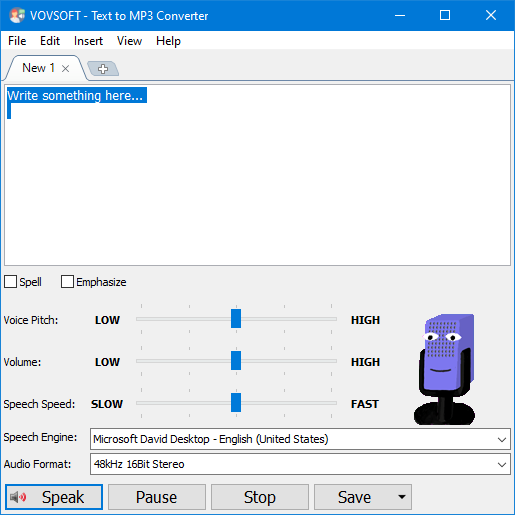
The software uses the preinstalled Microsoft SAPI Text-to-Speech engine on your Windows system to generate voice. You do not need to download a third-party voice engine or create an account. Additional languages can be added through Windows Settings in the Region and Language section. You select or download a language pack, restart the program, and the new voice is ready to use. Supported languages include English, Arabic, Chinese, French, German, Hindi, Japanese, Korean, Portuguese, Spanish, and many more.
Speech Speed, Pitch, and Volume Control
VovSoft gives you full control over how the audio sounds. The Speech Speed setting adjusts playback and recording from 10 times slower to 10 times faster. You can also change voice pitch and volume. Slower speeds are useful for language learners and accessibility users. Faster speeds are useful for quickly previewing long documents. These controls let you match the output to the exact listening experience you need before you export the file.
MP3 and WAV Export Options
Every conversion can be saved as either an MP3 or a WAV file. MP3 gives you a compact file that works on any phone, tablet, or media player. WAV gives you a higher quality recording that is better suited for editing, presentations, or professional audio projects. You choose the format before converting, so the output is exactly what you need from the start.
Supports TXT, PDF, and Microsoft Word Files
The software loads more than plain text. It supports TXT, PDF, DOC, and DOCX files as direct input. You do not need to copy and paste content from a Word document or a PDF into a text box before converting. You open the file directly inside the software and proceed to convert. This saves time, especially when working with long formatted documents.
Batch Conversion for Multiple Files
VovSoft Text to MP3 Converter supports batch conversion. You can load multiple files and convert them all at once. This is practical for educators building audio versions of course materials, content teams converting written scripts to voiceover files, or accessibility professionals processing large document collections regularly.
Read-Aloud Preview Before Export
Before saving the final file, you can preview the audio directly inside the software. This lets you check how the voice sounds, confirm the speed and pitch settings are right, and make adjustments before committing to the export. It removes the need to re-convert if something sounds off.
Spell Check, Emphasis, and Silence Insertion
The software includes spell check so errors in your source text do not end up in the audio. You can also add emphasis to specific words and insert silence at defined points. Silence insertion is especially useful for audiobooks and e-learning modules where natural pauses between sections improve the listening experience.
Voiceover Generation for Videos
If you create videos, VovSoft Text to MP3 Converter can generate the voiceover directly from your script. You write the narration as a text file, convert it to MP3, and drop the audio into your video editor. This saves hours of recording time and removes the need for a microphone setup for straightforward narration work.
Who VovSoft Text to MP3 Converter Is For
This software fits students who want to listen to their notes and study materials instead of reading them. It suits professionals who need to review long documents while multitasking. Content creators who need voiceover audio from written scripts will use it daily. Accessibility users who find reading difficult and educators building audio versions of course materials will also find it a practical, dependable tool.
Key Features of VovSoft Text to MP3 Converter 2026
- Converts text to MP3 or WAV audio in a few clicks using the Microsoft SAPI TTS engine
- Adjustable speech speed from 10x slower to 10x faster, plus pitch and volume control
- Exports audio as MP3 for compact size or WAV for higher quality
- Supports TXT, PDF, DOC, and DOCX files as direct input
- Converts up to 500,000 characters, equivalent to approximately 8 hours of audio
- Batch conversion to process multiple files at once
- Read-aloud preview before export to confirm output quality
- Spell check, emphasis support, and silence insertion for polished audio
- Generates voiceovers for YouTube videos and multimedia projects
- Multi-language support through Windows language packs
VovSoft Text to MP3 Converter 2026 Technical Setup Details
- Software Full Name: VovSoft Text to MP3 Converter 2026
- Setup File Name: VovSoft_Text_to_MP3_Converter_4.5.rar
- Setup Size: 20 MB
- Setup Type: Offline Installer / Full Standalone Setup
- Compatibility Mechanical: 32 Bit (x86) / 64 Bit (x64)
- Developers: VovSoft
System Requirements for VovSoft Text to MP3 Converter 2026
- Operating System: Windows 7/8/10
- RAM: 512 MB
- Hard Disk: 100 MB
- Processor: Intel Dual Core or higher processor
Frequently Asked Questions
What is VovSoft Text to MP3 Converter 2026?
VovSoft Text to MP3 Converter 2026 is a lightweight text-to-speech tool for Windows. It converts written text from TXT, PDF, DOC, and DOCX files into MP3 or WAV audio files using the Microsoft SAPI TTS engine built into Windows.
What file types can it open?
It supports TXT, PDF, DOC, and DOCX files as direct input. You open the file inside the software and convert it without any manual copying or pasting.
What speech engine does it use?
It uses the preinstalled Microsoft SAPI Text-to-Speech engine on your Windows system. You can add more voices and languages through Windows Settings by downloading a language pack.
Can I control the speed of the generated speech?
Yes. The Speech Speed setting adjusts the conversion from 10 times slower to 10 times faster. You can also change voice pitch and volume independently.
How long of a text can it convert in one run?
It converts up to 500,000 characters in a single run, which equals approximately 8 hours of audio output.
Does it support batch conversion?
Yes. You can load multiple files and convert them all at once, which saves time when working with large document collections.
Who is this software built for?
It is built for students, professionals, content creators, educators, and accessibility users who need a fast, simple, and reliable way to convert written content into audio without cloud dependency or complex configurations.
Download VovSoft Text to MP3 Converter 2026 Free
Click the button below to start the VovSoft Text to MP3 Converter 2026 download. This is the full latest version offline installer for 32-bit and 64-bit Windows.