Download Ultracopier 2026 full latest version program free setup for Windows.
Ultracopier 2026 for Windows Review
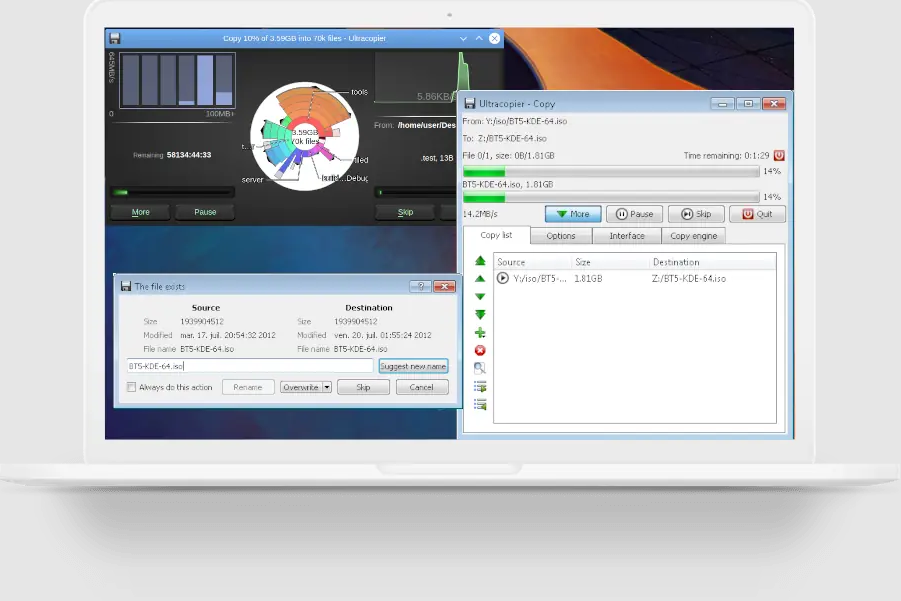
Ultracopier 2026 is a file copying and moving tool for Windows that gives you more control than the standard Windows copy window. It can handle large groups of files, pause or resume transfers, control transfer speed, manage file conflicts, and continue working when a problem occurs with one of the files. The current Windows release available in 2026 is version 3.0.2.3. The software is mainly useful for people who regularly move large folders, backups, videos, photos, or other large amounts of data. If you only copy a few files occasionally, Windows Explorer may already be enough. Ultracopier becomes more useful when you need better control over long or complicated file transfers. The main reason to use Ultracopier is control. Windows can handle normal copy and move tasks well, but Ultracopier gives you more options when a transfer becomes complicated. You can see the files being processed, add more files to the current list, change the order of jobs, and manage several transfer tasks from one window.
Pausing a transfer is useful when you are moving a large amount of data and suddenly need your drive or network connection for something else. You can stop the transfer and continue it later instead of cancelling the entire operation. The software also allows speed limits, which can prevent a large transfer from using all available disk or network resources. These controls are among the main reasons people choose a dedicated copy tool. File conflicts are another area where Ultracopier can save time. If a file with the same name already exists in the destination folder, you can choose how the program should handle it. Depending on the situation, it can skip the file, overwrite it, rename it, or use rules based on file dates. This is particularly useful when merging folders or updating backups.
Error handling is also one of its useful features. A normal transfer can become frustrating when one damaged, unavailable, or restricted file interrupts the process. Ultracopier can manage these errors and continue with the rest of the transfer instead of forcing you to start everything again. Its free version includes error and conflict management. The software can also manage a list of copy and move jobs. This is helpful when you need to transfer several folders to different locations. Instead of starting each task separately, you can place them in the transfer list and let Ultracopier process them in order. You can also add more files or folders while a transfer is already running.
One thing to keep in mind is that Ultracopier should not automatically be considered a faster replacement for Windows Explorer. Older independent tests found that Windows was sometimes faster, while Ultracopier performed better in certain transfer situations. The real advantage is its extra control rather than a guaranteed speed increase. This is also reflected in user discussions. People often mention Ultracopier when they need better control over large file transfers, folder merging, or copying between storage devices. At the same time, some users have reported bugs and compatibility problems, so it is worth testing the software with important data before making it part of a critical backup workflow.
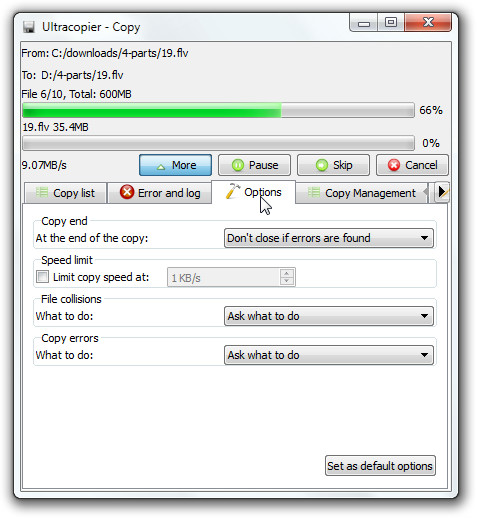
The free version is useful for basic transfer management, but some advanced features are reserved for the Ultimate version. According to the developer, the paid version adds checksum checking, pause controls, speed limits, additional performance options, and professional support. The checksum feature is especially important for users who care about confirming that copied files match the originals. This is more relevant for backups and valuable data than for ordinary day-to-day file copying. If you mainly move movies, photos, documents, or folders between local drives, the free version may provide enough control. Ultracopier is also not limited to Windows. The developer provides versions for several operating systems, although Windows users get the most direct benefit from its ability to work alongside the normal Windows file-copy process. The current download page lists Windows 10 and newer 64-bit versions among its available downloads.
Key Features
- Copy and move files with more control
- Pause and resume transfers
- Limit transfer speed
- Manage multiple copy and move jobs
- Add files or folders during a transfer
- Handle duplicate files
- Skip or replace conflicting files
- Rename files when conflicts occur
- Continue transfers after certain errors
- Show transfer speed and progress
- Manage copy lists
- Advanced file-renaming rules
- Multiple options for handling file conflicts
- Error and transfer logs
- Checksum support in the Ultimate version
- Windows 10 and newer 64-bit support
- Free version available
- Optional Ultimate version
- Support for multiple languages
Alternatives
TeraCopy: A strong alternative for Windows users who want better control over file copying, moving, and verification. It is a particularly common choice for people who regularly handle large transfers.
FastCopy: A better option when transfer speed and large-volume file operations are the main priorities. It is popular among users who regularly move large amounts of data.
FreeFileSync: More suitable when the main goal is keeping two folders or storage locations synchronized rather than simply copying files from one place to another.
Conclusion
Ultracopier 2026 is useful for Windows users who need more control over file transfers than Windows Explorer provides. Its biggest strengths are pause and resume controls, transfer speed limits, job management, conflict handling, and the ability to deal with errors without necessarily stopping the whole operation. It is not correct to say that Ultracopier will always copy files faster than Windows. Its value is the control it gives you. For large folders, backups, network transfers, or situations where you frequently need to merge files and deal with duplicate names, those controls can be much more useful than a small difference in transfer speed.
The free version is a good starting point for everyday file management. Users who need checksums, speed limits, and additional advanced features can consider the Ultimate version. Overall, Ultracopier 2026 is a practical Windows file-transfer tool for users who regularly work with large amounts of data and want more control over what happens during a copy or move operation. For simple transfers, Windows Explorer is still sufficient, but Ultracopier becomes much more useful when transfers get large, slow, or complicated.
Ultracopier 2026 Technical Setup Details
- Software Full Name: Ultracopier 2026
- Setup File Name: UltraCopier_3.1.0.3.rar
- Setup Size: 31 MB
- Setup Type: Offline Installer / Full Standalone Setup
- Compatibility: 32 Bit (x86) / 64 Bit (x64)
- Latest Version Release Added On: 14th Sep 2026
- Developers: Ultracopier
System Requirements for Ultracopier 2026
- Operating System: Windows 7/8/10
- RAM: 512 MB
- Hard Disk: 100 MB
- Processor: Intel Dual Core or higher processor
Ultracopier 2026 Download
Download Ultracopier 2026 free latest full version offline direct download link for full offline setup by clicking the button below.