Download AVS Video Editor 2026 full latest version program free setup for Windows.
AVS Video Editor 2026 for Windows Review
AVS Video Editor 2026 is a Windows video editing program developed by Online Media Technologies. It is designed for users who want to create, edit, and export videos without dealing with an overly complicated editing setup. You can use it to trim clips, join separate recordings, crop footage, add titles, apply transitions, and create videos for personal projects, presentations, and social media. Its timeline and storyboard views give users two ways to arrange their footage, making it suitable for beginners as well as people with some editing experience.
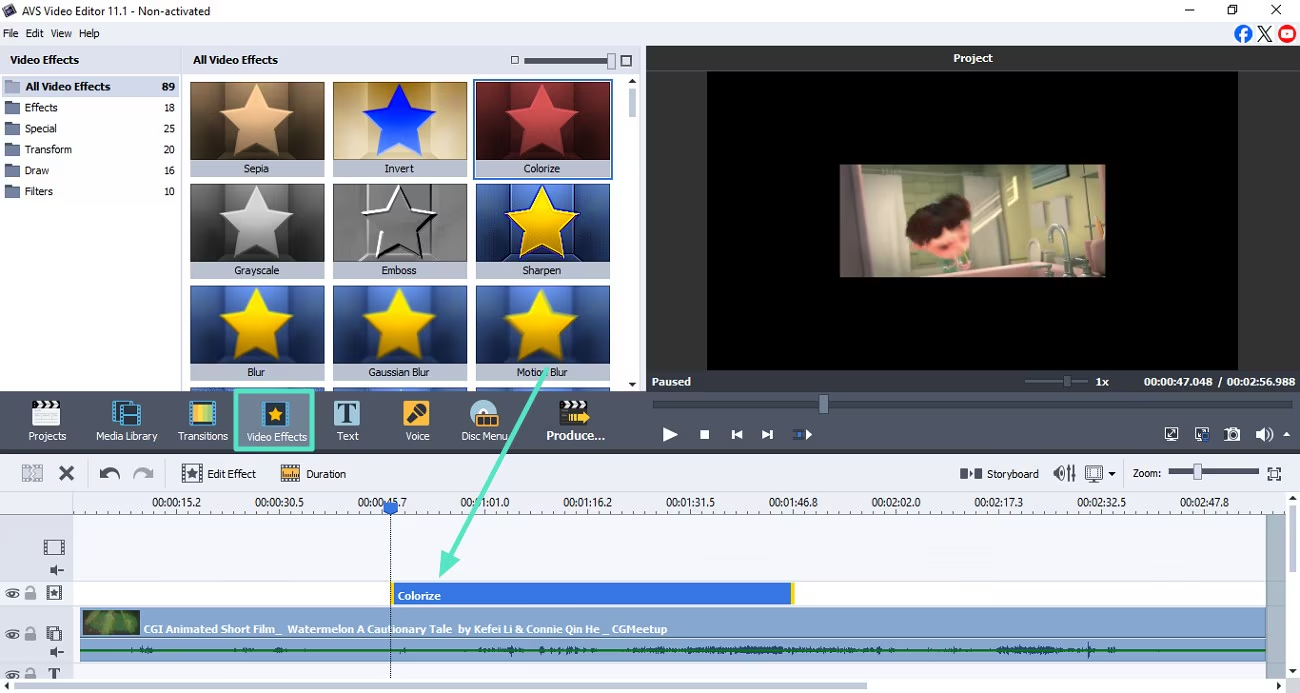
The editing tools cover many everyday video tasks. You can split and merge clips, remove unwanted sections, rotate footage, change playback speed, adjust colours, and stabilize shaky recordings. The software also provides more than 300 effects and transitions, along with text styles, overlays, and themed elements. These options help add variety to a video without requiring a separate effects application. You can also create slideshows from photos and combine video clips with background music or recorded narration.
AVS Video Editor supports a wide range of video formats, including MP4, AVI, MOV, MKV, WMV, MPEG, and formats used for DVD and Blu-ray projects. It can process footage in HD, Full HD, 2K, and 4K resolutions. The program also includes tools for capturing video from webcams, DV/HDV cameras, and VHS sources, as well as recording activity from your computer screen. Audio tools such as noise removal, equalization, normalization, compression, and pitch adjustment are useful when you need to improve narration or background sound within the same project.
The program uses GPU acceleration and video cache technology to help with editing and playback on supported hardware. Its interface is built around a media library, preview window, and editing timeline, so you can organize clips and see how changes affect the final video. The official AVS website currently lists version 26.0.2.17 and supports Windows 11, 10, 8.1, 8, and older versions. Although the software offers plenty of tools for everyday editing, users working on complex professional projects may find its controls and workflow less advanced than those in dedicated professional editors.
Key Features of AVS Video Editor 2026
- Timeline and storyboard editing: Arrange clips and organize your video project using two editing views.
- Video trimming and cutting: Remove unwanted sections, split clips, and join multiple recordings.
- 300+ effects and transitions: Add visual effects, transitions, titles, overlays, and themed elements.
- Video stabilization: Reduce unwanted camera movement in supported footage.
- Colour correction: Adjust the appearance of clips to improve their overall look.
- 4K video support: Edit and process HD, Full HD, 2K, and 4K footage.
- Wide format support: Work with formats such as MP4, AVI, MOV, MKV, WMV, MPEG, and more.
- Screen recording: Capture activity from your Windows desktop.
- Webcam and camera capture: Record from webcams and supported DV/HDV devices.
- Audio editing: Use noise removal, equalization, normalization, compression, and pitch adjustment.
- Slideshow creation: Turn photographs into video presentations.
- GPU acceleration: Use supported graphics hardware to help speed up video processing.
- DVD and Blu-ray projects: Create disc-based video projects with supported recording hardware.
Best Alternatives to AVS Video Editor 2026
-
DaVinci Resolve
DaVinci Resolve is a powerful video editor for users who want more advanced editing and post-production tools. It combines video editing, colour correction, visual effects, motion graphics, and audio production in one application. Its free version provides a substantial set of editing features, while the Studio edition adds more advanced tools.
Compared with AVS Video Editor, DaVinci Resolve offers greater control over colour, effects, and complex projects. However, its interface can take longer to learn, and it generally benefits from a more capable computer. Choose DaVinci Resolve if you want to develop your editing skills or work on more demanding video projects.
-
Shotcut
Shotcut is a free, open-source video editor available for Windows, macOS, and Linux. It supports a wide range of video and audio formats, a multitrack timeline, transitions, colour adjustments, filters, and 4K editing. It also includes screen, webcam, and audio capture options.
Unlike AVS Video Editor, Shotcut does not require a paid license for its core editing features. Its interface is flexible, but beginners may need time to understand its panels and editing controls. Choose Shotcut if you want a free desktop editor with broad format support and plenty of editing options.
-
Microsoft Clipchamp
Microsoft Clipchamp is a convenient option for everyday video editing on Windows. It provides templates, text, transitions, music, overlays, screen recording, webcam recording, and other tools for creating videos. It is included with Windows 11 and is also available for Windows 10 through the Microsoft Store.
Clipchamp is easier to approach for quick projects, while AVS Video Editor provides a traditional desktop timeline and a larger collection of effects and capture tools. Clipchamp is a good fit for short videos, social media content, and simple presentations. Choose Clipchamp if you prefer a straightforward editor that works closely with Windows.
Conclusion
AVS Video Editor 2026 is a practical Windows video editing program for users who want to create videos without learning a complicated professional workflow. Its timeline editing, 300+ effects, video stabilization, audio tools, screen recording, and support for different video formats cover most everyday editing needs.
It is particularly suitable for beginners, home users, and content creators who regularly work with recorded footage, slideshows, and social media videos. However, users who need advanced colour grading, complex effects, or professional post-production tools may find DaVinci Resolve a better choice. Overall, AVS Video Editor is worth considering if you want a straightforward desktop editor with a useful collection of editing and recording features.
AVS Video Editor 2026 Technical Setup Details
- Software Full Name: AVS Video Editor 2026
- Setup File Name: AVS_Video_Editor_26.0.3.6.rar
- Setup Size: 206 MB
- Setup Type: Offline Installer / Full Standalone Setup
- Compatibility Mechanical: 32 Bit (x86) / 64 Bit (x64)
- Developers: AVS
System Requirements for AVS Video Editor 2026
- Operating System: Windows 7/8/10
- RAM: 2 GB
- Hard Disk: 1 GB
- Processor: Intel Dual-Core or higher processor
AVS Video Editor 2026 Free Download
Download AVS Video Editor 2026 free latest full version offline direct download link for full offline setup by clicking the button below.