Download JetBrains GoLand 2026 full latest version program free setup for Windows.
JetBrains GoLand 2026 Review
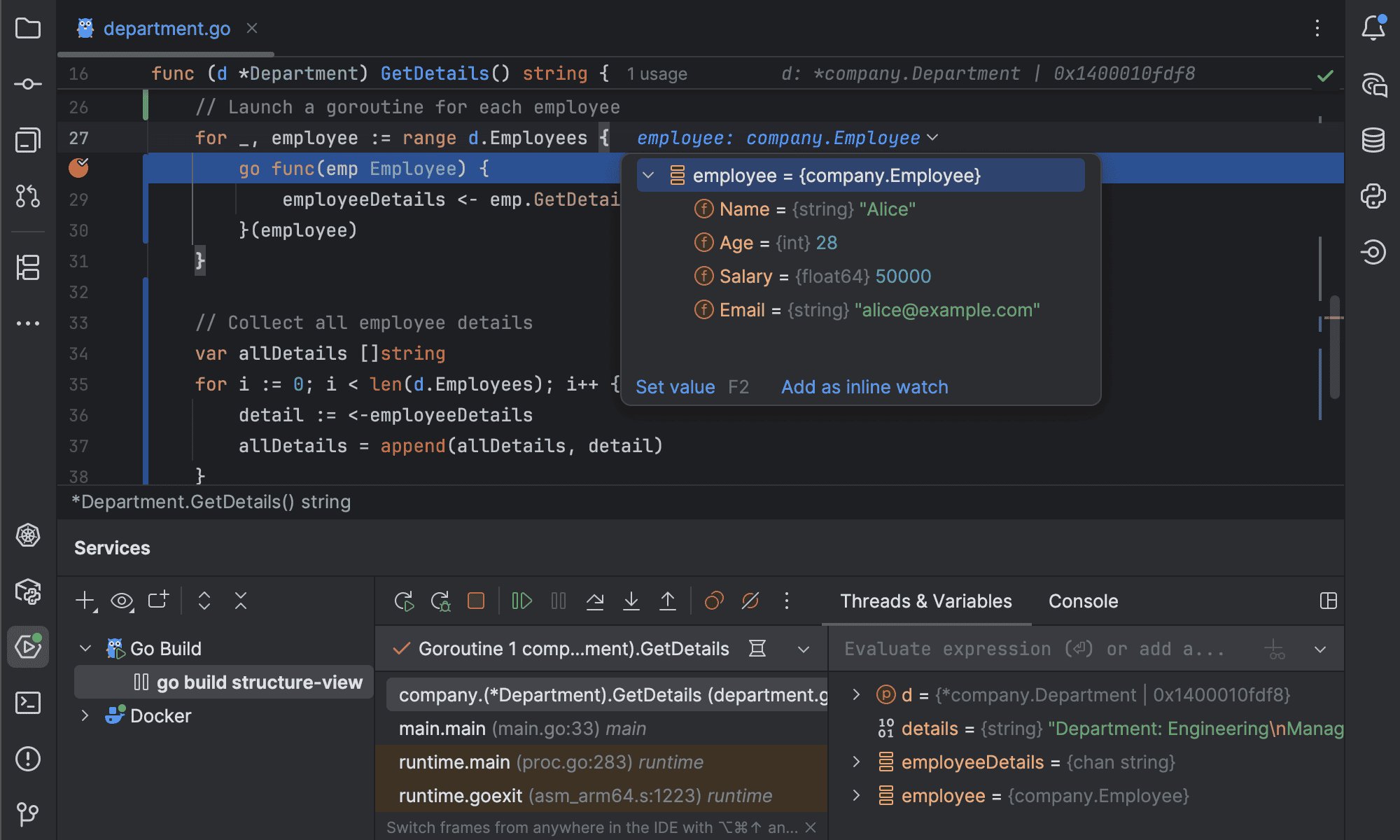
JetBrains GoLand 2026 is a professional IDE for Go developers who want a complete environment for writing, testing, debugging, and managing Go applications. It combines Go-specific tools with features for Git, databases, web development, remote work, and other development tasks. The 2026 releases also improve Go support, code analysis, performance, and AI-assisted development. For Windows users, GoLand is useful for everything from small Go programs to large backend services and multi-module projects. Instead of setting up several separate tools, developers can manage their code, dependencies, tests, debugging sessions, and version control from one application. GoLand’s biggest strength is its understanding of the Go programming language. Code completion, navigation, inspections, refactoring, and error detection are built into the IDE.

It can understand project structures and help developers find functions, types, methods, and related code without manually searching through files. GoLand 2026 also keeps pace with newer Go releases. The 2026.2 version adds support for Go 1.27, while the IDE continues to provide tools for modules, dependencies, workspaces, and modern Go projects. This is important for developers who want their development environment to stay aligned with the latest Go language features. One useful addition in GoLand 2026.2 is the Go Optimization tool. It can help identify areas where Go code may be improved for performance. The release also adds support for the go fix command, giving developers another way to update older Go code to newer language and API changes.
Git support is another strong part of GoLand. Developers can review changes, create branches, resolve conflicts, inspect commit history, and work with repositories directly from the IDE. The 2026 releases also improve support for Git worktrees, which can be useful when working on multiple branches or tasks at the same time. Testing is well integrated. GoLand supports Go’s built-in testing tools and can run individual tests, groups of tests, or complete test packages. Developers can also debug applications and tests directly inside the IDE rather than switching to another tool. GoLand is not limited to basic Go development. It includes tools for JavaScript, TypeScript, HTML, CSS, databases, SQL, and web development. This is useful for Go developers building APIs and web applications that also contain frontend code or database layers.
The database tools are particularly useful for backend developers. You can connect to supported databases, browse tables, write SQL queries, and inspect database information from inside the IDE. This can reduce the need to constantly switch between the code editor and a separate database application. GoLand also supports remote development. Windows users can work with projects running on remote machines, servers, containers, or WSL environments. This can be helpful when the development environment or required hardware is not available locally.
AI features are another part of the newer GoLand releases. JetBrains provides AI-assisted coding features that can help with code generation, explanations, editing, and other development tasks. These tools are optional, so developers who prefer traditional IDE workflows can continue working without relying heavily on AI. The main drawback is that GoLand can feel heavy compared with a lightweight editor. It also includes many features that a beginner may not need. If you only write small Go programs, Visual Studio Code with the Go extension may be enough. GoLand becomes more attractive when projects become larger and you need debugging, testing, Git, databases, remote development, and deeper code understanding in one place.
Key Features
- Professional IDE for Go development
- Support for modern Go versions
- Go 1.27 support in GoLand 2026.2
- Advanced Go code completion
- Code navigation and inspections
- Refactoring tools
- Built-in Go debugger
- Integrated Go testing tools
- Go modules and dependency management
- Go workspace support
- Go Optimization tool
- go fix support
- Git and GitHub integration
- Git worktree support
- Database and SQL tools
- JavaScript and TypeScript support
- HTML and CSS development tools
- Docker and container support
- WSL integration
- Remote development
- Integrated terminal
- AI-assisted development features
- Support for large Go projects and multi-module codebases

Alternatives
GoLand is a complete Go-focused IDE, but Windows developers have several alternatives depending on how they work.
Visual Studio Code is probably the most common alternative. With Microsoft’s Go extension and other plugins, it can provide code completion, debugging, testing, formatting, and Go project support. Its main advantage is that it is lighter and works well for developers who use multiple programming languages.
Cursor is another option for developers who want a more AI-focused coding experience. It is based around an editor workflow with AI assistance and can be useful for developers who want help generating, explaining, or modifying code while they work.
LiteIDE is a more focused option for Go developers who want a simpler development environment. It was designed specifically around Go and avoids many of the additional tools found in larger IDEs.
Vim or Neovim can be configured for Go development using plugins and language tools. They are attractive to experienced developers who prefer keyboard-driven workflows and want a highly customizable environment. However, setting up a complete Go development workflow usually requires more manual configuration.
Emacs can also be configured for Go programming through packages and language-server support. It provides extensive customization, but it has a steeper learning curve than GoLand or VS Code.
IntelliJ IDEA can be considered by developers who work across several JetBrains-supported languages. With the appropriate Go support, it can provide a broader development environment, although GoLand is more directly focused on Go development.
The choice depends on the project. GoLand is better when you want a ready-to-use professional Go IDE with deep project support. VS Code is a strong choice for a lighter multi-language workflow, while Cursor is more suitable for developers who want AI at the center of their coding process. LiteIDE can work well for users who want a simpler Go-specific environment.
Conclusion
JetBrains GoLand 2026 is a strong Windows IDE for developers who work seriously with Go. Its combination of code intelligence, debugging, testing, Git, databases, Docker, remote development, and Go-specific tools makes it suitable for both medium and large projects. The 2026 releases add useful improvements such as Go 1.27 support, the Go Optimization tool, go fix, better Git worktrees, and newer AI development features. These additions make GoLand more useful for modern Go workflows. For simple scripts, GoLand may feel like more software than you need. But if you build APIs, backend services, web applications, or larger Go projects and want most of your development tools in one place, GoLand 2026 is a solid choice for Windows developers.
JetBrains GoLand 2026 Technical Setup Details
- Software Full Name: JetBrains GoLand 2026
- Setup File Name: JetBrains_GoLand_2026.1.3.rar
- Setup Size: 871 MB
- Setup Type: Offline Installer / Full Standalone Setup
- Compatibility: 32 Bit (x86) / 64 Bit (x64)
- Latest Version Release Added On: 13th Sep 2026
- Developers: JetBrains
System Requirements for JetBrains GoLand 2026
- Operating System: Windows 7/8/10
- RAM: 8 GB
- Hard Disk: 10 GB
- Processor: Intel Core i5 or higher processor
JetBrains GoLand 2026 Download
Download JetBrains GoLand 2026 free latest full version offline direct download link for full offline setup by clicking the button below.