Download ACDSee Photo Studio Home 2027 full latest version program free setup for Windows.
ACDSee Photo Studio Home 2027 for Windows Review
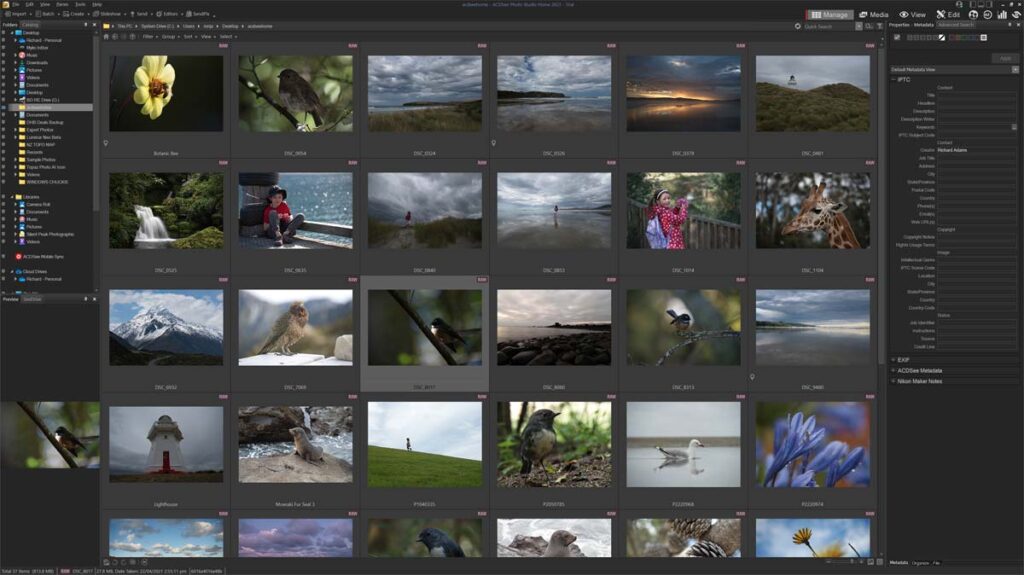
ACDSee Photo Studio Home 2027 is a Windows photo management and editing application for photographers who want to organize, view, and improve their images from one place. It combines digital asset management with everyday editing tools, RAW support, AI features, and batch workflow tools. The 2027 release adds Generative AI tools and a new Reject Tag for faster photo selection. The main difference in this release is the addition of AI Image Generation, Generative Fill, Generative Edit, and AI Remove. These tools let you create new images, extend missing areas, describe changes in natural language, and remove unwanted objects. Home 2027 also supports more than 750 RAW camera models, making it useful for photographers managing images from different cameras.

ACDSee Photo Studio Home 2027 is built around photo organization as much as editing. You can browse folders, catalog images, search your collection, rate photos, add metadata, and use facial recognition to make large photo libraries easier to manage. Its tab-based workflow also helps when working with multiple folders or groups of images.The new Reject Tag is a useful addition for photographers who shoot many similar images. Instead of deleting unwanted shots immediately, you can mark blurry, unwanted, or failed photos and deal with them later. This makes the first selection pass safer and faster.
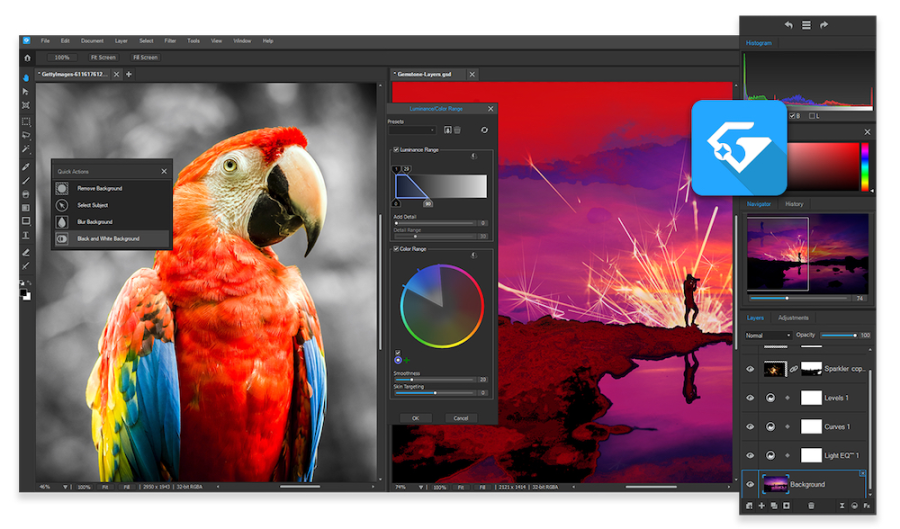
The 2027 version also brings several generative AI tools. AI Image Generation can create an image from a text prompt, while Generative Fill can extend or rebuild missing areas. Generative Edit allows changes to be described in words, and AI Remove is designed to erase unwanted objects. These features are different from the traditional correction tools and give Home users more creative editing options. For normal photo editing, Home 2027 includes tools for color, lighting, cropping, resizing, clarity, haze removal, skin correction, red-eye correction, text, borders, vignettes, watermarks, and special effects. Its Light EQ tool is also designed to adjust different brightness areas without treating the whole image in the same way.
RAW support remains an important part of the software. ACDSee says Home 2027 supports more than 750 RAW camera models, while the September 2026 build added RAW support for several newer Canon, Leica, Panasonic, and Sony cameras. One important limitation is that not every AI feature from the higher ACDSee editions is included in Home. ACDSee’s current support documentation states that Home 2027 includes the AI Super-Resolution model, while additional AI models such as Denoise, Hair Selection, Sky Selection, and Subject/Object/Background Selection are available in the Professional or Ultimate editions. The generative AI tools also use AI Credits. ACDSee explains that credits are deducted when generative features such as AI Image Generation or AI Remove are used. This is worth considering if you plan to use the new AI tools regularly.
Key Features
- AI Image Generation from text prompts, presets, or reference images
- Generative Fill for extending or rebuilding image areas
- Generative Edit for describing image changes
- AI Remove for removing unwanted objects
- Reject Tag for marking unwanted or poor-quality shots
- Digital asset management and photo cataloging
- Facial Recognition for organizing people in your library
- Support for more than 750 RAW camera models
- Light EQ for targeted lighting adjustments
- Color EQ and Split Tone controls
- Skin Tune and red-eye correction
- Dehaze, clarity, grain, text, borders, and watermark tools
- Batch import, conversion, and resizing tools
- AI Super-Resolution
- Support for common image formats including JPEG, PNG, TIFF, PSD, AVIF, and many RAW formats
Alternatives
Adobe Lightroom Classic is a strong option for photographers who mainly want RAW processing, cataloging, presets, and integration with the Adobe ecosystem.
ON1 Photo RAW combines photo management, RAW editing, effects, masking, and AI tools in one Windows application. It is worth considering if you want a more editing-focused alternative.
DxO PhotoLab is focused heavily on RAW quality, lens corrections, noise reduction, and detailed image processing. It is particularly relevant for photographers who care more about technical image quality than catalog management.
Corel PaintShop Pro provides Windows photo editing with layers, selections, effects, and creative tools. It is more oriented toward traditional image editing than ACDSee’s catalog-centered workflow.
Capture One is another option for photographers who want advanced RAW processing and detailed control over color and image output.
Adobe Photoshop Elements is designed for users who want familiar Photoshop-style editing without the full complexity of professional Photoshop.
Conclusion
ACDSee Photo Studio Home 2027 combines photo organization and everyday editing in a single Windows application. Its strongest new additions are the generative AI tools and Reject Tag, while RAW support, cataloging, Light EQ, batch tools, and standard correction features continue to cover regular photography workflows. For users who need advanced AI masking, AI Denoise, extensive RAW development controls, or professional-level editing features, the Professional and Ultimate editions offer a larger feature set. Home 2027 is positioned more toward photographers who want a single application for managing and improving their personal photo collections.
ACDSee Photo Studio Home 2027 Technical Setup Details
- Software Full Name: ACDSee Photo Studio Home 2027
- Setup File Name: ACDSee_Photo_Studio_Home_2027_v30.0.0.3620.rar
- Setup Size: 338 MB
- Setup Type: Offline Installer / Full Standalone Setup
- Compatibility Mechanical: 32 Bit (x86) / 64 Bit (x64)
- Developers: ACDSee
System Requirements for ACDSee Photo Studio Home 2027
- Operating System: Windows 7/8/10
- RAM: 1 GB
- Hard Disk: 1 GB
- Processor: Intel Dual Core or higher processor
ACDSee Photo Studio Home 2027 Download
Download ACDSee Photo Studio Home 2027 free latest full version offline direct download link for full offline setup by clicking the button below.