Download PowerISO 2026 full latest version program free setup for Windows.
PowerISO 2026 for Windows Review
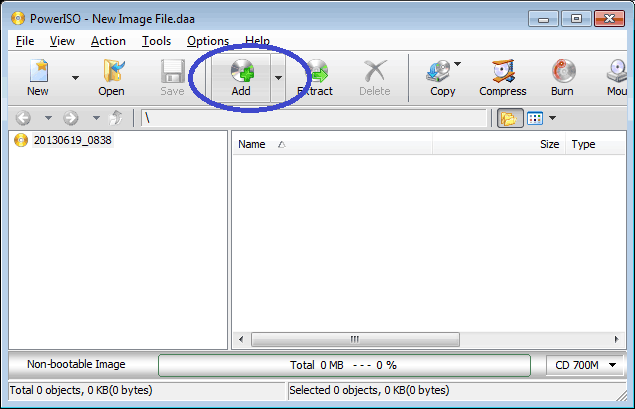
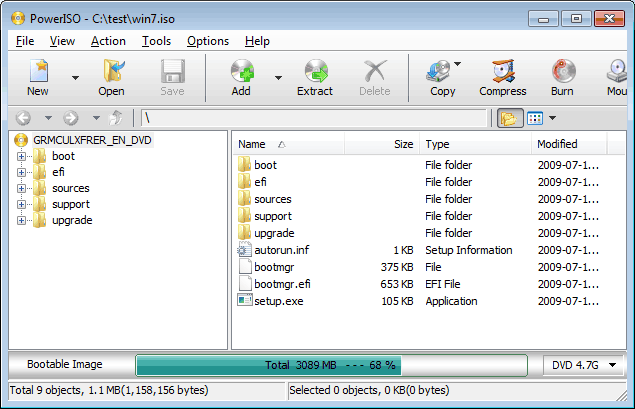
PowerISO 2026 is an all-in-one Windows utility for working with ISO files, disc images, archives, virtual drives, and bootable USB drives. The latest release is PowerISO 9.5, released on September 20, 2026. The update mainly contains bug fixes and enhancements, while the recent 2026 releases added more useful tools for creating Windows installation media and handling compressed images. The software can create, edit, extract, compress, encrypt, split, convert, mount, and burn image files. It also supports CD, DVD, and Blu-ray media, making it useful for users who still work with physical discs as well as modern USB-based installation media. PowerISO 2026 is mainly useful when you regularly deal with ISO and other disc image files. You can create an ISO from files and folders, edit an existing image, extract its contents, or mount it as a virtual drive without extracting everything first.

It supports common formats such as ISO, BIN/CUE, DMG, NRG, MDF/MDS, VDI, VMDK, and several other image types. Its bootable USB tools are one of the more useful parts of the software. PowerISO can write ISO images to USB drives in BIOS or UEFI mode and can create Windows installation drives. Recent releases also added support for creating bootable USB drives directly from ZIP, RAR, and 7Z archives. PowerISO can also install Windows 10 or Windows 11 to a USB drive or portable SSD. This can be useful when you want a Windows environment on removable storage, although the USB drive will be erased during the process, so important files should be backed up first. For disc work, PowerISO supports burning CD, DVD, and Blu-ray images. It can copy discs to image files, erase rewritable media, create audio CDs, and rip audio CDs to formats such as MP3, WMA, WAV, FLAC, and APE.
Another useful feature is its virtual drive support. You can mount ISO and other supported image files and access their contents like a normal drive. PowerISO supports up to 23 virtual drives, which can be useful when working with multiple disc images. PowerISO also has its own DAA image format. DAA files can be compressed, password-protected, and split into multiple volumes. The software can extract, edit, and mount DAA images without first decompressing them. The company states that PowerISO can process image files up to 8192 GB. The free unregistered version can be used for evaluation, but it has a 300 MB limit for creating or editing image files and displays registration prompts. This is important if you plan to work with large ISO files.
Key Features
- Create ISO and BIN/CUE images from files, folders, or discs
- Edit existing ISO images without extracting them first
- Extract files from ISO and many other image formats
- Mount disc images as virtual drives
- Support for up to 23 virtual drives
- Burn CD, DVD, and Blu-ray discs
- Create bootable USB drives
- Support BIOS and UEFI boot modes
- Create Windows installation USB drives
- Install Windows 10/11 to USB drives
- Create bootable USB drives from ZIP, RAR, and 7Z files
- Convert ISO, BIN, DMG, and other image formats
- Compress ISO/BIN images
- Password-protect and split DAA images
- Rip Audio CDs to MP3, FLAC, WAV, APE, and other formats
- Support for popular archive and disc-image formats
- GUI DISM tool and sector data viewer
- Support for 32-bit, 64-bit, and ARM64 Windows editions
Alternatives
Rufus is a focused option for creating bootable USB drives, especially for Windows and Linux installation media.
WinCDEmu is a simpler choice if your main requirement is mounting ISO files as virtual drives rather than editing or burning images.
AnyBurn combines ISO creation, burning, extraction, image conversion, and bootable USB creation in a relatively simple interface.
UltraISO is another long-running Windows tool for creating, editing, converting, and managing ISO images.
ImgBurn is mainly focused on disc burning and image creation, making it more suitable for users whose workflow still involves optical media.
7-Zip can open and extract many ISO-related archives and is useful when you only need file extraction rather than a complete disc-image toolkit.
Conclusion
PowerISO 2026 remains a broad Windows utility for users who need more than simple ISO mounting. Its combination of image editing, conversion, virtual drives, disc burning, bootable USB creation, Windows installation tools, and archive support makes it suitable for a wide range of disc-image tasks. The biggest recent changes are focused on bootable USB workflows, including support for compressed archives and additional Windows installation customization. For users who frequently create or modify ISO files, prepare installation media, or work with different disc-image formats, PowerISO 2026 provides these functions in one application.
PowerISO 2026 Technical Setup Details
- Software Full Name: PowerISO 2026
- Setup File Name: PowerISO_9.5.rar
- Setup Size: 12 MB
- Setup Type: Offline Installer / Full Standalone Setup
- Compatibility: 32 Bit (x86) / 64 Bit (x64)
- Developers: PowerISO
System Requirements for PowerISO 2026
- Operating System: Windows 7/8/10
- RAM: 512 MB
- Hard Disk: 150 MB
- Processor: Intel Dual Core or higher processor
PowerISO 2026 Download
Download PowerISO 2026 free latest full version offline direct download link for full offline setup by clicking the button below.