Download Multi Commander 2026 full latest version program free setup for Windows.
Multi Commander 2026 for Windows Review
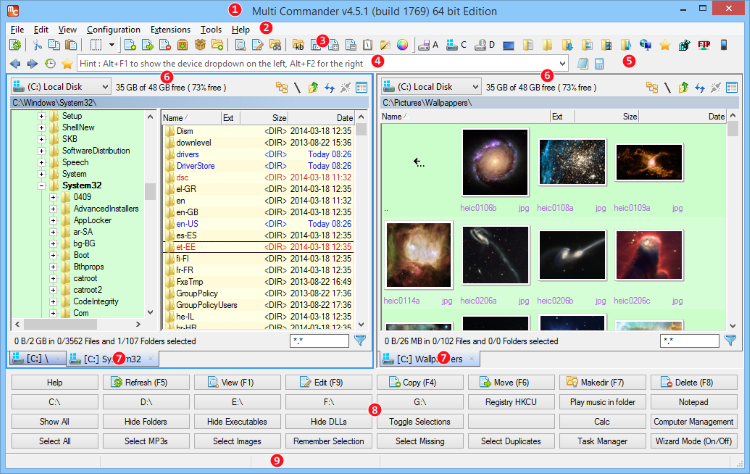
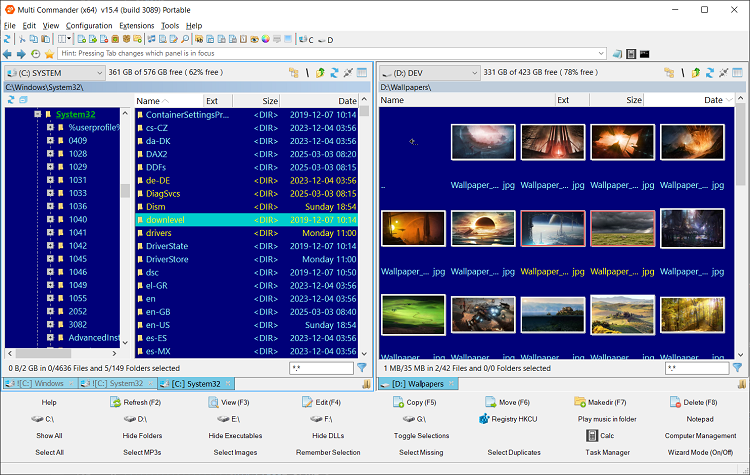
Multi Commander 2026 is a free dual-panel file manager for Windows that offers an alternative to File Explorer. It is designed for users who regularly work with large folders, multiple file locations, archives, network storage, and repetitive file operations. The current release is Multi Commander 16.5 Build 3221, released on September 25, 2026. This release includes stability improvements and digital signing for the program files. The software combines a two-panel interface with tabs, advanced search, batch renaming, archive support, file viewing, FTP/SFTP access, scripting, and customizable commands. It is available as a normal Windows installation or a portable version that can run from a USB drive. Multi Commander 2026 is built for users who find the standard Windows file manager limiting. Its dual-panel layout lets you keep two folders open at the same time, which is useful when copying, moving, comparing, or organizing files between locations.

Tabs can also keep several folders available without opening multiple Explorer windows. File operations are one of its strongest areas. Multi Commander can copy, move, delete, and unpack files in the background, so longer operations do not have to block the rest of the interface. Copy and move jobs can be paused, skipped, or stopped, while queues and filters provide more control over large transfers. The Multi-Rename tool is useful when dealing with groups of files. You can apply rules to rename multiple files and folders instead of changing each name manually. The software also supports filters, search-and-replace operations, and undo for safer batch renaming. Multi Commander can work directly with several archive formats, including ZIP, 7-Zip, RAR, TAR, GZ, and BZ2.
It can browse archives, extract selected files, and create new archives without requiring a separate file manager for basic archive tasks. Its search system goes beyond simple filename matching. You can search by file contents, attributes, size, date, regular expressions, duplicate files, and even files inside archives. This makes it useful when you know something about a file but do not remember its exact name or location. The 2026 release also introduced a major rewrite of the file-operation engine. Multi Commander 16.0 rebuilt the system responsible for copy, move, delete, pack, and unpack operations, with the project reporting more than 80 stability fixes.
It also added NTFS and ReFS permission copying and block cloning for file copies on the same ReFS volume. For advanced users, scripting and plug-ins make Multi Commander more flexible than a basic Explorer replacement. Custom commands, aliases, keyboard shortcuts, extensions, and an SDK allow users to adapt the program to repetitive workflows. It also includes FTP with SSL/TLS and SFTP/SCP support for remote file management. The main drawback is the learning curve. Multi Commander exposes a large number of settings, commands, shortcuts, and tools, so new users may need some time to configure it comfortably. Users looking for a simple two-folder browser may find it more feature-heavy than necessary.
Key Features
- Dual-panel file manager
- Multi-tab folder browsing
- Customizable keyboard and mouse controls
- Background copy, move, and delete operations
- Pause, resume, skip, and queue controls
- Advanced Multi-Rename tool
- File and folder comparison
- Duplicate file search
- Content and regular-expression search
- Search inside archives
- ZIP, 7-Zip, RAR, TAR, GZ, and BZ2 support
- Built-in file viewer with text, binary, and Hex modes
- FTP and SFTP/SCP support
- Windows Registry browsing
- File permissions and ownership tools
- Picture conversion, rotation, and metadata tools
- Audio file information and MP3 tag tools
- Script engine and custom commands
- Plug-in and extension support
- NTFS and ReFS permission copying
- ReFS block cloning
- Portable USB version
- 32-bit and 64-bit Windows builds
- Free to download and use
Alternatives
Directory Opus is a highly customizable Windows file manager with dual-pane views, advanced file operations, search, synchronization, and extensive configuration options.
Total Commander is a long-running two-panel file manager with tabs, batch tools, archive support, plug-ins, and keyboard-driven workflows.
FreeCommander provides a dual-panel interface with tabs, file comparison, search, archive support, and batch operations.
XYplorer focuses on fast file browsing, tabs, advanced search, scripting, and a highly customizable interface.
Double Commander is an open-source cross-platform file manager based around the traditional two-panel workflow.
Q-Dir is a lighter option that provides multiple file panes in one window and is useful for users who want a simpler alternative to Explorer.
Conclusion
Multi Commander 2026 is a feature-rich Windows file manager aimed at people who regularly perform more advanced file-management tasks. Its dual-panel workflow, tabs, batch renaming, archive tools, search, scripting, network support, and customizable commands make it considerably more capable than a basic Explorer replacement. The 2026 releases also brought important changes to the file-operation engine, including improvements for copy, move, delete, packing, permissions, and ReFS block cloning. The latest 16.5 build adds further stability work and digitally signs the application files. For users who manage large numbers of files or want more control over repetitive Windows file tasks, Multi Commander provides a broad set of tools while remaining free to use.
Multi Commander 2026 Technical Setup Details
- Software Full Name: Multi Commander 2026
- Setup File Name: Multi_Commander-16.5.0.3221.rar
- Setup Size: 11 MB
- Setup Type: Offline Installer / Full Standalone Setup
- Compatibility Mechanical: 32 Bit (x86) / 64 Bit (x64)
- Developers: Multi Commander
System Requirements for Multi Commander 2026
- Operating System: Windows 7/8/10
- RAM: 1 GB
- Hard Disk: 200 MB
- Processor: Intel Dual Core or higher processor
Multi Commander 2026 Download
Download Multi Commander 2026 free latest full version offline direct download link for full offline setup by clicking the button below.