Download iCare Data Recovery Pro 2026 full latest version program free setup for Windows.
iCare Data Recovery Pro 2026 for Windows Review
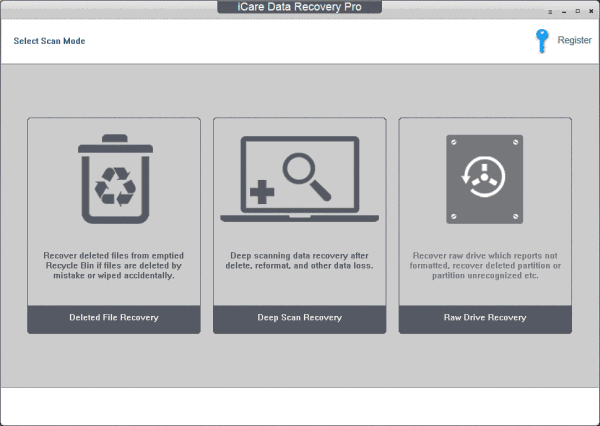
iCare Data Recovery Pro 2026 is a Windows data recovery utility designed to help recover deleted, formatted, or inaccessible files from hard drives, SSDs, USB drives, memory cards, and other storage devices. It is aimed at users who need to retrieve lost documents, photos, videos, archives, and other personal files without using a full professional recovery workstation. The software provides different recovery modes for common data-loss situations. It can scan storage devices for deleted files, search for data after formatting or partition problems, and recover files from drives that are no longer behaving normally. Its interface is focused on selecting a drive, scanning it, previewing recoverable files, and saving the required data to another location. iCare Data Recovery Pro is mainly useful for accidental deletion and common file-loss situations.
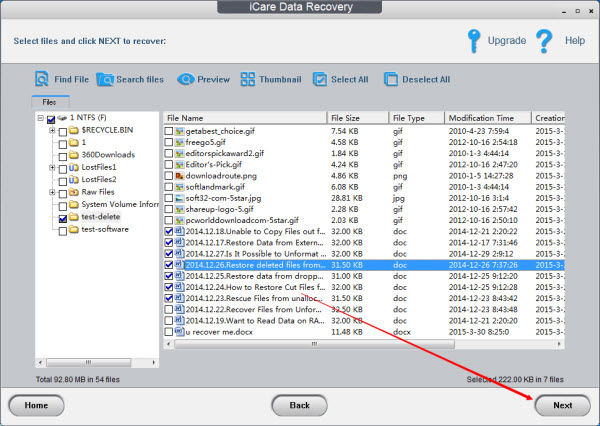
If a file was deleted and the storage space has not been heavily reused, a recovery scan may be able to locate the original data. The software can also search for files when the normal Windows file system is no longer providing easy access. The recovery process is straightforward. You select the disk, partition, or removable device and start a scan. After scanning, the program presents the files it can identify so you can select the data you want to recover. Previewing available files before recovery can help avoid restoring unnecessary data. Its support for removable storage makes it useful beyond internal PC drives. USB flash drives, memory cards, external hard drives, and similar devices can be scanned when files disappear because of accidental deletion, formatting, or file-system problems. The software also provides deeper scanning for situations where a normal scan does not locate the required files.
This can take considerably longer, particularly on large disks, but it can search for file information that is no longer easily visible through the normal Windows file structure. One important point with any recovery program is that recovery is not guaranteed. Deleted files can become permanently unrecoverable when new data overwrites the same storage area. For this reason, the safest approach is to stop writing new files to the affected drive and save recovered data to a different disk. iCare Data Recovery Pro is therefore better viewed as a recovery utility for common Windows data-loss situations rather than a replacement for professional forensic recovery services. Physically damaged drives, severe hardware failures, encrypted volumes, or heavily overwritten data may require specialized recovery equipment and expertise.
Key Features
- Recover deleted files
- Recover files after accidental formatting
- Scan internal hard drives and SSDs
- Support for USB flash drives
- Support for external hard drives
- Memory card recovery
- Recovery from damaged or inaccessible partitions
- Quick scanning for common deletion cases
- Deeper scanning for difficult recovery situations
- File preview before recovery
- Support for documents, photos, videos, audio, archives, and other file types
- Search and filter recovered files
- Recovery of files from different Windows file systems
- Simple scan-and-recover workflow
- Windows-focused recovery environment
Alternatives
Recuva is a lightweight Windows recovery utility suited to recently deleted files and common accidental deletion scenarios.
Disk Drill provides recovery tools for Windows and supports internal drives, external storage, USB devices, and memory cards. It also includes additional disk-management features.
EaseUS Data Recovery Wizard offers guided recovery for deleted, formatted, and inaccessible files and is designed for users who prefer a simple graphical workflow.
R-Studio is aimed at more advanced users and provides deeper control over partitions, file systems, RAID recovery, and difficult storage problems.
DMDE is a powerful option for users who need detailed control over partitions, disk structures, and file recovery.
TestDisk and PhotoRec are open-source tools. TestDisk focuses strongly on partition and file-system recovery, while PhotoRec can recover files based on their underlying data signatures.
Conclusion
iCare Data Recovery Pro 2026 is designed for Windows users dealing with accidental deletion, formatting, inaccessible partitions, and other common data-loss situations. Its scan, preview, and recovery workflow makes it easier to search a storage device and identify files that may still be recoverable. The most important limitation is that no software can reliably recover data that has already been overwritten or storage that has suffered serious physical damage. For the best chance of recovery, stop using the affected drive as soon as data loss occurs and save recovered files to another storage device. For ordinary Windows file-loss situations, iCare Data Recovery Pro provides a focused recovery workflow without requiring advanced disk-recovery knowledge.
iCare Data Recovery Pro 2026 Technical Setup Details
- Software Full Name: iCare Data Recovery Pro 2026
- Setup File Name: iCare_Data_Recovery_Pro_9.0.1.2.rar
- Setup Size: 7.5 MB
- Setup Type: Offline Installer / Full Standalone Setup
- Compatibility: 32 Bit (x86) / 64 Bit (x64)
- Developers: iCare
System Requirements for iCare Data Recovery Pro 2026
- Operating System: Windows 7/8/10
- RAM: 512 MB
- Hard Disk: 100 MB
- Processor: Intel Dual Core or higher processor
iCare Data Recovery Pro 2026 Download
Download iCare Data Recovery Pro 2026 free latest full version offline direct download link for full offline setup by clicking the button below.