Download Chris-PC RAM Booster 2026 full latest version program free setup for Windows.
Chris-PC RAM Booster 2026 for Windows Review
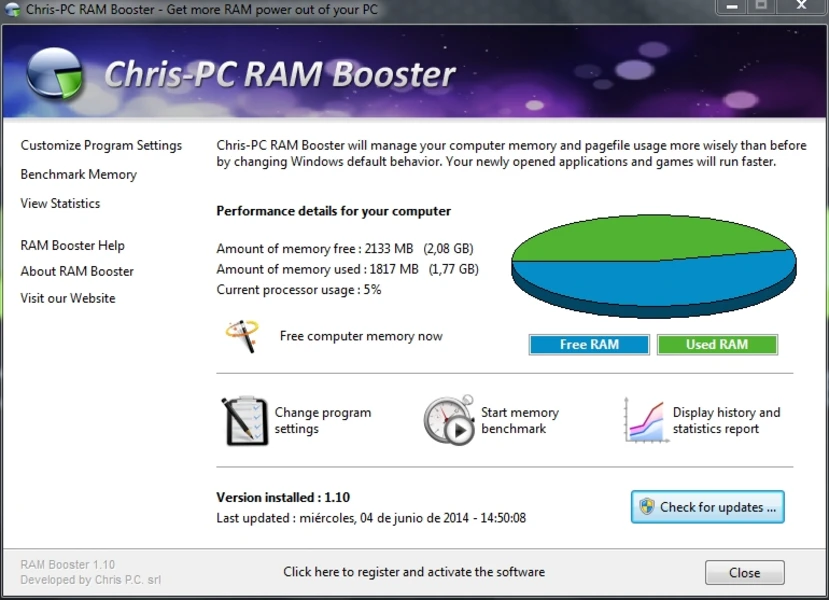
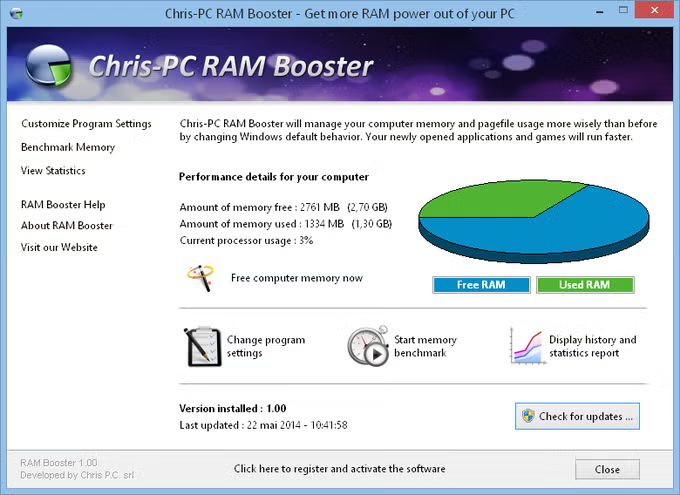
Chris-PC RAM Booster 2026 is a Windows utility designed to manage RAM and pagefile usage more actively. It monitors available physical memory and can start freeing RAM when usage reaches a user-defined threshold. The current version is 7.26.1001, released on October 1, 2026. The software is mainly aimed at users who regularly run out of available memory while using several applications or games. It runs in the background and can move less active data from physical RAM toward Windows virtual memory, giving newly opened programs more available RAM. It also includes memory monitoring, benchmarking, and several controls for deciding when the optimization should run. The main purpose of Chris-PC RAM Booster is to change how Windows handles memory when physical RAM becomes heavily occupied. You can set a low-memory threshold, and the software starts its memory-freeing process when that threshold is reached.

This approach is more useful for RAM-limited computers than for modern systems that already have plenty of memory. One practical feature is its background operation. Once configured, RAM Booster can continue monitoring memory without requiring you to manually optimize RAM each time. It can also work as a background service, which makes it suitable for unattended systems and some server environments. The software gives users control over when memory should be freed. Settings include the low-memory threshold, full-screen application behavior, and CPU usage conditions. There is also an option to stop RAM freeing while a laptop is running on battery and resume it when the system is plugged in.
Chris-PC RAM Booster also includes a memory benchmark and performance statistics. A system-tray icon can display real-time memory usage, making it easier to see when RAM consumption is getting high. These tools are useful for users who want to monitor memory behavior rather than simply press a one-click optimization button. However, RAM Booster does not increase the physical RAM installed in a computer. Its approach relies partly on Windows virtual memory, which uses storage as an extension of memory. This can help when RAM is under pressure, but it cannot provide the same performance as adding more physical RAM. For a computer that constantly runs out of memory, a hardware upgrade may still be the better long-term solution. The current 2026 release continues the software’s focus on Windows 10 and Windows 11. The official download page lists version 7.26.1001, while third-party software directories also list the same release for Windows.
Key Features
- Optimizes physical RAM and pagefile usage
- Automatic RAM freeing
- Custom low-memory threshold
- Background operation
- Runs as a Windows service
- Full-screen application settings
- CPU usage conditions for memory optimization
- Memory benchmark test
- Performance statistics
- Real-time memory usage from the system tray
- Battery-aware settings for laptops
- Support for server machines
- Simple and customizable interface
- Windows 10 and Windows 11 support
Chris-PC RAM Booster 2026 Alternatives
Process Lasso is a broader Windows performance tool that gives more control over processes, CPU priorities, and system responsiveness.
Mem Reduct is a lightweight option for users who mainly want to monitor and reduce memory usage.
Wise Memory Optimizer provides a simple interface for users looking for basic RAM optimization without many advanced controls.
RAMMap from Microsoft Sysinternals is better for technical users who want detailed information about how Windows is allocating physical memory.
KCleaner focuses more on closing unnecessary processes and cleaning system resources, making it a different approach to improving available resources.
Windows built-in memory management is also worth considering. If a PC frequently reaches its memory limit, closing unnecessary applications or adding more physical RAM can be more effective than relying on a memory optimizer.
Conclusion
Chris-PC RAM Booster 2026 is a focused utility for Windows computers that frequently experience high RAM usage. Its useful features include automatic memory monitoring, custom thresholds, background operation, full-screen application controls, benchmarking, and real-time memory statistics. The latest 7.26.1001 release also maintains support for Windows 10 and Windows 11. It can be useful on older or RAM-limited PCs where memory pressure is a regular problem. However, it should not be treated as a replacement for physical RAM. Users with sufficient memory may notice little benefit, while systems that constantly run out of RAM are usually better served by adding more memory or reducing the number of demanding applications running at the same time.
Chris-PC RAM Booster 2026 Technical Setup Details
- Software Full Name: Chris-PC RAM Booster 2026
- Setup File Name: Chris-PC_RAM_Booster_7.26.1001.rar
- Setup Size: 3.5 MB
- Setup Type: Offline Installer / Full Standalone Setup
- Compatibility Mechanical: 32 Bit (x86) / 64 Bit (x64)
- Developers: Chris-PC
System Requirements for Chris-PC RAM Booster 2026
- Operating System: Windows 7/8/10
- RAM: 512 MB
- Hard Disk: 100 MB
- Processor: Intel Dual Core or higher processor
Chris-PC RAM Booster 2026 Download
Download Chris-PC RAM Booster 2026 free latest full version offline direct download link for full offline setup by clicking the button below.