Download Hitek JaSFTP 2026 full latest version program free setup for Windows. Hitek JaSFTP 2026 is a powerful and efficient FTP, FTPS, and SFTP automation application.
Hitek JaSFTP 2026 for Windows Review
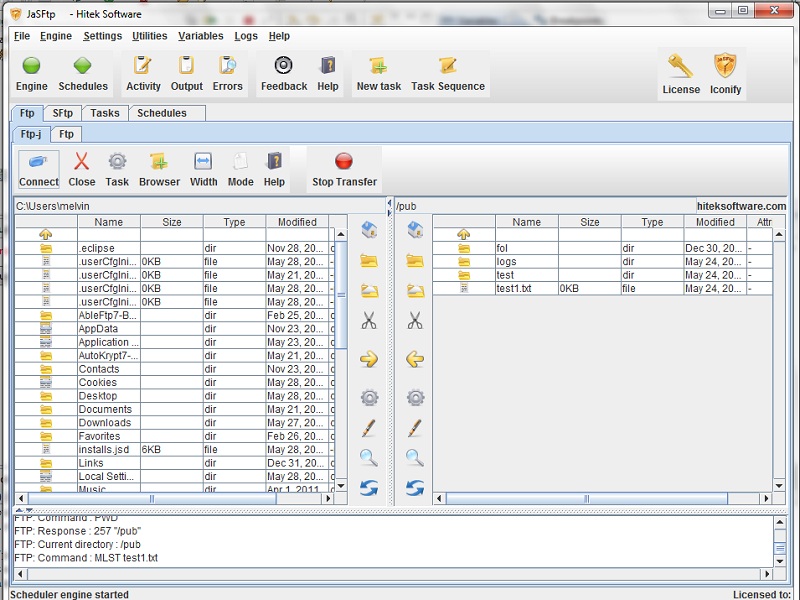
Hitek JaSFTP 2026 is an automated file transfer tool for Windows users who need more than a basic FTP client. It supports FTP, FTPS, and SFTP and is built around scheduled and unattended transfers. Instead of manually moving the same files every day, you can create tasks that run automatically and handle uploads, downloads, file renaming, and other actions. Hitek lists version 14.06 as the current release, published on September 22, 2026. JaSFTP is mainly useful for system administrators, developers, businesses, and users who regularly exchange files with remote servers. Its strength is automation. You can schedule transfers, monitor local or remote folders, create task chains, send failure notifications, and run the background task engine as a Windows service. This makes it better suited to repeatable workflows than a simple drag-and-drop FTP application. JaSFTP provides a practical way to automate secure file transfers between a Windows PC and remote servers.

You can create SFTP tasks for uploads and downloads and run them manually or on a schedule. Wildcards allow groups of files to be selected, while subdirectory transfers make it easier to handle larger folder structures. Files can also be renamed using date or time values, which is useful for backups and regularly generated reports. The scheduler is one of the most useful parts of JaSFTP. Instead of starting each transfer yourself, you can create recurring jobs and connect multiple tasks into a workflow. Task chains can perform actions based on previous task results, while email notifications can report task failures. This gives users better control over unattended file operations. JaSFTP can also monitor local and remote directories. Changes such as new files, different file sizes, file counts, or modification dates can trigger another task. For example, a new file on a local folder can start an upload, while a changed remote file can trigger a download or copy operation. This is particularly useful for backup and server-to-PC workflows.
For advanced users, JaSFTP includes dynamic variables, command-line task execution, sequential SFTP commands, and remote control through SSH. The background task engine can also run as a Windows service, allowing automated jobs to continue without requiring the user to interact with the application each time. Security is another important part of the software. JaSFTP supports SSH-based SFTP connections, password and public-key authentication, and SSH1/SSH2 according to the available product documentation. It also supports HTTP and SOCKS proxy connections for supported workflows. The main limitation is that JaSFTP is designed around automation rather than being a lightweight file browser. If you only need to connect to a server occasionally and move a few files manually, a simpler FTP/SFTP client may feel easier. JaSFTP makes more sense when you need scheduled transfers, monitoring, task dependencies, and unattended jobs.
Key Features
- FTP, FTPS, and SFTP support
- Automated file uploads and downloads
- Scheduled and recurring transfers
- Wildcard file selection
- Multiple file and subdirectory transfers
- Automatic date and time-based file naming
- Local and remote directory monitoring
- File size, file count, and modification-date monitoring
- Task chains for multi-step workflows
- Dynamic variables
- Email notifications based on task results
- SFTP command tasks
- Password and public-key authentication
- SSH1 and SSH2 support
- HTTP and SOCKS proxy support
- Multiple connections and simultaneous task threads
- SFTP logging
- Command-line Task Runner
- Remote control through SSH
- Windows Service support
- Web-page download and monitoring features
Hitek JaSFTP 2026 Alternatives
WinSCP is a strong choice for users who mainly want a straightforward Windows file transfer client with SFTP support and a familiar interface.
FileZilla is better suited to users who need a popular FTP/SFTP client for regular manual transfers without the deeper automation focus of JaSFTP.
Cyberduck is a good option for users who prefer a simple graphical interface for connecting to different remote storage and server services.
Bitvise SSH Client is useful when SFTP transfers are closely connected with SSH access and remote server administration.
Core FTP Pro is worth considering for Windows users who want FTP, FTPS, and SFTP features with scheduling and transfer management.
AbleFTP is the closest Hitek alternative for users who need the company’s automation approach but do not require SFTP. Hitek describes AbleFTP as a subset of JaSFTP focused on FTP and FTPS automation.
Conclusion
Hitek JaSFTP 2026 is a good fit for Windows users who need automated and repeatable file transfers rather than just a basic FTP browser. Its scheduler, directory monitoring, task chains, dynamic variables, notifications, and Windows Service support make it especially useful for backups, server synchronization, recurring uploads, and other unattended workflows. For occasional manual transfers, JaSFTP may offer more automation than you actually need. But for users managing regular SFTP or FTP jobs, it provides a much deeper workflow system than a typical file transfer client.
Hitek JaSFTP 2026 Technical Setup Details
- Software Full Name: Hitek JaSFTP 2026
- Setup File Name: Hitek_Software_JaSFTP_14.06.rar
- Setup Size: 76 MB
- Setup Type: Offline Installer / Full Standalone Setup
- Compatibility Mechanical: 32 Bit (x86) / 64 Bit (x64)
- Developers: Hitek
System Requirements for Hitek JaSFTP 2026
- Operating System: Windows 7/8/10
- RAM: 1 GB
- Hard Disk: 200 MB
- Processor: Intel Dual Core or higher processor
Hitek JaSFTP 2026 Download
Download Hitek JaSFTP 2026 free latest full version offline direct download link for full offline setup by clicking the button below.