Download AutomationX Studio 2026 full latest version program free setup for Windows. AutomationX Studio 2026 is an industrial automation engineering program which can be used to develop, configure, visualize, simulate, and maintain industrial control applications.
AutomationX Studio 2026 Review
Industrial plants often use many separate systems for control, monitoring, visualization, and data management. Managing these systems can make automation projects harder to develop and maintain. AutomationX Studio 2026 is best understood as part of the broader AutomationX industrial automation platform, which combines engineering, PLC, HMI, SCADA, process control, data management, and system integration. Its engineering environment, known as aXIDE, is designed to let engineers configure I/O, communication, PLC programs, visualization, and operator interfaces from one environment. For automation engineers, PLC developers, system integrators, and plant operators, this integrated approach can reduce the need to manage disconnected engineering tools.
aXIDE supports centralized data management, multi-user engineering, reusable automation libraries, documentation management, access controls, and integration with external applications. This can be useful for large projects where many engineers need to work with the same automation data. One of the main strengths of the AutomationX platform is its PLC and control functionality. The aXPLC environment supports IEC 61131-3 programming and multiple hardware platforms. It also supports features such as function block programming, multiple PLC tasks, real-time data acquisition, redundant configurations, and communication between PLC systems. This gives engineers a flexible environment for building and managing industrial control logic.
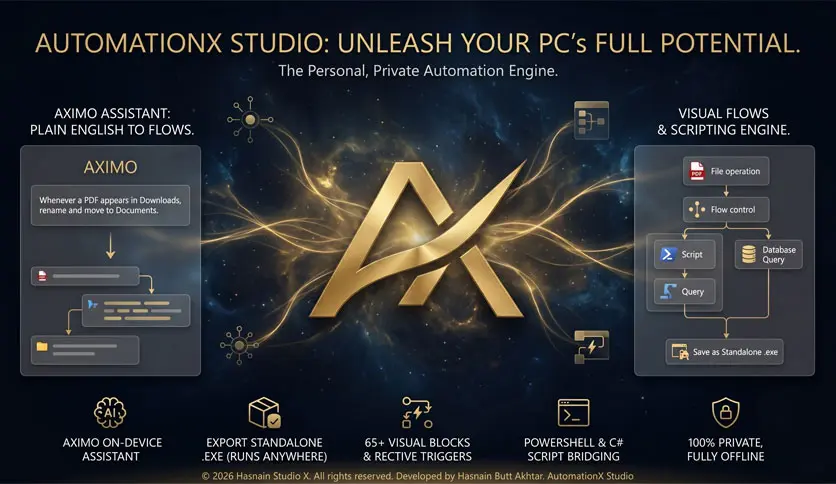
HMI and SCADA functionality is another important part of the platform. The aXHMI component provides process visualization, multi-monitor workstations, video walls, web visualization, multilingual interfaces, online data monitoring, and connections to process data. These features help operators view plant conditions and interact with automation systems from centralized workstations. AutomationX also provides tools for alarm, event, and trend management. Users can configure alarm attributes, define thresholds and actions, review alarm statistics, record trend data, and export information for further analysis. These functions can help plant teams identify process problems and monitor system performance more effectively.
Integration is another key area. The platform supports a broad range of industrial and IT interfaces, including OPC, OPC UA, Modbus, Profinet, Profibus, REST, XML, ODBC, BACnet, CANBus, and other protocols. APIs are also available for custom applications and data processing. This makes the platform suitable for environments where existing control systems and business applications need to exchange information.
The platform is designed to scale from standalone installations to redundant and highly available cluster systems. This is important for companies that may need to expand their automation infrastructure over time. AutomationX also focuses on IT and OT security through access control, system hardening, lifecycle support, threat detection support, and system segmentation. AutomationX is used across areas such as manufacturing, food production, infrastructure, process industries, and other industrial environments. Its current solutions can also connect production systems with ERP, MES, warehouse, planning, and quality processes.
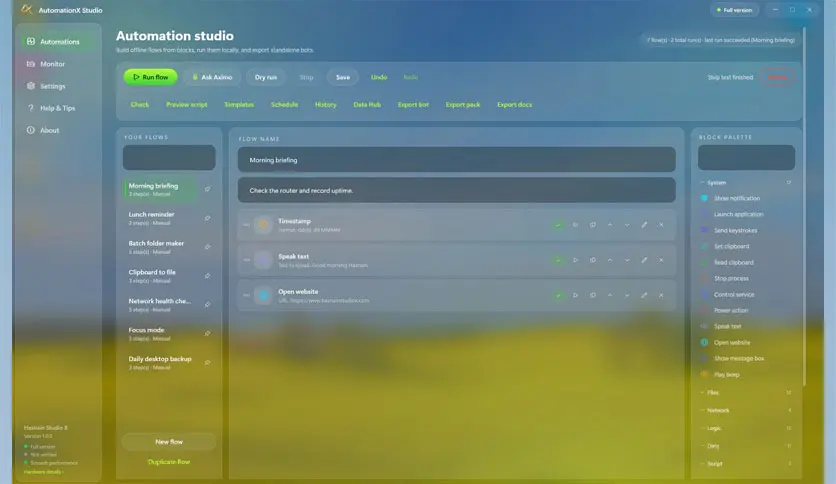
Overall, AutomationX Studio 2026 is a strong option for professional industrial automation projects that require an integrated engineering and control environment. Its combination of PLC programming, HMI, SCADA, visualization, alarms, trends, simulation, communication interfaces, and scalable architecture can address many common automation challenges.
Key Features of AutomationX Studio 2026
- Integrated industrial automation engineering environment.
- aXIDE engineering and configuration tools.
- PLC programming and control functions.
- IEC 61131-3 support.
- Function Block Diagram programming.
- Multiple PLC tasks.
- Real-time data acquisition.
- Redundant PLC configurations.
- HMI and process visualization.
- Multi-monitor control room support.
- Video wall support.
- Web visualization.
- SCADA and process monitoring.
- Alarm and event management.
- Configurable alarm priorities and actions.
- Alarm statistics and event lists.
- Trend recording and archives.
- Trend data export.
- Centralized project data management.
- Multi-user engineering.
- Reusable automation classes and libraries.
- Documentation management.
- Role-based access controls.
- External application integration.
- .NET and C# integration.
- Support for standard industrial interfaces.
- OPC and OPC UA connectivity.
- Modbus and Profinet support.
- Profibus connectivity.
- REST and XML interfaces.
- ODBC database connectivity.
- APIs for custom applications.
- Modular system architecture.
- Scalable deployment options.
- Standalone and redundant configurations.
- High-availability cluster support.
- IT and OT integration.
- System hardening and access management.
- Integration with ERP and MES systems.
- Suitable for manufacturing and process industries.
- Useful for infrastructure and industrial control projects.
AutomationX Studio 2026 Technical Setup Details
- Software Full Name: AutomationX Studio 2026
- Setup File Name: AutomationX_Studio_1.0.0.rar
- Setup Size: 244 MB
- Setup Type: Offline Installer / Full Standalone Setup
- Compatibility: 32 Bit (x86) / 64 Bit (x64)
- Developers: AutomationX
System Requirements for AutomationX Studio 2026
- Operating System: Windows 7/8/10
- RAM: 8 GB
- Hard Disk: 5 GB
- Processor: Intel Core i5 or higher processor
AutomationX Studio 2026 Free Download
Download the latest full version of AutomationX Studio 2026 for free, with a direct offline download link for a full offline setup, by clicking the button below.