Download CoolUtils Total Image Converter 2026 full latest version program free setup for Windows. Total Image Converter is a batch image conversion tool. It converts JPEG, PNG, TIFF, RAW, and 35+ other image formats in one go. It also resizes, crops, rotates, and watermarks photos without extra software.
CoolUtils Total Image Converter 2026 Review
CoolUtils Total Image Converter 2026 is a desktop tool built for people who convert many images at once. Photographers, web designers, and office staff often face the same problem. They have hundreds of photos in one format and need them in another. Doing this one file at a time wastes hours. Total Image Converter solves this by processing whole folders in a single run. The software supports a long list of formats. This includes JPEG, PNG, TIFF, BMP, GIF, ICO, PSD, and WebP. It also reads RAW files from most camera brands, such as Canon, Nikon, Sony, and Fuji. Users can convert these RAW files straight to JPEG or PNG. This saves a trip through Photoshop or Lightroom just to export a batch of photos.
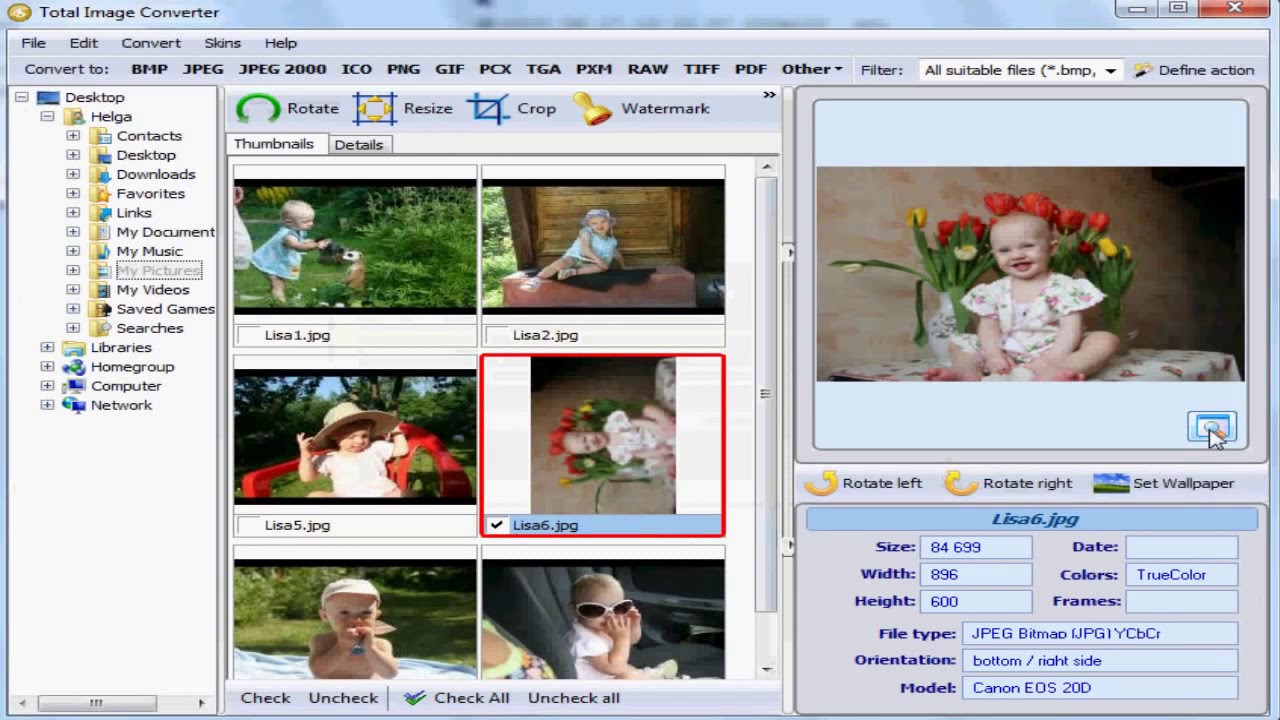
Batch processing is the core strength of this tool. A user can select a full folder, choose the output format, and press start. The program handles the rest. There is no need to open each file one by one. For repeat jobs, the software also supports command line operation. This lets IT teams and agencies automate conversions on a schedule, without opening the app at all. Image editing tools are built into the conversion step. Users can resize photos by pixels or by percentage. They can crop, rotate, and add watermarks at the same time as conversion. This removes the need for a separate editing tool for simple, repeat tasks. The software also handles CMYK to RGB conversion, which is useful for print-to-web workflows.
Large file handling is another point worth noting. Some TIFF scans run into hundreds of megabytes. Many free tools fail to open these files. Total Image Converter is built to handle large TIFFs without crashing, which makes it useful for archive and scanning teams. One limitation is platform support. The software runs on Windows only. There is no Mac or Linux version. Users on those systems will need a different tool. The interface is also functional rather than modern. Users who want a simple one-click ejector or a flashy UI may find it plain. But users who need reliable batch conversion will likely value function over looks.
Key Features
- Converts JPEG, PNG, TIFF, BMP, GIF, ICO, PSD, WebP, and more
- Supports RAW formats from Canon, Nikon, Sony, and Fuji cameras
- Batch converts full folders in one run
- Resize images by pixels or percentage
- Crop, rotate, and watermark during conversion
- CMYK to RGB color conversion
- Combines multiple images into one PDF file
- Command line support for automation
- Handles large TIFF files without crashing
- Built-in preview panel for each image
CoolUtils Total Image Converter 2026 Technical Setup Details
- Software Full Name: CoolUtils Total Image Converter 2026
- Setup File Name: CoolUtils_Total_Image_Converter_8.5.0.322.rar
- Setup Size: 135 MB
- Setup Type: Offline Installer / Full Standalone Setup
- Compatibility Mechanical: 32 Bit (x86) / 64 Bit (x64)
- Developers: CoolUtils
System Requirements for CoolUtils Total Image Converter 2026
- Operating System: Windows 7/8/10
- RAM: 2 GB
- Hard Disk: 1 GB
- Processor: Intel Dual Core or higher processor
CoolUtils Total Image Converter 2026 Free Download
Download CoolUtils Total Image Converter 2026 free latest full version offline direct download link for full offline setup by clicking the button below.