Download Sonimus N-Console v1.1.0 for Mac free. It is the full latest version setup of N-Console for macOS. N-Console is a console emulation plugin modeled on the classic Neve 8014 desk. It is built for Mac producers who want their tracks to sound warm, alive, and three-dimensional instead of flat and sterile.
Review of Sonimus N-Console
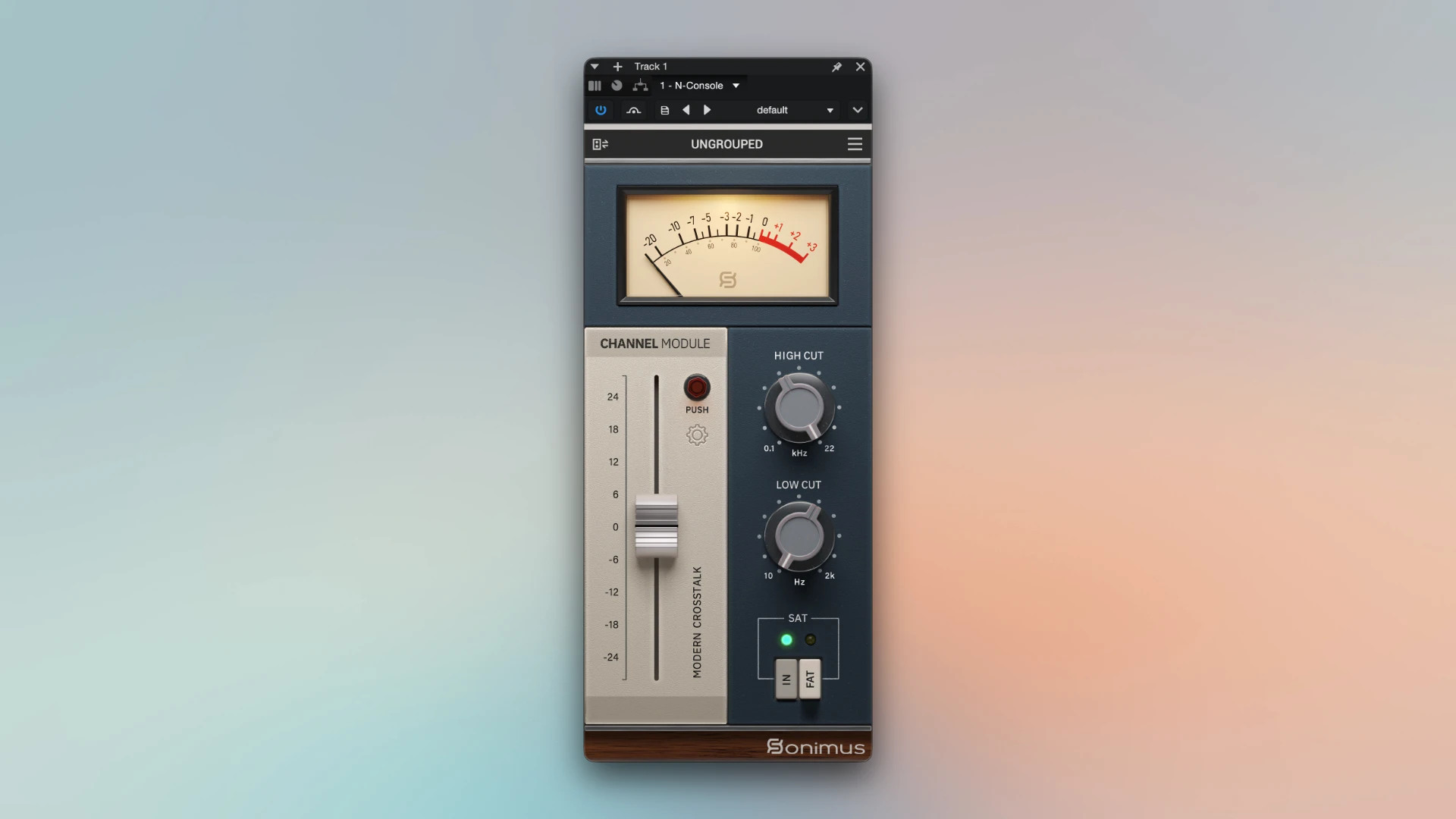
N-Console is a professional console emulation plugin for Mac that brings the sound of the Neve 8014 console into your DAW. It is made by Sonimus. The plugin combines a channel module and a buss module in one instance. You get analog warmth, saturation, and depth on tracks, busses, and the master in a single plugin. Most Mac producers face the same problem. Tracks mixed entirely inside a DAW often sound flat. They lack the depth and character that tracks gain when they pass through a real analog console. N-Console solves this. It adds the harmonic coloration and spatial depth of the Neve 8014 without any outboard hardware. Add it to a track, a buss, or the master and the mix starts to feel alive.
The plugin runs on macOS 10.10 or higher. Apple Silicon is fully supported as of version 1.1. It supports Audio Units, VST2.4, VST3, and AAX. Whether you mix in Logic Pro, Reaper, or Pro Tools on a Mac, N-Console fits straight into your signal chain. N-Console is the evolution of Sonimus’s earlier Britson plugin, which was based on the Neve 8014 console. Sonimus took that emulation and rebuilt it with a modern feature set. The result combines the classic console character with mix and blend control, dual saturation modes, tone color busses, and grouping across an entire session.
Channel and Buss Modules in One Plugin
Earlier Sonimus console emulations shipped as two separate plugins. One was a channel strip and the other was a buss processor. N-Console merges both into a single plugin instance. Load it on a track and use it as a channel. Load another instance on a buss or the master and switch it to buss mode. Both modes share the same interface and controls. There is no separate plugin to learn. This cuts down on plugin clutter in large Mac sessions and makes routing simpler.
Dual Saturation Modes: Normal and Fat
N-Console includes two saturation modes. Normal mode applies subtle distortion with a high dynamic range. It works well on vocals, acoustic instruments, and mix busses where you want warmth without an obvious effect. Fat mode applies a hotter signal with a lower dynamic range. It works well on drums, bass, and electronic elements where you want stronger character. You can run N-Console subtly across an entire mix, or use it aggressively on a single track as a creative overdrive effect.
Mix and Blend Control
The MIX control blends the processed and unprocessed signal. You decide how much console character comes through, from a light touch to a fully saturated tone. This gives you the benefits of the emulation without committing the dry signal completely to the processed path.
Tone Color Busses
Tone color busses let different groups of tracks share a common tonal character. This mirrors how channel strips on a real analog console can impart slightly different coloration depending on their position in the signal path. Drums, vocals, and instrumental busses can each carry a distinct but complementary tone, giving the whole mix a more cohesive feel.
Grouping and Master Grouping
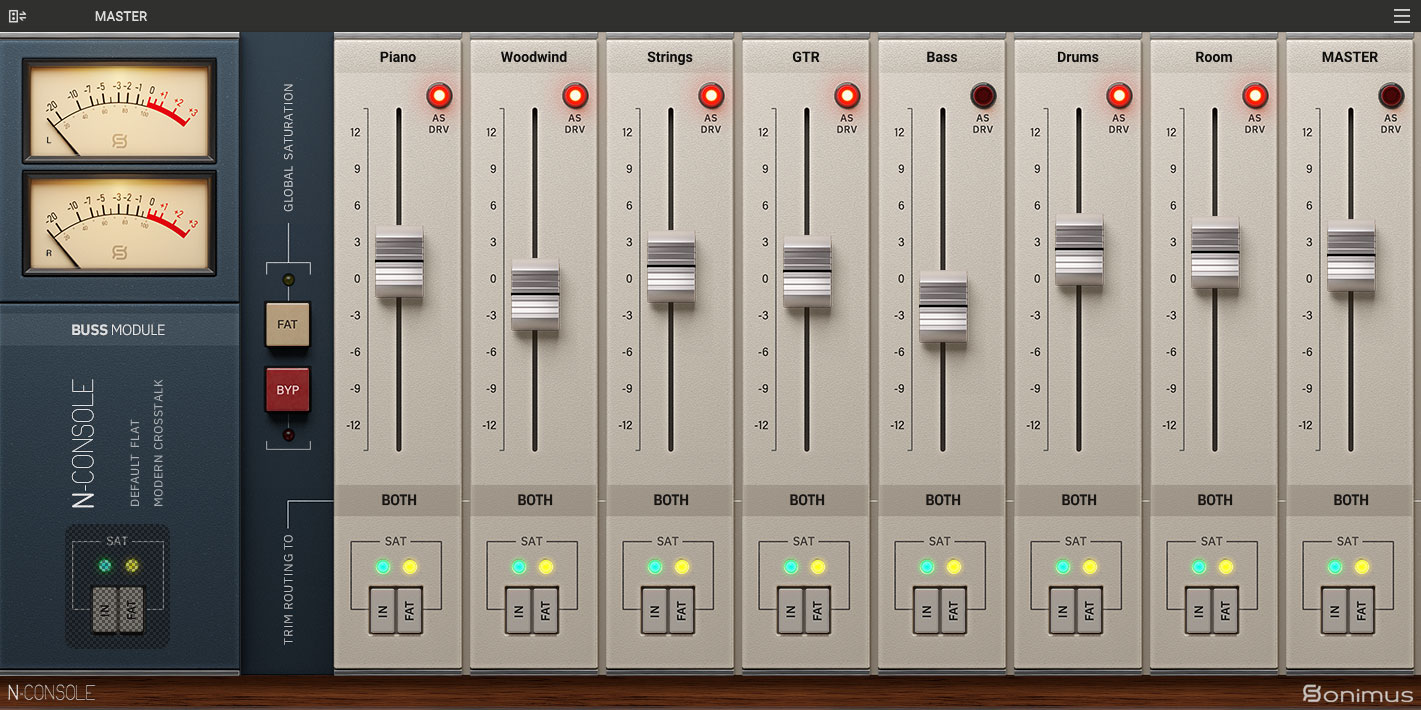
N-Console includes a powerful grouping system. You can group multiple instances under one name for unified control. The Master Grouping function lets one instance control volume, saturation, and FAT mode for the entire group. The Global Saturation Bypass button turns off saturation across all grouped instances at once. This makes it fast to compare your processed mix against the dry signal. The FAT Mode Switch toggles Fat saturation for the whole group in one click. Instances can also stay ungrouped if you want full independent control.
Linear Phase and Minimum Phase Oversampling
Version 1.1 added a major new feature: linear phase oversampling. This delivers high phase accuracy. It matters most on the mix bus and during mastering, where phase coherence affects stereo imaging and how a mix translates across systems. Minimum phase oversampling is the alternative mode. It behaves more like the original analog hardware and introduces natural phase shift. You can choose linear phase when transparency matters most, and minimum phase when you want the character closer to the original console.
Extra Settings Panel
Version 1.1 also added an Extra Settings panel. This gives you deeper control over the plugin, including the oversampling mode and other configuration options. The main interface stays clean and fast to use. Advanced users can open the Extra Settings panel when they need more control.
Gain Staging and Analog Workflow
N-Console’s gain staging controls work the way levels were managed on the original analog console. Driving a signal harder into a stage produces more harmonic character. This gives you a tactile, level-based way to dial in coloration, instead of relying only on a saturation amount knob.
How N-Console Sounds on Mac
User feedback on N-Console points to subtle, musical enhancement rather than an obvious effect. One reviewer described it as adding small changes that enliven almost any signal, with filters that cut unwanted content cleanly and saturation good enough to replace dedicated saturation plugins. Another reviewer called it great value that added surprising space to the mix and became part of their default plugin chain. One engineer reported running their entire Sonimus collection, including N-Console, across every session in Logic Pro and Reaper on an M1 Mac without issues.
On individual tracks, Normal mode adds warmth to vocals and acoustic instruments without changing the core tone. On drum busses, Fat mode adds punch and glue, especially when combined with Master Grouping for the whole drum group. On the mix bus and master, linear phase oversampling keeps the stereo image intact while adding overall glue. A second instance on a track can also work purely as a creative overdrive effect.
One thing to know before buying. N-Console does not offer a free demo or trial version. Your purchase decision relies on the audio demos and reviews available on the Sonimus website. The update cycle has also been slow in the past, which has been a point of frustration in community forums. The version 1.1 update with Apple Silicon support and linear phase oversampling addressed much of that frustration and was provided free to existing owners.
Key Features of Sonimus N-Console for Mac
- Console emulation modeled on the classic Neve 8014 desk
- 2-in-1 design combines channel and buss modules in one plugin instance
- Dual saturation modes: Normal for subtle warmth, Fat for stronger character
- Mix and blend control to balance processed and unprocessed signal
- Tone color busses for cohesive group tonal character
- Grouping system with Master Grouping for session-wide control
- Global Saturation Bypass and FAT Mode Switch for grouped instances
- Linear phase oversampling for high phase accuracy in mixing and mastering
- Minimum phase oversampling for authentic analog-style phase behavior
- Extra Settings panel for deeper configuration control
- Gain staging controls modeled on the original analog console
- Zero latency option when oversampling is disabled, no group delay
- 64-bit floating-point double precision internal processing
- Native Apple Silicon support added in version 1.1
- Compatible with Logic Pro, Reaper, Pro Tools, Ableton Live, Cubase, and Studio One
- Available as AU, VST2.4, VST3, and AAX plugin formats on Mac
Technical Details
- Full Name: Sonimus N-Console
- Setup App File Name: Sonimus N-Console
- Full Application Size: 85 MB
- Setup Type: AU, VST, VST3, Avid (AAX)
- Latest Version: 1.1.0
- Developers: Sonimus
System Requirements
- Operating System: macOS 10.9 (Mavericks) or later
- Memory (RAM): 4/8 GB
- Hard Disk Space: 226 MB
- Processor: Apple Silicon (M1-M5) and newer or Intel Core (64-bit)
Frequently Asked Questions
Does Sonimus N-Console work on Apple Silicon Mac?
Yes. Native Apple Silicon support was added in version 1.1. N-Console runs natively on M1 and later Mac chips. Users report smooth performance with low CPU usage even when running multiple instances across a full session in Logic Pro and Reaper.
What hardware console does N-Console emulate?
N-Console is modeled on the Neve 8014, a classic British console used on countless recordings since the 1970s. It is the successor to Sonimus’s earlier Britson plugin, which was based on the same console, rebuilt with a modern feature set and a 2-in-1 channel and buss design.
Is N-Console compatible with Logic Pro?
Yes. N-Console includes the Audio Units (AU) format, which is Logic Pro’s native plugin format on Mac. Install the AU version and it appears in the Logic Pro plugin library. It also supports VST3 for other Mac DAWs and AAX for Pro Tools.
What is the difference between N-Console and Britson?
N-Console is the rebuilt successor to Britson. Both are based on the Neve 8014 console, but N-Console adds mix and blend control, dual saturation modes, tone color busses, grouping features, and the 2-in-1 channel and buss design. Existing Britson owners received N-Console as part of the upgrade.
Is there a free trial for N-Console?
No. N-Console does not offer a free demo or trial version. Sonimus provides audio demos and customer reviews on their website to help with the purchase decision. Existing owners of N-Console version 1.0 or Britson received the version 1.1 update free.
What is the difference between Normal and Fat saturation modes?
Normal mode applies subtle distortion with a high dynamic range, suited for transparent warmth on vocals and acoustic instruments. Fat mode applies a hotter signal with a lower dynamic range, suited for stronger character on drums, bass, and electronic elements. Both modes can be used subtly across a mix or aggressively as a creative effect.
What plugin formats does N-Console support on Mac?
N-Console supports Audio Units (AU), VST2.4, VST3, and AAX on Mac. This covers Logic Pro, Pro Tools, Reaper, Ableton Live, Cubase, and Studio One. The Mac installer is a Universal Binary, so it works on both Intel and Apple Silicon processors.
How is N-Console different from Sonimus A-Console?
N-Console is based on the Neve 8014 console and has a warmer character. A-Console is based on an API-style console and is more transparent and open. Both plugins received the same version 1.1 update, including Apple Silicon support and linear phase oversampling. The choice between them depends on which console character fits your mix.
Download Sonimus N-Console v1.1.0 for Mac
Click the button below to start the Sonimus N-Console download for Mac. This is the full latest version of N-Console for macOS. It supports Intel and Apple Silicon Macs.