Download STM32CubeMX 2026 full latest version program free setup for Windows. STM32CubeMX 2026 is a professional microcontroller configuration and code-generation tool which allows developers to configure STM32 hardware visually and generate the corresponding code for developing the embedded application.
STM32CubeMX 2026 for Windows Review
STM32CubeMX 2026 is a Windows development tool from STMicroelectronics designed to make STM32 microcontroller setup easier. Instead of manually writing the initial code for pins, clocks, timers, communication interfaces, and other hardware features, you can configure them through a graphical interface and let STM32CubeMX generate the required initialization code. The software is mainly useful for embedded developers, electronics engineers, students, and makers working with STM32 microcontrollers. It can start a project from an STM32 chip, development board, or example, then guide you through hardware configuration before generating a project for a supported development environment.
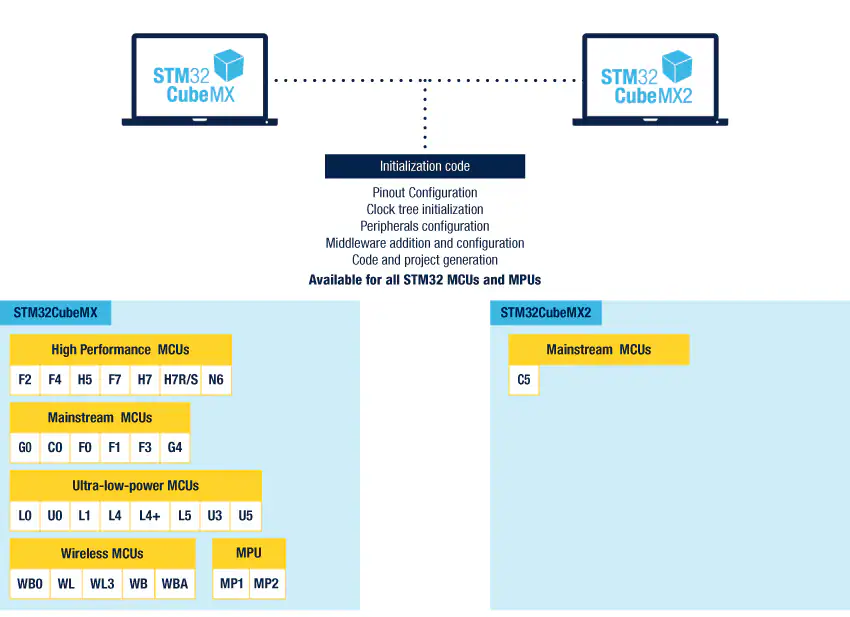
For Windows users, the current STM32CubeMX documentation supports Windows 10 and Windows 11. The latest 6.18.x documentation lists Windows 10 32-bit and 64-bit support and Windows 11 64-bit support, while newer release documentation also identifies Windows 10 and 11 64-bit as supported host systems. One important detail is that STM32CubeMX isn’t a complete replacement for a programming environment. Its main job is hardware configuration and code generation. You can then open the generated project in STM32CubeIDE, IAR Embedded Workbench, Keil MDK, CMake, or another supported development setup and continue writing, compiling, and debugging the application.
One of the most useful parts of STM32CubeMX is its configuration system. You select the STM32 device or board and then configure the features required by your project. The software can identify conflicts between pin assignments and other hardware settings before you generate the project. For example, if two peripherals require the same physical pin, STM32CubeMX can flag the conflict instead of leaving you to discover the problem later in your code. This doesn’t eliminate every hardware or software mistake, but it catches many configuration problems early.
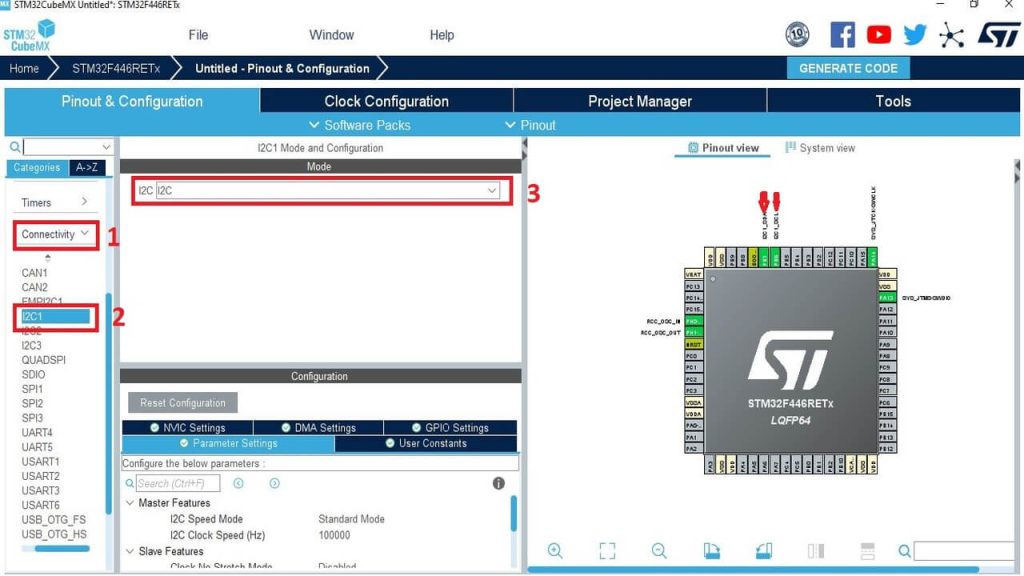
The clock configuration screen is another important part of the workflow. STM32 microcontrollers can have several clock sources and frequency relationships, and getting them wrong can cause communication or timing problems. STM32CubeMX provides a graphical way to configure the clock tree and identify invalid settings. Peripheral configuration is handled in the same environment. You can enable a UART, SPI interface, I²C bus, ADC, timer, DMA channel, or other supported feature and then adjust its available settings.
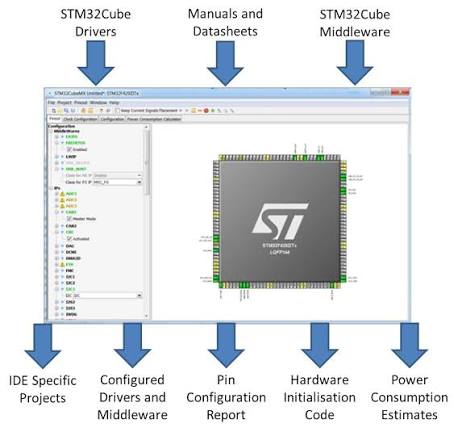
Once the configuration is complete, STM32CubeMX generates the initialization code and project files. ST’s documentation explains that the generated code is focused on initialization of peripherals and supported middleware rather than generating the complete application logic for you. That distinction matters. STM32CubeMX can prepare the foundation of a project, but you still need to write the application code that tells the microcontroller what your product should actually do.
STM32CubeMX 2026 Code Generation
Code generation is the central reason many developers use STM32CubeMX. After you configure the device, CubeMX creates initialization code and the required project structure. Depending on the selected settings, this can include HAL drivers, middleware, CMSIS components, and project files for the selected development environment. The generated project can be configured for environments such as STM32CubeIDE, IAR Embedded Workbench, and Arm Keil MDK. Current documentation also lists CMake and Makefile project generation options.
The advantage is consistency. Instead of manually setting up every register and initialization function before writing the actual application, you begin with a configuration generated from the selected STM32 device and enabled peripherals. The limitation is equally important: generated code isn’t a complete application. You still need to write the logic for your product. If you’re building a sensor device, for example, CubeMX can help configure the ADC, timer, GPIO, communication interface, and other supported components, but your application still needs to decide how to read the sensor, process the values, and respond to them.
STM32CubeMX 2026 Peripheral Configuration
STM32CubeMX supports a wide range of STM32 peripherals, although the exact options depend on the selected chip. Common configuration tasks include GPIO, USART, SPI, I²C, timers, ADC, DMA, USB, and other device-specific peripherals. Middleware such as FreeRTOS, USB components, LwIP, and FatFs can also be configured when supported by the selected device and installed software packages. This device-dependent approach is important. Not every STM32 chip has the same peripherals, memory, pins, or capabilities. A feature appearing in one STM32 family doesn’t mean it will be available on every STM32 device. CubeMX reduces this confusion by presenting configuration options according to the selected hardware.
Key Features of STM32CubeMX 2026
- Graphical STM32 microcontroller configuration.
- Pin and peripheral configuration.
- Clock tree configuration.
- GPIO setup.
- USART and UART configuration.
- SPI configuration.
- I²C configuration.
- ADC configuration.
- Timer configuration.
- DMA configuration.
- USB configuration where supported.
- Ethernet and networking options where supported.
- FreeRTOS configuration.
- FatFs support.
- LwIP support.
- STM32 middleware configuration.
- STM32Cube expansion packages.
- Project creation from an MCU.
- Project creation from a development board.
- Project creation from examples.
- Automatic initialization C-code generation.
- HAL driver support.
- Low-Layer driver code generation.
- Project generation for several development environments.
- .ioc project configuration files.
- User-code sections that can be preserved during regeneration.
- Software package management.
- Hardware conflict detection.
- Pin assignment checking.
- Clock configuration checking.
- Project import and export.
- Built-in access to ST development tools.
- Support for custom code-generation templates.
- Video tutorials within the application.
- Support for Windows 10 and Windows 11.
- Support for multiple STM32 device families.
STM32CubeMX 2026 Alternatives
STM32CubeIDE
STM32CubeIDE is the closest alternative when you want an all-in-one STM32 development environment. It combines project development, compilation, debugging, and CubeMX-related configuration features. It makes more sense than standalone CubeMX if you want one application for most of the development process.
STM32CubeMX2
STM32CubeMX2 is part of ST’s newer Cube ecosystem and is designed as a newer configuration and initialization tool. ST currently lists CubeMX2 separately from the traditional STM32CubeMX application, with Windows 10 and 11 64-bit support. Developers should check whether their target STM32 device and workflow are supported before choosing it instead of the established CubeMX application.
Keil MDK
Keil MDK is a professional development environment for Arm-based microcontrollers. It can be used with STM32 devices and is particularly relevant for teams already using the Keil toolchain. It isn’t a direct one-to-one replacement for CubeMX’s graphical hardware configuration, but it can form part of the same STM32 development workflow.
IAR Embedded Workbench
IAR Embedded Workbench provides a professional development environment for Arm-based embedded systems and supports STM32 development. It is worth considering for teams that already use IAR tools or need its compiler and debugging workflow.
PlatformIO
PlatformIO provides a different development approach, with project management and support for many embedded platforms and development environments. It’s useful for developers who work across multiple microcontroller families rather than staying entirely within the ST ecosystem.
Conclusion
STM32CubeMX 2026 is a practical Windows tool for STM32 development, especially when you want a faster way to configure hardware and generate the initial C code. It’s easy enough for newcomers to start with, while its project and package features remain useful for experienced developers. It won’t replace firmware knowledge or proper testing, but it can remove a large amount of repetitive setup work from an STM32 project.
STM32CubeMX 2026 Technical Setup Details
- Software Full Name: STM32CubeMX 2026
- Setup File Name: STM32CubeMX_Windows_v6.17.0.rar
- Setup Size: 662 MB
- Setup Type: Offline Installer / Full Standalone Setup
- Compatibility: 32 Bit (x86) / 64 Bit (x64)
- Developers: STM32CubeMX
System Requirements for STM32CubeMX 2026
- Operating System: Windows 10/11
- RAM: 2 GB
- Hard Disk: 2 GB
- Processor: Intel Dual Core or higher processor
STM32CubeMX 2026 Download
Download STM32CubeMX 2026 free latest full version offline direct download link for full offline setup by clicking the button below.