Download USB Safely Remove 7.4.1.1336 full latest version program free setup for Windows. USB Safely Remove 2026 is a professional application which allows you to quickly and safely remove USB devices such as external hard drives, USB flash drives, and other USB devices without manually unplugging them.
USB Safely Remove 2026 Review:
USB Safely Remove 2026 is a dedicated device management utility designed to improve the way users handle removable storage devices in Windows. While Windows already includes a built-in “Safely Remove Hardware” feature, this software expands the experience with additional control, customization options, and troubleshooting tools. It is built for users who frequently connect USB flash drives, external hard drives, memory cards, and other removable devices and want a faster and more reliable way to manage them. The software focuses on making device removal easier while helping reduce the risk of interrupted transfers and file corruption. One of the biggest strengths of USB Safely Remove 2026 is its enhanced device menu.
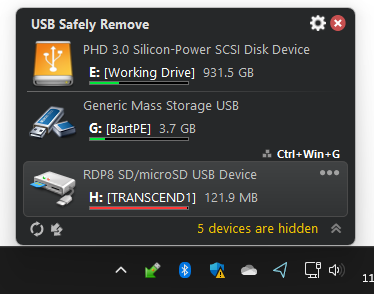
The default Windows removal menu can become confusing when multiple devices are connected because several devices may appear with generic names. This software replaces that with a more organized system that shows recognizable names and custom icons, making it easier to identify the correct device. Users can even rename devices or hide unnecessary entries to keep the list clean and easier to navigate. Another useful feature is its ability to detect what prevents a device from being safely removed. Most users have experienced the message saying that a device cannot be ejected because it is still in use. Instead of leaving users guessing, USB Safely Remove identifies the applications or files currently locking the device and gives options to close them. This can save time and reduce frustration during everyday use.
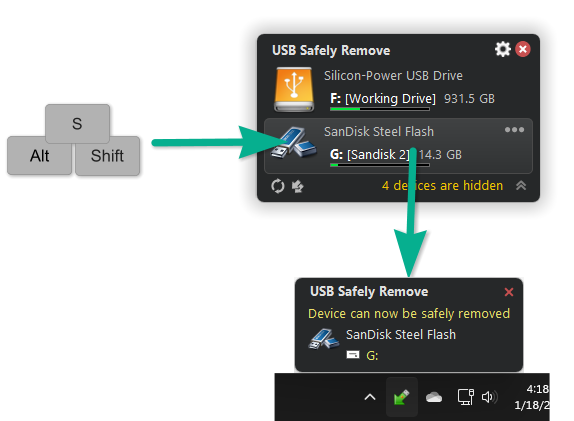
Automation is another area where USB Safely Remove 2026 performs well. The software can automatically launch actions when a device is connected or disconnected. Users can create routines such as starting backup software, opening a file manager, scanning a drive for threats, or running other selected tasks. This makes repetitive tasks quicker and more convenient, especially for people who regularly work with external storage. The drive management capabilities also add practical value. Users can assign permanent drive letters to specific devices and hide empty card reader slots that often create clutter in Windows Explorer. This creates a more organized environment and prevents changing drive letters from disrupting workflows or software shortcuts.
Another interesting feature is device reactivation. If a device has been safely stopped but is still physically connected, users can reactivate it without unplugging and reconnecting it. This may sound like a small improvement, but it can be useful when external drives are connected in hard-to-reach places. Overall, USB Safely Remove 2026 is more than a simple USB ejection tool. It combines device management, automation, troubleshooting, and organization into a lightweight utility that can improve everyday workflow for users who regularly rely on external storage devices. Whether you are managing flash drives, external hard disks, or other removable hardware, it provides a more convenient experience than the standard Windows solution.
Key Features
- Safe one-click removal of external devices
- Displays clear device names and custom icons
- Rename connected devices for easier identification
- Hide unnecessary devices from the menu
- Shows programs preventing device removal
- Force stop locked devices when needed
- Reactivate stopped devices without reconnecting
- Hotkey support for faster access
- Automatic actions during connection or removal
- Run backups automatically before device removal
- Command-line support for automation tasks
- Assign fixed drive letters to devices
- Hide unused card reader slots
- Supports USB, SATA, FireWire, and hot-plug devices
- Optional power-off function for external drives
- Device disabling and re-enabling options
Technical Details
- Software Full Name: USB Safely Remove 2026
- Setup File Name: USB_Safely_Remove_7.4.1.1336.rar
- Setup Size: 3.7 MB
- Setup Type: Offline Installer / Full Standalone Setup
- Compatibility Mechanical: 32 Bit (x86) / 64 Bit (x64)
- Developers: USB Safely
System Requirements
- Operating System: Windows 7/8/10
- RAM: 1 GB
- Hard Disk: 500 MB
- Processor: Intel Dual Core or higher processor
USB Safely Remove 7.4.1.1336 Free Download
Download USB Safely Remove 2026 free latest full version offline direct download link for full offline setup by clicking the button below.