Download Awesome Miner Ultimate 2026 full latest version program free setup for Windows. Awesome Miner Ultimate 2026 is a professional cryptocurrency-mining management program which allows users to monitor, control, optimize, and automate mining operations.
Awesome Miner Ultimate 2026 for Windows Review
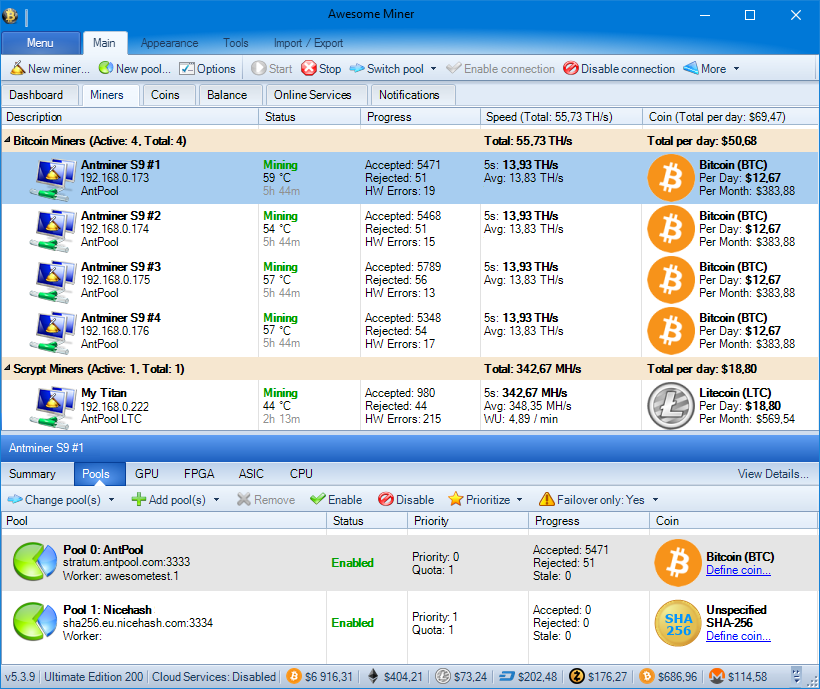
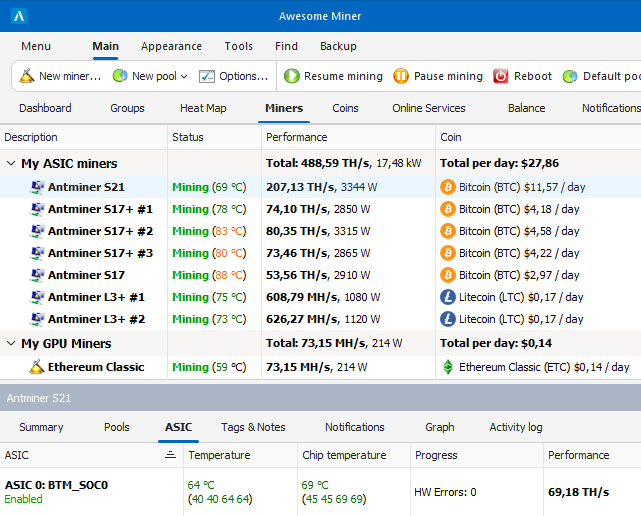
Awesome Miner Ultimate 2026 is a Windows-based application for managing and monitoring cryptocurrency mining hardware from one place. It is designed for users who work with ASIC miners, GPU rigs, or CPU mining and need a central dashboard instead of opening the control page for every machine separately. The software can connect to popular ASIC hardware and can also manage GPU and CPU mining software. It provides information such as hashrate, temperature, power usage, mining status, pool information, and profitability. It can also restart miners, change settings, apply templates, and send alerts when something goes wrong. Awesome Miner says its platform can manage very large mining operations, with centralized management for up to 200,000 miners.
One important point is that Awesome Miner is mainly a management and monitoring application, not simply a Bitcoin miner. It can control mining software on Windows and connect to miners running elsewhere, including Linux-based systems. This makes it more useful for people managing several machines than for someone who only wants to start a single miner on a personal PC. The Windows application also includes profit switching, GPU overclocking, mining rules, notifications, remote management, mining history, web access, and hardware monitoring. Some features require an active subscription, particularly when managing more than two miners.
ASIC Miner Management
ASIC management is one of Awesome Miner’s strongest areas. Instead of logging into each ASIC through its individual web interface, you can bring multiple devices into the same dashboard. The software supports popular hardware from manufacturers such as Bitmain Antminer, Canaan Avalon, Innosilicon, Goldshell, and MicroBT Whatsminer. Once miners are connected, you can monitor their operating condition and perform supported actions from the central interface.
Depending on the miner model and firmware, available controls can include restarting the machine, changing pools, changing power modes, pausing mining, and accessing additional hardware information.The exact controls aren’t identical for every ASIC. Awesome Miner’s documentation maintains a feature-support list because different manufacturers expose different controls. This is an important limitation to understand. Having an ASIC listed as supported doesn’t necessarily mean every management function will be available for every model.
GPU Mining Management
Awesome Miner can also manage GPU mining. The software can start, monitor, and control mining software on Windows computers. Remote computers can also be managed through the Awesome Miner Remote Agent. GPU overclocking is available as part of the managed-miner workflow. It supports GPUs from both NVIDIA and AMD. For someone running several mixed GPU systems, having mining controls and hardware information in one application can save a lot of manual work. CPU mining is supported as well, although the official documentation notes that CPU mining will generally generate only a small income compared with GPU mining.
Profit Switching
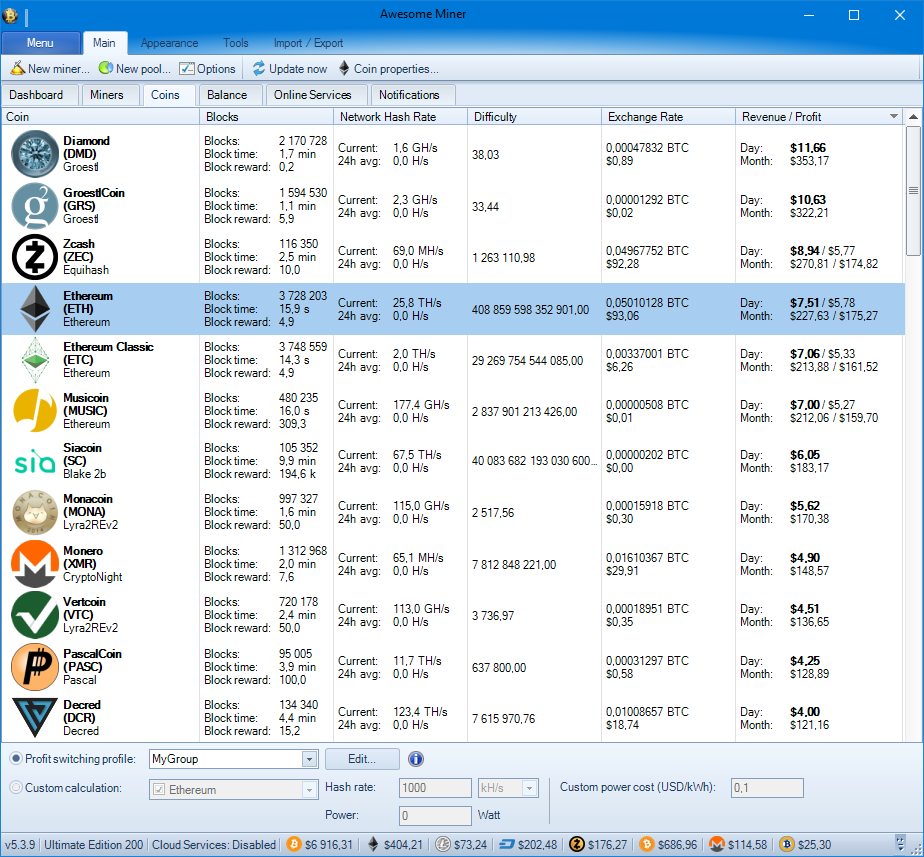
Profit switching is one of the features that makes Awesome Miner different from a basic mining dashboard.The software can compare supported mining options and automatically switch between mining pools or algorithms based on profitability. This is intended to reduce the need for manually checking which option is currently more profitable.
Awesome Miner provides tools for algorithm benchmarking, coin statistics, pool balances, wallet balances, power consumption, and profitability calculations. However, a profitability estimate shouldn’t be treated as guaranteed income. Mining profitability changes with coin prices, network difficulty, pool fees, electricity costs, hardware efficiency, and downtime. The software can help you make decisions, but it can’t remove those variables.
Rules and Automation
The rules system is useful for repetitive problems. You can create conditions that tell Awesome Miner what to watch for and what to do when a condition occurs. The documentation lists triggers, actions, variables, and notification options as part of the rules system. This can reduce the amount of manual checking required. For example, an operator can build a rule around a miner becoming unavailable and configure an appropriate response. The exact action depends on the miner and the condition being monitored.
Mining History
Awesome Miner keeps historical mining information so you can look beyond the current status. Mining history can help identify patterns such as repeated downtime, declining hashrate, temperature problems, or changes in performance. This matters because a miner that looks fine right now may still have a history of repeated failures. Looking at historical information can make troubleshooting easier than relying only on the current dashboard.
Key Features of Awesome Miner Ultimate 2026
- Central dashboard for mining operations.
- Supports ASIC, GPU, and CPU mining.
- Supports popular ASIC manufacturers.
- Supports NVIDIA and AMD GPUs.
- Remote monitoring and management.
- GPU overclocking controls.
- Automatic profit switching.
- Mining profitability calculations.
- Pool and wallet balance information.
- Hashrate monitoring.
- Temperature monitoring.
- Power consumption monitoring.
- Mining history.
- Miner grouping and tagging.
- Configuration templates.
- Automatic miner discovery.
- Rules for detecting mining problems.
- Automatic actions when a problem occurs.
- Email and other notification options.
- Telegram notifications.
- Built-in web interface.
- Remote Agent for controlling other computers.
- Support for Windows and remote Linux mining systems.
- ASIC firmware management.
- Antminer support.
- Whatsminer support.
- Avalon support.
- Goldshell support.
- Innosilicon support.
- Canaan support.
- Mining pool management.
- Benchmarking for algorithms.
- Dual-mining support for selected miners.
- Custom mining software support.
- HTTP API.
- C# scripting API.
- Multi-user access control.
- Heat maps and performance information.
- Power curtailment options.
- Large-scale mining management.
Awesome Miner Alternatives
Minerstat
Minerstat is a strong alternative for users who want centralized management of mining hardware with monitoring and automation tools. It can be a better fit if you prefer a more cloud-oriented management experience.
Hive OS
Hive OS is another popular choice for managing mining rigs, particularly GPU-based systems. It is built around a dedicated mining operating environment rather than Awesome Miner’s Windows-first management approach.
Foreman
Foreman focuses heavily on ASIC monitoring and farm management. It can be a good alternative for operators who mainly work with ASIC miners and want a web-based management system.
Braiins OS
Braiins OS is more closely associated with ASIC firmware and Bitcoin mining management. It is worth considering when the main goal is improving control and efficiency on compatible ASIC hardware rather than managing a mixed collection of GPU and ASIC systems.
NiceHash
NiceHash is easier for users who want a simpler mining experience. It combines mining software with a marketplace-based approach, making it less focused on detailed farm management than Awesome Miner.
Conclusion
Awesome Miner Ultimate 2026 is a strong Windows solution for users who need centralized control over multiple cryptocurrency miners. Its combination of ASIC and GPU support, profit switching, remote access, alerts, automation, templates, and hardware monitoring makes it more suitable for serious mining management than basic mining software. For a single beginner-owned rig, a simpler option may be easier, but for a growing operation where monitoring and automation matter, Awesome Miner is worth considering.
Awesome Miner Ultimate 2026 Technical Setup Details
- Software Full Name: Awesome Miner Ultimate 2026
- Setup File Name: Awesome_Miner_Ultimate_11.5.5.rar
- Setup Size: 103 MB
- Setup Type: Offline Installer / Full Standalone Setup
- Compatibility: 32 Bit (x86) / 64 Bit (x64)
- Developers: Awesome Miner Ultimate
System Requirements for Awesome Miner Ultimate 2026
- Operating System: Windows 7/8/10
- RAM: 2 GB
- Hard Disk: 500 MB
- Processor: Intel Dual Core or higher processor
- Microsoft .NET Framework 4.5 or later.
Awesome Miner Ultimate 2026 Download
Download Awesome Miner Ultimate 2026 free latest full version offline direct download link for full offline setup by clicking the button below.