Download Tabs Studio 2026 full latest version program free setup for Windows. It is a highly productive tool for Microsoft Visual Studio that allows developers to organize, group, sort, color, customize, and navigate open files more efficiently.
Tabs Studio 2026 for Windows Review
Tabs Studio 2026 is a Visual Studio and SQL Server Management Studio extension designed for developers who regularly work with many open documents. It replaces the standard document-tab experience with more control over tab grouping, coloring, sorting, navigation, and layout. The main idea is simple: when a project has dozens of open files, you should be able to find the right file without repeatedly searching through crowded tabs. Tabs Studio supports the latest Visual Studio 2026 and 2022, as well as SQL Server Management Studio 22 and 21. Older versions of Visual Studio and SSMS are also supported through separate installers. The latest listed release is Tabs Studio 5.7.2, released on July 1, 2026.
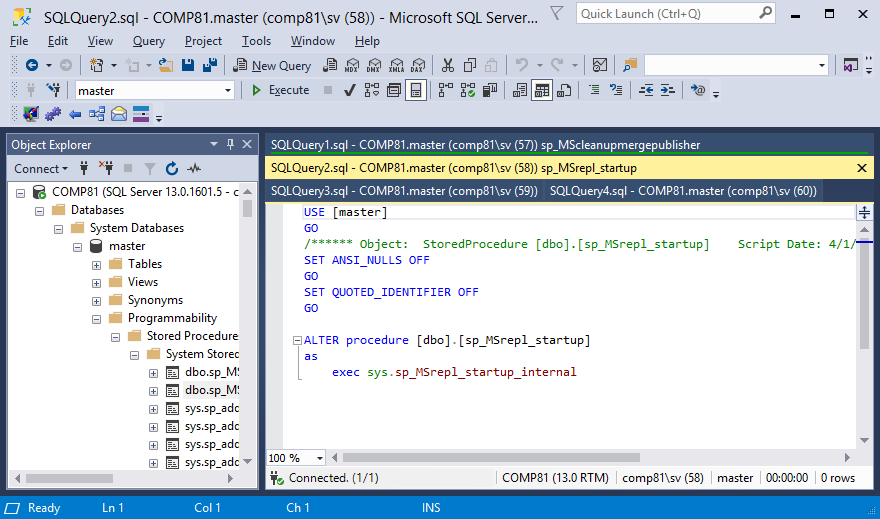
The extension is especially useful for developers working on large solutions where many files stay open at the same time. It can group related tabs, assign colors, display tab numbers, and provide keyboard shortcuts for moving between documents. It also supports custom tab titles, which can be particularly useful in SQL Server Management Studio where several query tabs may otherwise have nearly identical names.

Tabs Studio 2026 for Visual Studio
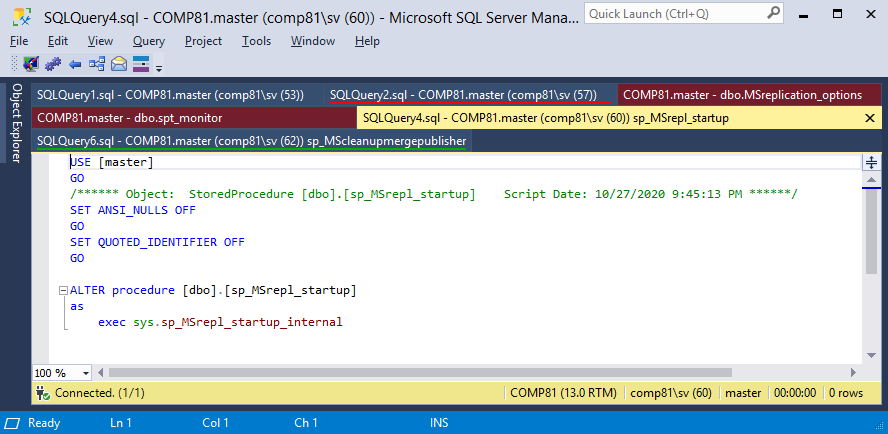
Tabs Studio is most useful when Visual Studio projects become large enough that the normal tab bar starts getting in the way. A small project may only have a handful of open files, so additional tab management isn’t necessary. In a larger solution, however, you may have source files, interfaces, tests, configuration files, generated files, and views open at the same time. The extension gives those files more structure. You can organize them by project, use colors to distinguish groups, and move between them with shortcuts. Visual Studio itself has added more document-management options over time, including color tabs and other customization features. Tabs Studio is still useful for developers who want more control than the built-in tab system provides.
Tabs Studio 2026 for SQL Server Management Studio
SQL Server Management Studio is another area where Tabs Studio can be useful. Database developers often keep several query windows open at the same time. If the tabs have similar names, finding the correct query becomes difficult. Tabs Studio’s custom comments can make those tabs easier to identify. For example, instead of seeing several generic query names, you can use descriptive labels such as Customer Report, Monthly Sales, Order Cleanup, or Test Query. This doesn’t change the SQL itself. It simply makes the open-document area easier to manage.
Tabs Studio 2026 Tab Organization
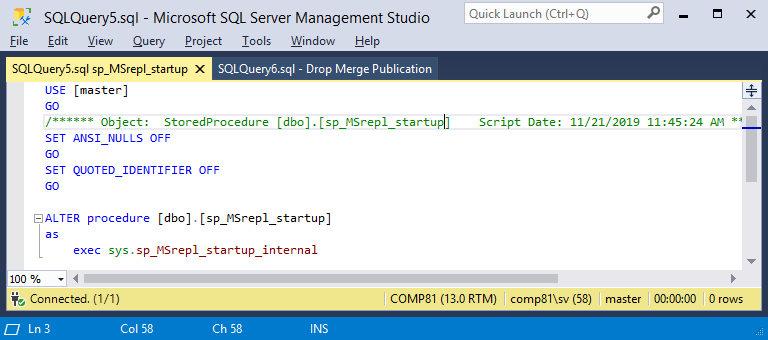
Tabs Studio provides several ways to organize documents instead of forcing every open file into one long horizontal row. Multiple tab rows can make more documents visible at once. Grouping can keep related files together, while sorting can help establish a consistent order. The extension also allows tabs to be colored according to projects or custom rules. This can be especially useful when a Visual Studio solution contains several projects that use similar file names. The main benefit isn’t that the extension makes coding faster by itself. It reduces the time spent looking for documents. That difference matters. If you switch between files hundreds of times during a workday, small improvements in document navigation can become noticeable.
Tabs Studio 2026 Keyboard Shortcuts
Keyboard navigation is another important part of the extension.You can move to the next or previous tab, reorder tabs, and directly select the first 20 tabs using shortcuts. Tab numbers can be displayed when direct navigation is enabled. This works particularly well for developers who prefer the keyboard instead of repeatedly clicking on the tab bar. The shortcuts also make it easier to switch between two files during tasks such as comparing code, editing a class and its test, or checking a query against application code.
Tabs Studio 2026 Ease of Use
Tabs Studio is relatively simple once the basic setup is complete, but the number of customization options can take some time to understand. A common mistake is trying to configure every option immediately. A better approach is to start with the features that solve your actual problem. If the main problem is too many tabs, start with multiple rows and grouping. If similar filenames are confusing, use tab colors or custom labels. If you frequently switch between documents, learn the keyboard shortcuts first. The extension is designed to fit into Visual Studio rather than replacing the IDE, so developers don’t need to learn a completely different development environment.
Key Features of Tabs Studio 2026
- Replace the standard Visual Studio document tabs.
- Supports Visual Studio 2026 and 2022.
- Supports SQL Server Management Studio 22 and 21.
- Organizes large numbers of open documents.
- Supports multiple tab rows.
- Groups related documents.
- Colors tabs by project.
- Colors tabs using custom rules.
- Displays tab numbers for quick navigation.
- Provides next and previous tab shortcuts.
- Allows direct navigation to the first 20 tabs.
- Supports tab reordering with keyboard shortcuts.
- Helps distinguish files with identical names.
- Supports custom tab titles.
- Allows custom comments in tab names.
- Can automatically create tab comments from document contents.
- Provides several tab layout options.
- Helps organize tabs by project.
- Includes tab extensions for additional customization.
- Supports recently edited documents.
- Works with SQL query tabs.
- Supports older Visual Studio versions through separate installers.
- Supports older SQL Server Management Studio versions.
- Available for individual users and businesses.
Tabs Studio 2026 Alternatives
Visual Studio Built-In Tab Features
Before installing another extension, it’s worth checking Visual Studio’s own tab features. Current Visual Studio versions include features such as color tabs and flexible document management. This is the simplest option because there is nothing extra to install. It may be enough for developers who only need basic tab customization.
Productivity Power Tools
Microsoft’s Productivity Power Tools collection has included document-tab features such as scrollable tabs, vertical tabs, pinned tabs, tab sorting, and project-based tab colors. It can be useful for developers who want additional Visual Studio productivity features rather than a tool focused almost entirely on document tabs.
ReSharper
JetBrains ReSharper is a much broader Visual Studio productivity extension. It provides code analysis, navigation, refactoring, and other development features in addition to improving the general coding workflow. It isn’t a direct replacement for Tabs Studio because its main purpose is code productivity rather than tab management.
System Informer
System Informer is more focused on Windows process and system management, so it isn’t a direct replacement for Tabs Studio. It may appear in lists of Visual Studio productivity alternatives, but it serves a completely different purpose. For tab management specifically, Visual Studio’s built-in features or another Visual Studio extension are closer alternatives.
Visual Studio Extensions
The Visual Studio Marketplace contains thousands of extensions that can change and extend the IDE. Developers can choose smaller extensions for specific workflow problems instead of installing a large productivity package. This approach can be useful if you only want one feature, such as improved navigation, tab coloring, or project organization.
Conclusion
Tabs Studio 2026 is a useful Windows extension for developers who regularly work with crowded Visual Studio or SQL Server Management Studio tabs. It doesn’t try to replace your IDE or add unnecessary development tools. Instead, it focuses on document organization and navigation. If you normally keep dozens of files open, the extra control can make everyday work more comfortable. If you only use a few tabs at a time, Visual Studio’s built-in features may already provide everything you need.
Tabs Studio 2026 Technical Setup Details
- Software Full Name: Tabs Studio 2026
- Setup File Name: TabsStudio_5.7.2.rar
- Setup Size: 2.4 MB
- Setup Type: Offline Installer / Full Standalone Setup
- Compatibility Mechanical: 32 Bit (x86) / 64 Bit (x64)
- Latest Version Release Added On: 27th Aug 2026
- Developers: Tabs Studio
System Requirements for Tabs Studio 2026
- Operating System: Windows 7/8/10
- RAM: 1 GB
- Hard Disk: 100 MB
- Processor: Intel Dual Core or higher processor
Tabs Studio 2026 Download
Download Tabs Studio 2026 free latest full version offline direct download link for full offline setup by clicking the button below.