Download Craft Anything 2026 full latest version program free setup for Windows.
Craft Anything 2026 for Windows Review
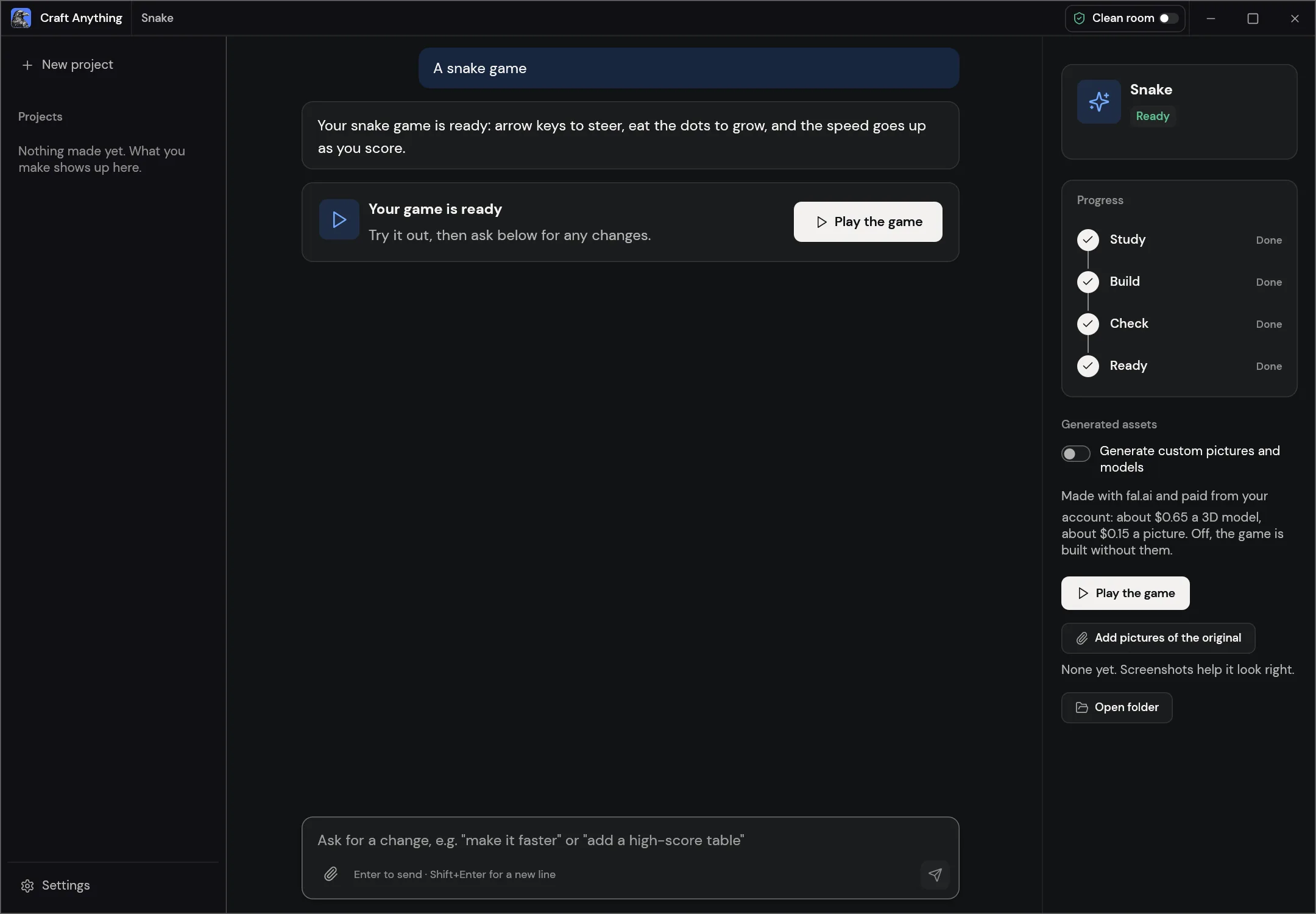
Craft Anything 2026 is an open-source software exploration and development tool from the ArtCraft team. It helps users understand how websites, desktop applications, mobile apps, games, and files work. After studying a target, it can work with an AI coding agent to create a new project based on the user’s instructions. It then checks the result against the original and identifies areas that need improvement.
Unlike a traditional code editor, Craft Anything combines software inspection with AI-assisted project creation. It is available for Windows, macOS, Linux, and FreeBSD. The software is free and open source, making it an interesting option for developers, software researchers, and people who want to experiment with rebuilding their own projects.

Study Websites and Applications
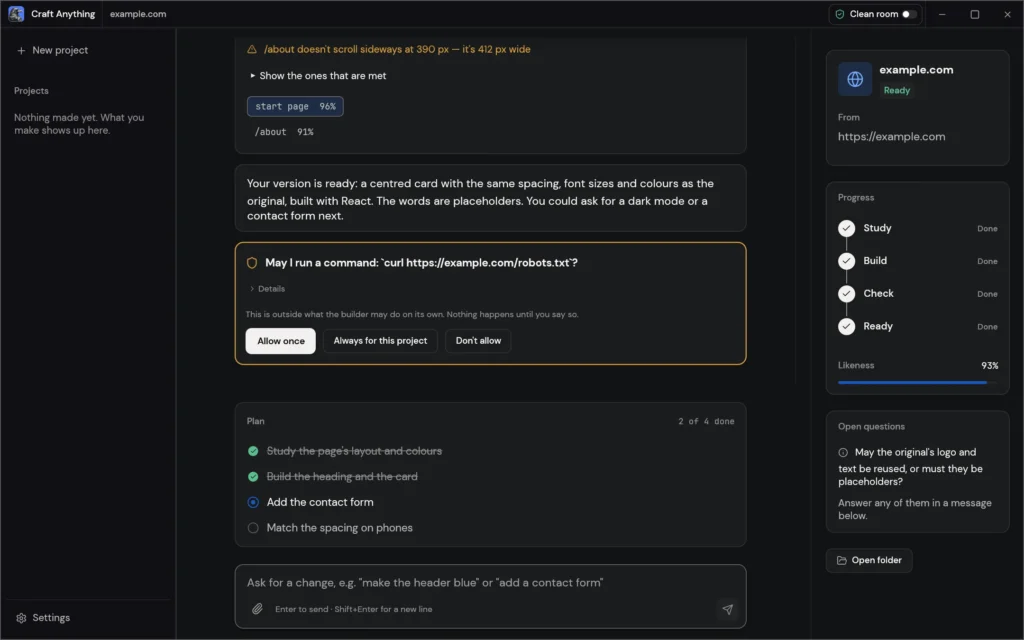
Craft Anything uses inspection tools to examine different types of software. Users can study websites, desktop applications, phone apps, games, and supported files. It collects information about the target and provides evidence behind its findings, helping users understand how a program works rather than relying entirely on AI-generated explanations.
The default Clean Room mode works with visible information and avoids reading the original software’s code, files, or website source. Deep mode offers more detailed inspection when users have permission to examine the target internally.
Build Projects With AI
After studying a target, users can describe what they want to create. For example, they can ask Craft Anything to recreate a website layout or build a game with similar gameplay. A connected coding agent then creates a new project using the requested language, framework, or game engine.
Claude Code is the primary supported builder. Other integrations include tools such as GitHub Copilot CLI and Grok Build, although support and testing vary. Users should remember that Craft Anything does not include a coding-agent subscription or automatically provide free AI usage. They need to install and sign in to their chosen agent separately.
Check and Improve Results
One useful part of Craft Anything is its checking process. It compares the new project with the original and reports differences that may need attention. Website projects can be checked at three screen widths, while supported game projects can use their own testing process.
Users can review the results, request changes, and continue improving the project. This makes the software more useful than a basic prompt-based generator because it includes a way to examine the output instead of simply accepting the first result.
Desktop App, CLI, and Advanced Tools
Craft Anything offers a Simple mode for starting projects and an Advanced mode for users who want more control. The Advanced workbench provides access to inspection tools, evidence, logs, functions, and other technical information. It also includes a command-line interface (CLI) and an MCP server. Its tools can be used by compatible AI agents through these interfaces, which gives developers more flexibility when connecting the software to an existing workflow. However, Craft Anything is still in early alpha. Some integrations and application-testing features are incomplete or have not been fully tested with real-world setups. Clean Room mode is also not a computer security sandbox, so users should review agent permissions and approve commands carefully.
Key Features of Craft Anything
- Website Inspection:Examine website layouts, visible content, menus, fonts, colors, and other elements.
- Application Analysis:Study desktop applications, mobile apps, supported files, and software behavior.
- Game Exploration:Inspect game projects and work on recreating gameplay in supported engines.
- AI Project Building:Use a connected coding agent to create new projects from written instructions.
- Clean Room Mode:Study visible information without reading the original software’s internal code or files.
- Deep Mode:Access deeper inspection tools for software you own or are authorized to examine.
- Project Checking:Compare generated projects with the original and identify differences.
- Simple and Advanced Modes:Choose a guided workflow or a more detailed technical workbench.
- CLI and MCP Support:Connect the inspection engine to compatible command-line and AI-agent workflows.
Best Alternatives to Craft Anything
- Ghidra
Ghidra is a free, open-source reverse-engineering framework for examining compiled software. It offers tools for disassembly, decompilation, and code analysis. It is a strong choice for users who mainly want to understand how existing programs work, but it does not provide Craft Anything’s complete AI-assisted project-building workflow.
- Cursor
Cursor is an AI-powered code editor designed to help developers write, understand, and modify code. It can work with existing projects, answer questions about code, and assist with development tasks. It is more suitable for everyday coding and editing, while Craft Anything focuses more on studying an existing target and checking a new project against it.
- Replit
Replit provides a browser-based development environment with AI-assisted project creation. Users can describe an application, generate code, and continue developing it within the platform. It is a useful alternative for building applications quickly, although its cloud-based workflow differs from Craft Anything’s local software inspection and rebuilding approach.
Conclusion
Craft Anything 2026 for Windows brings software inspection, AI-assisted development, and project checking into one open-source tool. Its Clean Room and Deep modes, advanced workbench, and CLI and MCP support make it particularly interesting for developers who want to study existing software and build their own projects.
The main limitation is its early-alpha status. Some features and coding-agent integrations still need further development, and users must arrange their own AI coding tools. Even so, Craft Anything is worth exploring if you want a free tool that goes beyond ordinary AI code generation and helps you study, build, and improve software projects.
Craft Anything 2026 Technical Setup Details
- Software Full Name: Craft Anything 2026
- Setup File Name: Craft_Anything-0.6.1.rar
- Setup Size: 55 MB
- Setup Type: Offline Installer / Full Standalone Setup
- Compatibility Mechanical: 32 Bit (x86) / 64 Bit (x64)
- Latest Version Release Added On: 20th Nov 2026
- Developers: Craft Anything
System Requirements for Craft Anything 2026
- Operating System: Windows 7/8/10
- RAM: 8 GB
- Hard Disk: 2 GB
- Processor: Intel Dual Core or higher processor
Craft Anything 2026 Free Download
Download Craft Anything 2026 free latest full version offline direct download link for full offline setup by clicking the button below.