Download MedCalc 2026 full latest version program free setup for Windows. MedCalc 2026 is a focused statistics package for researchers who work with medical and biomedical data.
MedCalc 2026 for Windows Review
MedCalc 2026 is statistical software for Windows designed mainly for biomedical research, clinical studies, laboratory work, and medical data analysis. It combines a spreadsheet, statistical tests, graphs, and specialized tools in one desktop application. Unlike general statistics programs, MedCalc puts strong emphasis on medical research tasks such as ROC curve analysis, method comparison, survival analysis, reference intervals, and meta-analysis. The software has been developed since 1993 and includes more than 220 statistical tests, procedures, and graphs. It is designed to be easier to learn than many large statistical packages, which makes it useful for researchers who need reliable results without building complicated workflows from scratch.
The current 2026 release is MedCalc version 23.7, released on August 20, 2026. This update added several statistical and reporting improvements, including new effect-size measures, weighted options for some analyses, confidence interval lines for logistic regression, and a test for the proportional hazards assumption in survival analysis. MedCalc runs directly on Windows and supports both traditional Intel/AMD processors and Qualcomm ARM64 devices. It is available in 32-bit and 64-bit editions, while the current download page provides separate installers for each version.
One of MedCalc’s strongest areas is ROC curve analysis. ROC curves are commonly used in medical research to evaluate how well a diagnostic test separates two groups, such as people with and without a particular condition. MedCalc includes tools for creating ROC curves, calculating the area under the curve, comparing ROC curves, and working with related diagnostic-test measurements. This makes the program particularly useful for researchers working with diagnostic tests. Instead of using a general statistics package and searching for separate tools, the required analysis methods are available inside the same application.
MedCalc 2026 for Medical Research
MedCalc is particularly suited to biomedical research because many of its tools are designed around problems researchers encounter in medical studies. For example, researchers can use it to calculate descriptive statistics, compare groups, study relationships between variables, evaluate diagnostic tests, compare measurement methods, and analyze outcomes over time. The software also includes sample-size calculations. This is useful before collecting data because researchers can estimate how many participants may be needed for a planned analysis.
MedCalc also provides post-hoc power calculations and online QuickCalcs for several common medical statistics. Another useful feature is the ability to work with summarized data. The statistics menu includes tests that can be performed when the original individual-level data isn’t available, including calculations involving means, proportions, standard deviations, correlations, relative risk, and odds ratios. This gives MedCalc a practical advantage for researchers who regularly work with published study results or summarized clinical data.
MedCalc 2026 Graphs and Reports
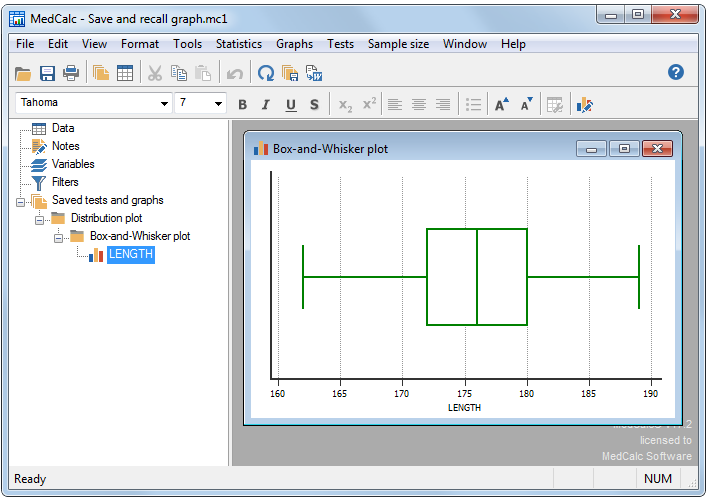
MedCalc doesn’t stop at statistical calculations. Its graphing tools are designed to turn analysis results into figures that can be used in reports and research papers. The software supports ROC curves, Bland-Altman plots, Kaplan-Meier curves, forest plots, violin plots, scatter diagrams, heatmaps, and other statistical graphs. Graphs can be edited, labeled, saved, and exported in several formats. The ability to export directly to PowerPoint is useful for presentations, while formats such as SVG and high-resolution TIF are more suitable when researchers need editable or high-quality figures.
MedCalc 2026 Ease of Use
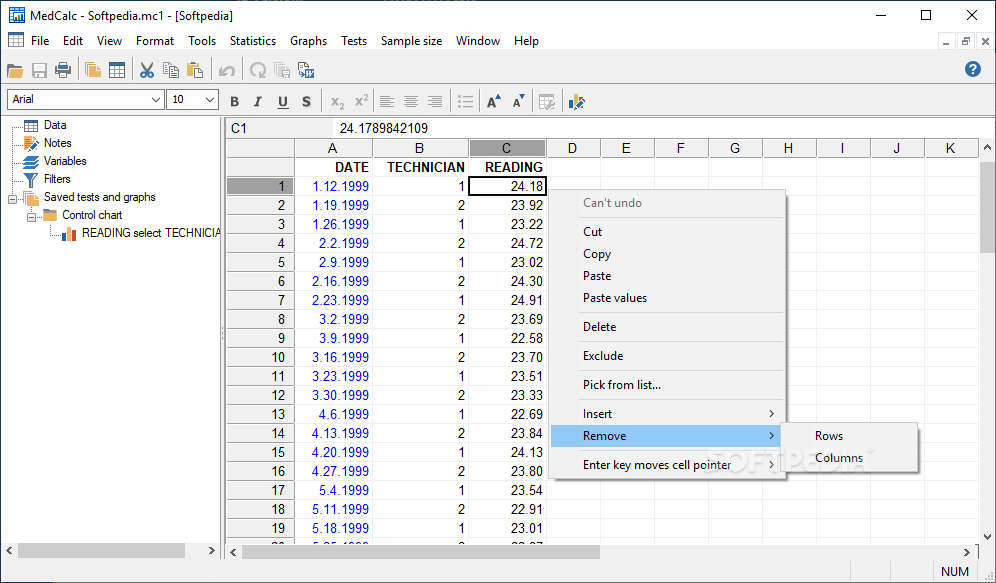
MedCalc is built around a spreadsheet-style interface and menu-based statistical tools. You select the data, choose the analysis, enter the required options, and review the resulting tables and graphs. The software also provides context-sensitive help. When users are working inside a statistical dialog, help is available for the relevant settings and methods. This can make the program easier to approach than software that expects users to remember commands or write statistical code. That doesn’t mean every analysis is automatically correct. Statistical software performs the calculation you request, but choosing the correct test still depends on the study design and the type of data. Researchers should understand the assumptions behind a method before using its results in a paper.
Key Features of MedCalc 2026
- More than 220 statistical tests, procedures, and graphs.
- Designed for biomedical research.
- Integrated spreadsheet for managing research data.
- ROC curve analysis.
- Bland-Altman analysis.
- Passing-Bablok regression.
- Deming regression.
- Reference interval analysis.
- Kaplan-Meier survival analysis.
- Cox regression.
- Meta-analysis tools.
- Logistic regression.
- Multiple regression.
- ANOVA.
- T-tests.
- Chi-squared and Fisher’s exact tests.
- Correlation analysis.
- Outlier detection.
- Sample-size calculations.
- Power analysis.
- Method comparison tools.
- Agreement analysis.
- Quality-control tools.
- Publication-ready graphs.
- Forest plots.
- Violin plots.
- Scatter diagrams and heatmaps.
- Kaplan-Meier survival curves.
- Graph export to SVG, PNG, JPG, GIF, BMP, and TIF.
- Export graphs to PowerPoint.
- Excel and other data-file imports.
- Support for missing data.
- Subgroup selection.
- Built-in scripting for repetitive tasks.
- Context-sensitive help.
- 32-bit and 64-bit Windows versions.
- Intel and AMD processor support.
- Qualcomm ARM64 support.
- Free software updates.
MedCalc 2026 Alternatives
IBM SPSS Statistics
IBM SPSS Statistics is a strong alternative for researchers who need a broader statistical package. It covers data management, statistical analysis, and reporting and is widely used in academic and research environments. It may be a better choice when a project requires a broad collection of general statistical methods rather than MedCalc’s stronger focus on biomedical analysis.
Minitab Statistical Software
Minitab is useful for users who work with statistics, quality analysis, process improvement, and research. It provides a wider set of tools for general statistical analysis. For medical researchers who mainly need ROC analysis and method comparison, MedCalc can be more focused.
JASP
JASP is a free and open-source statistics application with a graphical interface. It is a useful option for students, researchers, and users who want statistical analysis without paying for a commercial license. JASP is frequently listed as one of the alternatives to MedCalc.
jamovi
jamovi is another free statistics program built around a simple graphical interface. It is useful for users who want a straightforward alternative to traditional statistics software. Its broader general-statistics approach can make it attractive for academic users who don’t specifically need MedCalc’s medical analysis tools.
R
R is a free programming language and environment used for statistics and data analysis. It offers far more flexibility than MedCalc but requires users to work with code or graphical interfaces built around R. For experienced researchers who want complete control over their analysis, R can be a powerful alternative. For users who prefer menus and ready-made medical procedures, MedCalc is easier to approach.
Conclusion
MedCalc 2026 is a strong choice for medical researchers, clinicians, laboratory professionals, and students who need practical statistical analysis without building every calculation from code. Its ROC analysis, method-comparison tools, survival analysis, meta-analysis, graphs, and medical research features make it more specialized than general statistics software. If you need broad statistical flexibility, R or SPSS may be a better fit. If your work centers on biomedical research and diagnostic statistics, MedCalc’s focused workflow is one of its biggest strengths.
MedCalc 2026 Technical Setup Details
- Software Full Name: MedCalc 2026
- Setup File Name: MedCalc-v23.7.rar
- Setup Size: 114 MB
- Setup Type: Offline Installer / Full Standalone Setup
- Compatibility: 32 Bit (x86) / 64 Bit (x64)
- Developers: MedCalc

System Requirements for MedCalc 2026
- Operating System: Windows 7/8/10
- RAM: 2 GB
- Hard Disk: 200 MB
- Processor: Intel Dual Core or higher processor
MedCalc 2026 Download
Download MedCalc 2026 free latest full version offline direct download link for full offline setup by clicking the button below.